Join us at FabCon Atlanta from March 16 - 20, 2026, for the ultimate Fabric, Power BI, AI and SQL community-led event. Save $200 with code FABCOMM.
Register now!The Power BI Data Visualization World Championships is back! Get ahead of the game and start preparing now! Learn more
Hi,
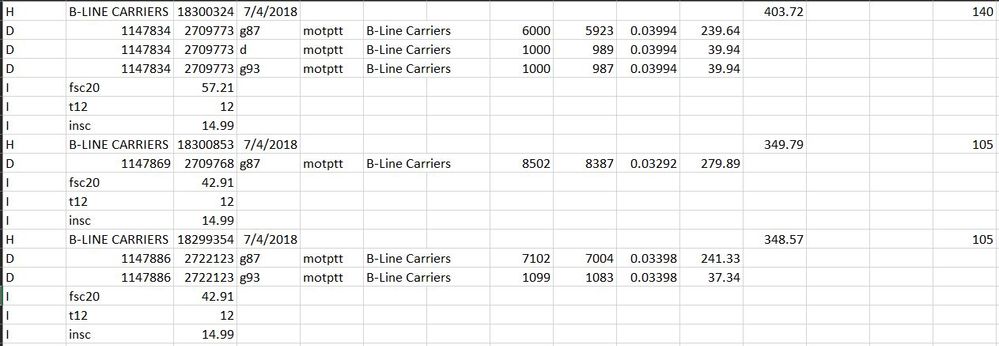
I'm new in BI community and was looking for a way to transform my disoriented dataset into a tabluar format
Current format
expected formatIs this something that can be acheived within BI, or should it be done outside BI, I have numerous files in similar format, looking for sugesstion or help on how to go forward. Thanks in advance
Aren't you only needing lines where the first column has D? Then get all the lines the filter (in Powerquery) the lines with D in that column. Then remove the not needed columns.
Hi, I also need date listed in H, and the number next to it.
I would also need "I" row elements to appear in a column
ah ok, that's a different story 🙂
As with another similar request a few days ago, it's fairly complex as you can't reference "other rows" in PowerQuery. So you can't really tell "go to the NEXT line and get a value". Generally speaking, you can't guarantee a sequential order. Granted, you can create a key column and put a number, but, even in DAX, how can you tell which row where to look for the three values to put in column?
IF you could have a way to put the same value on all of the rows of the same "group" (the D ones and the corresponding I) it could be done via DAX...
The Power BI Data Visualization World Championships is back! Get ahead of the game and start preparing now!
Check out the November 2025 Power BI update to learn about new features.
| User | Count |
|---|---|
| 59 | |
| 43 | |
| 42 | |
| 23 | |
| 17 |
| User | Count |
|---|---|
| 190 | |
| 122 | |
| 96 | |
| 66 | |
| 47 |