FabCon is coming to Atlanta
Join us at FabCon Atlanta from March 16 - 20, 2026, for the ultimate Fabric, Power BI, AI and SQL community-led event. Save $200 with code FABCOMM.
Register now!- Power BI forums
- Get Help with Power BI
- Desktop
- Service
- Report Server
- Power Query
- Mobile Apps
- Developer
- DAX Commands and Tips
- Custom Visuals Development Discussion
- Health and Life Sciences
- Power BI Spanish forums
- Translated Spanish Desktop
- Training and Consulting
- Instructor Led Training
- Dashboard in a Day for Women, by Women
- Galleries
- Data Stories Gallery
- Themes Gallery
- Contests Gallery
- QuickViz Gallery
- Quick Measures Gallery
- Visual Calculations Gallery
- Notebook Gallery
- Translytical Task Flow Gallery
- TMDL Gallery
- R Script Showcase
- Webinars and Video Gallery
- Ideas
- Custom Visuals Ideas (read-only)
- Issues
- Issues
- Events
- Upcoming Events
The Power BI Data Visualization World Championships is back! Get ahead of the game and start preparing now! Learn more
- Power BI forums
- Forums
- Get Help with Power BI
- Desktop
- Need understanding for RLS
- Subscribe to RSS Feed
- Mark Topic as New
- Mark Topic as Read
- Float this Topic for Current User
- Bookmark
- Subscribe
- Printer Friendly Page

- Mark as New
- Bookmark
- Subscribe
- Mute
- Subscribe to RSS Feed
- Permalink
- Report Inappropriate Content
Need understanding for RLS
Hi Guys,
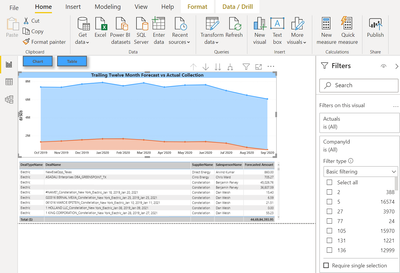
I have created the below report and have a role in my mode as user = USERNAME().
Now what I want is that whenever a user logs in he/she sees data for only their Company ID and not other companies data.
So can you help me how to set up this?
If a make a company filter to my report then I think it will not work as everyone will see the data for the company which i'll select in the filter.
Regards,
Himanshu
Solved! Go to Solution.
- Mark as New
- Bookmark
- Subscribe
- Mute
- Subscribe to RSS Feed
- Permalink
- Report Inappropriate Content
Hi @Anonymous
Build a sample to you to show you how to achieve the goal.
Data Table:
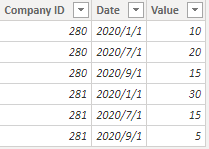
Build a user table:
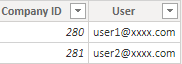
Relating two tables by CompanyID company.
Manage Roles in Data Table.
 [Company ID]=
CALCULATE (
    MAX ( Data[Company ID] ),
    FILTER ( User, User[User] = USERPRINCIPALNAME() )
)
Let's view as user1@xxxx.com
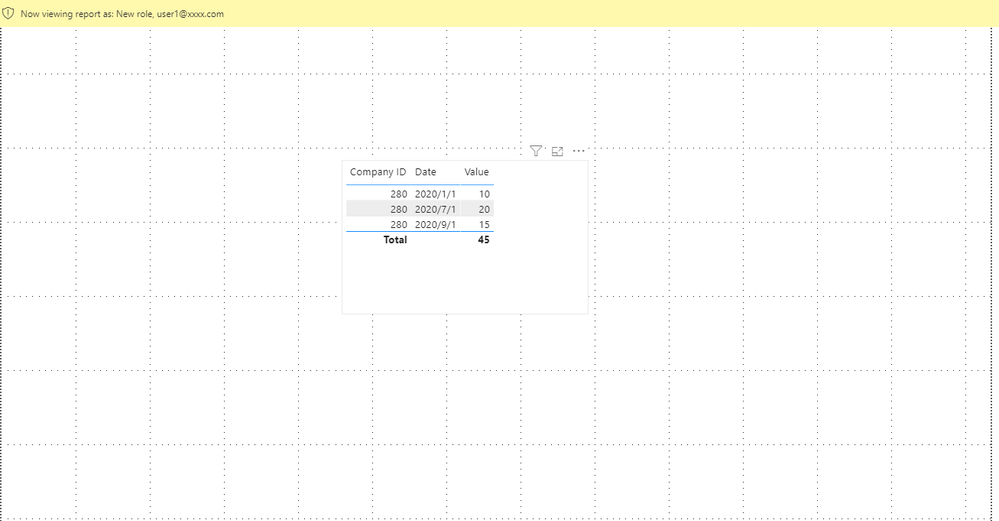
You can download the pbix file from this link: Need understanding for RLS
Best Regards,
Rico Zhou
If this post helps, then please consider Accept it as the solution to help the other members find it more quickly.


- Mark as New
- Bookmark
- Subscribe
- Mute
- Subscribe to RSS Feed
- Permalink
- Report Inappropriate Content
@Anonymous , Can you share sample data and sample output in table format? Or a sample pbix after removing sensitive data.
refer if these can help in RLS - Row Level security
https://community.powerbi.com/t5/MBAS-Gallery/Microsoft-Power-BI-Unleash-row-level-security-patterns-in-Power/td-p/712613
https://radacad.com/dynamic-row-level-security-with-organizational-hierarchy-power-bi
https://www.blue-granite.com/blog/using-dynamic-row-level-security-with-organizational-hierarchies
https://docs.microsoft.com/en-us/power-bi/service-admin-rls
https://blog.tallan.com/2018/04/10/row-level-security-in-power-bi-part-1-roles-and-users/
https://radacad.com/what-do-you-need-to-implement-dynamic-row-level-security-in-power-bi
- Mark as New
- Bookmark
- Subscribe
- Mute
- Subscribe to RSS Feed
- Permalink
- Report Inappropriate Content
@amitchandak I dont have the desired output as I will be a visual.
What I want is suppose there are 2 users in my system having different company ID against their name i.e 280, 281.
Is it possible that when user 1 logs in then he sees data for the company 280 only and not for company 281.
I'm sharing the pbix file. Can you please help me with this. I want if a certain user logs in then he/she should see only their company ID's data and nothing else.
please suggest how to share the pbix file. i cant see option to insert a file.
Regards,
Himanshu
- Mark as New
- Bookmark
- Subscribe
- Mute
- Subscribe to RSS Feed
- Permalink
- Report Inappropriate Content
Hi @Anonymous
Build a sample to you to show you how to achieve the goal.
Data Table:
Build a user table:
Relating two tables by CompanyID company.
Manage Roles in Data Table.
 [Company ID]=
CALCULATE (
    MAX ( Data[Company ID] ),
    FILTER ( User, User[User] = USERPRINCIPALNAME() )
)
Let's view as user1@xxxx.com
You can download the pbix file from this link: Need understanding for RLS
Best Regards,
Rico Zhou
If this post helps, then please consider Accept it as the solution to help the other members find it more quickly.
- Mark as New
- Bookmark
- Subscribe
- Mute
- Subscribe to RSS Feed
- Permalink
- Report Inappropriate Content
@Anonymous Thanks for your help but I have a question.
Can you please explain what exactly the below expression is doing. The MAX function is picking what?
The condition is working for me but not completely. I have some roles also defined with users ( see below table)
Now if I select a user name the sales person should see only his sales data and the manager should see complete data.
Regards,
Himanshu
| company ID | user | role | reporttoID | reporttoname |
| 280 | user1@xxx.com | Sales Person | 5 | abc |
| 281 | user2@xxx.com | Sales Person | 10 | xyz |
| 281 | user3@xxx.com | Manager | 12 | zzz |
 [Company ID]=
CALCULATE (
    MAX ( Data[Company ID] ),
    FILTER ( User, User[User] = USERPRINCIPALNAME() )
)
- Mark as New
- Bookmark
- Subscribe
- Mute
- Subscribe to RSS Feed
- Permalink
- Report Inappropriate Content
Hi @Anonymous
In my sample there is not role column in it, so I can calculate company ID for each user by this measure.
There is an organization hierachy in your sample, you may refer to this blog: Dynamic Row Level Security with Organizational Hierarchy Power BI
Best Regards,
Rico Zhou
If this post helps, then please consider Accept it as the solution to help the other members find it more quickly.
- Mark as New
- Bookmark
- Subscribe
- Mute
- Subscribe to RSS Feed
- Permalink
- Report Inappropriate Content
@Anonymous for this to work you need to make use of DRLS(Dynamic Row Level Security)
Prerequesties--->Create a table "User Details" and have details about thier UserID,email id ,name, and create relationship between the user table and the dimension table as below ....this will meet your requirement any help please do let me know
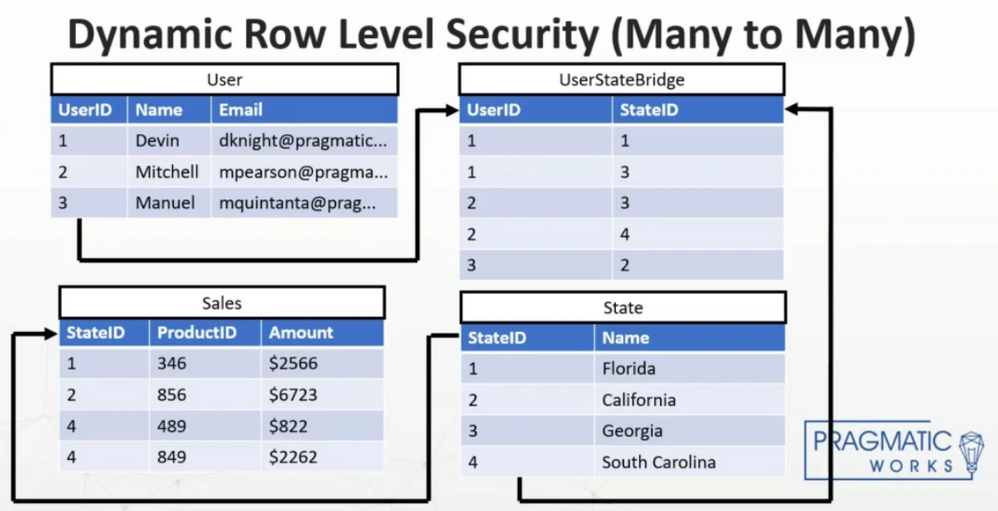
Hope it resolves your issue? Please consider accepting it as the solution to help the other members find it more quickly.
Appreciate your Kudos, Press the thumbs up button!!👍
Helpful resources

Power BI Dataviz World Championships
The Power BI Data Visualization World Championships is back! Get ahead of the game and start preparing now!

Power BI Monthly Update - December 2025
Check out the December 2025 Power BI Holiday Recap!

FabCon Atlanta 2026
Join us at FabCon Atlanta, March 16-20, for the ultimate Fabric, Power BI, AI and SQL community-led event. Save $200 with code FABCOMM.

| User | Count |
|---|---|
| 40 | |
| 35 | |
| 34 | |
| 31 | |
| 28 |


| User | Count |
|---|---|
| 137 | |
| 102 | |
| 71 | |
| 67 | |
| 65 |


