cancel
Showing results for 
Search instead for 
Did you mean: 

The Power BI Data Visualization World Championships is back! Get ahead of the game and start preparing now! Learn more

Reply

Need to set up a calculation for price planning with two different values

I need to set up an invoicing calculation that has a price for the first 50 items at $50 then any other item will be $40, how do I set up such multiplication? 

1 ACCEPTED SOLUTION
nickchobotar
Skilled Sharer
Skilled Sharer

@Amazing_Random 

Your phrase "first 50 items" is the key to the sulution. Please clarify or as @ryan_mayu  suggested please provide a data sample.  Meanwhile, assuming your invoices are numeric and not alpha numeric then you can create a calculated coumn with a simple condition below (Mulitplier Column) 


Multiplier = IF('Table'[Invoice #] >= 2050, 40, 50)


you can hardcode the condition value as I did in my case  2000+ 50 , or 

create a use MIN() function to pull the min value and add 50

 MIN('Table'[Invoice #])+50


Multiplier = IF('Table'[Invoice #] >= MIN('Table'[Invoice #])+50, 40, 50)


Then you can multiply mulitplier column  by amount =  


Multiplied Amount = 'Table'[Amount] * 'Table'[Multiplier]
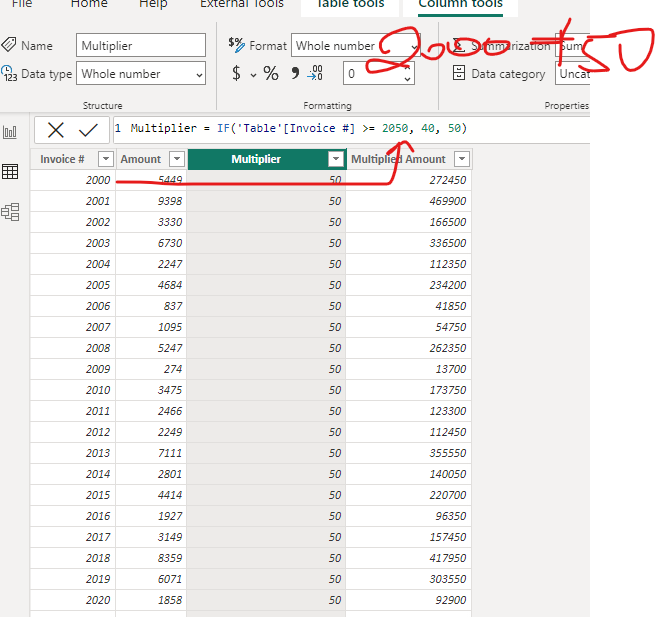


nickchobotar_3-1670981549188.png


This is a quick and dirty way to get to the finish line. A better way would be to apply the same logic in Power Query or even bake in the whole logic just into a DAX measure but as I mentioned in the begining the solution depends on how your invoices are ordered. 


Thanks,

N -

View solution in original post

3 REPLIES 3
nickchobotar
Skilled Sharer
Skilled Sharer

@Amazing_Random 

Your phrase "first 50 items" is the key to the sulution. Please clarify or as @ryan_mayu  suggested please provide a data sample.  Meanwhile, assuming your invoices are numeric and not alpha numeric then you can create a calculated coumn with a simple condition below (Mulitplier Column) 


Multiplier = IF('Table'[Invoice #] >= 2050, 40, 50)


you can hardcode the condition value as I did in my case  2000+ 50 , or 

create a use MIN() function to pull the min value and add 50

 MIN('Table'[Invoice #])+50


Multiplier = IF('Table'[Invoice #] >= MIN('Table'[Invoice #])+50, 40, 50)


Then you can multiply mulitplier column  by amount =  


Multiplied Amount = 'Table'[Amount] * 'Table'[Multiplier]


nickchobotar_3-1670981549188.png


This is a quick and dirty way to get to the finish line. A better way would be to apply the same logic in Power Query or even bake in the whole logic just into a DAX measure but as I mentioned in the begining the solution depends on how your invoices are ordered. 


Thanks,

N -

Your suggestion worked, thanks! I'll keep in mind to send samples for more clarification next time

ryan_mayu
Super User
Super User

could you pls priovde the sample data and expected output?


Did I answer your question? Mark my post as a solution!

Proud to be a Super User!


Helpful resources

Announcements
Power BI DataViz World Championships

Power BI Dataviz World Championships

The Power BI Data Visualization World Championships is back! Get ahead of the game and start preparing now!

December 2025 Power BI Update Carousel

Power BI Monthly Update - December 2025

Check out the December 2025 Power BI Holiday Recap!

FabCon Atlanta 2026 carousel

FabCon Atlanta 2026

Join us at FabCon Atlanta, March 16-20, for the ultimate Fabric, Power BI, AI and SQL community-led event. Save $200 with code FABCOMM.