cancel
Showing results for 
Search instead for 
Did you mean: 

View all the Fabric Data Days sessions on demand. View schedule

Reply
Anonymous
Not applicable

Need to extract the lookupValue from a column in sharepoint list

Hi All,


I'm extracting data from a sharedpoint list, from the Power Query Editor I see the values of the column as "List":

Then I use the "Expand to New Rows" option and I get the "Record" in the column values:

Captura de pantalla 2020-10-28 211842.png

Then I click again into the expand option and I want to select only the option of "lookupValue" from the list

Captura de pantalla 2020-10-28 212229.png

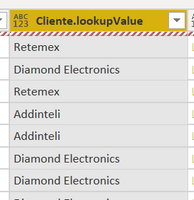
Values are displayed:

Captura de pantalla 2020-10-28 212337.png

But after the changes are applied, I get the error message and the values:


Failed to save modifications to the server. Error returned: 'OLE DB or ODBC error: [Expression.Error] We cannot convert the value "" to type Table.. The current operation was cancelled because another operation in the transaction failed. '.


Any idea of how to solve this? Thanks in advance.


This is the code generated:


let
Source = SharePoint.Tables("https://xxxxxxxxxx/icpmo/", [Implementation="2.0", ViewMode="All"]),
#"bb14239c-c848-465d-80ad-52b29b8c3e96" = Source{[Id="bb14239c-c848-465d-80ad-52b29b8c3e96"]}[Items],
#"Expanded Cliente" = Table.ExpandListColumn(#"bb14239c-c848-465d-80ad-52b29b8c3e96", "Cliente"),
#"Expanded Cliente1" = Table.ExpandRecordColumn(#"Expanded Cliente", "Cliente", {"lookupValue"}, {"Cliente.lookupValue"})
in
#"Expanded Cliente1"

2 REPLIES 2
amitchandak
Super User
Super User
Anonymous
Not applicable

Thanks @amitchandak 


I already tried to replace values and change the data type, but is was not successful.


Code to change data type and replace value after expanding:


#"Expanded Cliente1" = Table.ExpandRecordColumn(#"Expanded Cliente", "Cliente", {"lookupValue"}, {"Cliente.lookupValue"}),
#"Changed Type" = Table.TransformColumnTypes(#"Expanded Cliente1",{{"Cliente.lookupValue", type text}}),
#"Replaced Value" = Table.ReplaceValue(#"Changed Type","","NA",Replacer.ReplaceValue,{"Cliente.lookupValue"})


Error message:

OLE DB or ODBC error: [Expression.Error] We cannot convert the value "" to type Table..


I tried also to change the data type before the expanding


#"Changed Type" = Table.TransformColumnTypes(#"bb14239c-c848-465d-80ad-52b29b8c3e96",{{"Cliente", type text}}),
#"Expanded Cliente" = Table.ExpandListColumn(#"Changed Type", "Cliente"),
#"Expanded Cliente1" = Table.ExpandRecordColumn(#"Expanded Cliente", "Cliente", {"lookupValue"}, {"Cliente.lookupValue"})


I got the following:

Expression.Error: We cannot convert a value of type List to type Text.
Details:
Value=[List]
Type=[Type]


Any other idea? Thanks in advance

Helpful resources

Announcements
November Power BI Update Carousel

Power BI Monthly Update - November 2025

Check out the November 2025 Power BI update to learn about new features.

Fabric Data Days Carousel

Fabric Data Days

Advance your Data & AI career with 50 days of live learning, contests, hands-on challenges, study groups & certifications and more!

FabCon Atlanta 2026 carousel

FabCon Atlanta 2026

Join us at FabCon Atlanta, March 16-20, for the ultimate Fabric, Power BI, AI and SQL community-led event. Save $200 with code FABCOMM.

Top Solution Authors
Top Kudoed Authors