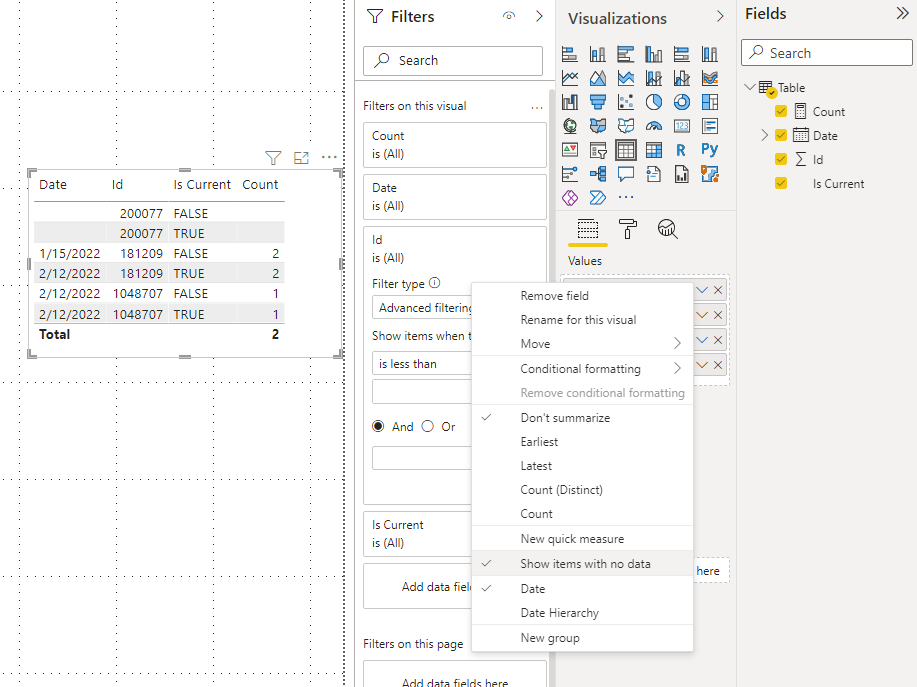
Hi All,
I have the below example of my data. I need to count the distinct dates (excluding blanks) by Id. I'm ultimately trying to find out how many ids have multiple dates. The Is Current column indicates the latest row of data. So.. in a month from now for Id = 181209 it's possible for it to have another date and therefore another line in the data.
| Date | Id | Is Current |
| 1/15/2022 | 181209 | FALSE |
| 2/12/2022 | 181209 | TRUE |
| | 200077 | FALSE |
| | 200077 | TRUE |
| 2/12/2022 | 1048707 | FALSE |
| 2/12/2022 | 1048707 | TRUE |
This is what I'm trying to get:
| Date | Work Item Id | Is Current | Count | Multiple_Dates |
| 1/15/2022 | 181209 | FALSE | 2 | Yes |
| 2/12/2022 | 181209 | TRUE | 2 | Yes |
| | 200077 | FALSE | | |
| | 200077 | TRUE | | |
| 2/12/2022 | 1048707 | FALSE | 1 | No |
| 2/12/2022 | 1048707 | TRUE | 1 | No |
In the new version of the table, I have a count of date changes by Id. The first one, 181209 has had two dates associated with it, the second doesn't have any dates at all, and the last one continues to have the same date. I want to use the multiple dates column as an indicator for something else.
I can't seem to get it to calculate by group correctly. This is what I've tried so far:
Count = CALCULATE(DISTINCTCOUNTNOBLANK('Table'[Date]),GROUPBY('Table','Table'[Id]))
This gives me the following:
| Date | Work Item Id | Is Current | Count |
| 1/15/2022 | 181209 | FALSE | 1 |
| 2/12/2022 | 181209 | TRUE | 1 |
| | 200077 | FALSE | |
| | 200077 | TRUE | |
| 2/12/2022 | 1048707 | FALSE | 1 |
| 2/12/2022 | 1048707 | TRUE | 1 |
Can anyone help with this and let me know what I'm missing?