Join us at FabCon Atlanta from March 16 - 20, 2026, for the ultimate Fabric, Power BI, AI and SQL community-led event. Save $200 with code FABCOMM.
Register now!Vote for your favorite vizzies from the Power BI Dataviz World Championship submissions. Vote now!
Hi @porjaiko ,
You may create measure like DAX below, and put this new measure into your visual.
DATE/TIME OUT new= IF(MAX(Table1[DATE/TIME OUT])=BLANK(), CALCULATE(MAX(Table1[DATE/TIME IN]), ALLEXCEPT(Table1,Table1[Department], Table1[Name], Table1[Surname])),MAX(Table1[DATE/TIME OUT]) )
I am not sure what desired result would you want, could you please share your sample data and desired output screenshots for further analysis? You can also upload sample pbix to OneDrive and post the link here. Do mask sensitive data before uploading.
Please read this post to get your answer quickly: How to Get Your Question Answered Quickly.
Best Regards,
Amy
Community Support Team _ Amy
If this post helps, then please consider Accept it as the solution to help the other members find it more quickly.
Hi @porjaiko ,
You may create measure like DAX below, and put this new measure into your visual.
DATE/TIME OUT new= IF(MAX(Table1[DATE/TIME OUT])=BLANK(), CALCULATE(MAX(Table1[DATE/TIME IN]), ALLEXCEPT(Table1,Table1[Department], Table1[Name], Table1[Surname])),MAX(Table1[DATE/TIME OUT]) )
I am not sure what desired result would you want, could you please share your sample data and desired output screenshots for further analysis? You can also upload sample pbix to OneDrive and post the link here. Do mask sensitive data before uploading.
Please read this post to get your answer quickly: How to Get Your Question Answered Quickly.
Best Regards,
Amy
Community Support Team _ Amy
If this post helps, then please consider Accept it as the solution to help the other members find it more quickly.
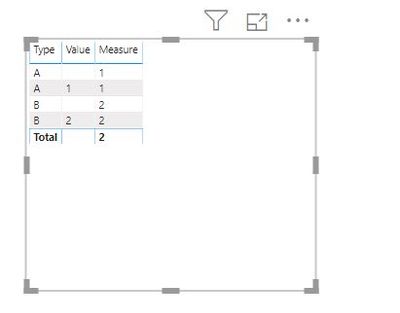
Use the below Measure to achieve your requirement:
Thank you for your help.
Vote for your favorite vizzies from the Power BI World Championship submissions!
If you love stickers, then you will definitely want to check out our Community Sticker Challenge!
Check out the January 2026 Power BI update to learn about new features.
| User | Count |
|---|---|
| 56 | |
| 52 | |
| 45 | |
| 17 | |
| 16 |
| User | Count |
|---|---|
| 108 | |
| 107 | |
| 39 | |
| 33 | |
| 25 |