cancel
Showing results for 
Search instead for 
Did you mean: 

The Power BI Data Visualization World Championships is back! Get ahead of the game and start preparing now! Learn more

Reply
Anonymous
Not applicable

Need help with the Format Conversion

Hello Everyone,


Is there any possibility to convert the "0.00%" format to a number format.


Since by using VALUE() function we can convert the "0" or "0,000" format to a number format.


Would really appreciate the help in this matter.


Thanks & Regards,

Harsh

1 ACCEPTED SOLUTION

Hi @Anonymous


Is this problem sloved?
If not, please let me know.


Best Regards,
Liang
If this post helps, then please consider Accept it as the solution to help the other members find it more quickly.

View solution in original post

4 REPLIES 4
amitchandak
Super User
Super User

@Anonymous , just check % sign is check (In dark grey when check), then you can revert it. else you have create a new column divide by 100


New Column = [Percent]/100 //number data type


Data Format New Rib.png

Share with Power BI Enthusiasts: Full Power BI Video (20 Hours) YouTube
Microsoft Fabric Series 60+ Videos YouTube
Microsoft Fabric Hindi End to End YouTube
Anonymous
Not applicable

Hello Amit,


I've written a DAX and below is the example of my DAX - 


RLU Act Vs Bud = VAR Currentitem = SELECTEDVALUE(RLUKeyMeasures[Retirement Living Unit]) RETURN SWITCH(TRUE(), CurrentItem = “Occupancy” , FORMAT([RLU Act Occupancy%]-[RLU Bud Occupancy%], “0.0%”), CurrentItem = “Vacant Units”, VALUE(FORMAT([RLU Act Vacant Units] -1+[RLU Bud Vacant Units], “0”)), CurrentItem = “Vacant units recurrent charges”, VALUE(FORMAT([RLU Act Vacant Units Recurrent charges] -1+[RLU Bud Vacant Units Recurrent charges], “0,000”)), BLANK())


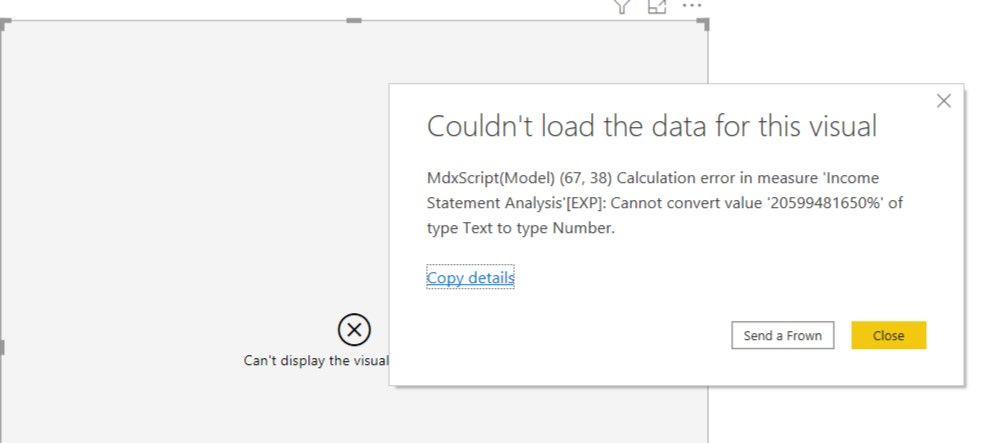
In this I've used VALUE() Function in order to convert the format of "0" or "0,000" but not able convert the "0.00%" since it throws back the back stating that it cannot the "XX.XX%" type text to the number.


Here's the screen shot attached for the reference.


Thanks & Regards,

HarshError ScreenshotError Screenshot

Hi @Anonymous


Is this problem sloved?
If not, please let me know.


Best Regards,
Liang
If this post helps, then please consider Accept it as the solution to help the other members find it more quickly.

Hi @Anonymous ,


The principle is that data in a column needs to be in the same data format.

Try to delete value function.

VALUE

Custom numeric formats for the FORMAT function


Best Regards,
Liang
If this post helps, then please consider Accept it as the solution to help the other members find it more quickly.

Helpful resources

Announcements
Power BI DataViz World Championships

Power BI Dataviz World Championships

The Power BI Data Visualization World Championships is back! Get ahead of the game and start preparing now!

December 2025 Power BI Update Carousel

Power BI Monthly Update - December 2025

Check out the December 2025 Power BI Holiday Recap!

FabCon Atlanta 2026 carousel

FabCon Atlanta 2026

Join us at FabCon Atlanta, March 16-20, for the ultimate Fabric, Power BI, AI and SQL community-led event. Save $200 with code FABCOMM.