I created a measure that will calculate the total number of days up to the last date present in my data. In my current data the MAX or last current date is June 28 218. I'm almost getting the correct total days even when filters are applied (for Slicers: Year, Quarter and Month), But If I filter my report with specific EmpName their Total days are all different because not all of them has a max date of June 28. So what I need is a measure that will be fixed Total days based on the MAX or last present date of my date column regardless of which EmpName is filtered.
Here's my current measure:
IR Total Num of Days = IF(MONTH(MAX('InitialResponse-Assoc'[DateTimeReceived])),
SUMX (
    SUMMARIZE (
        ADDCOLUMNS (
            VALUES ( 'InitialResponse-Assoc'[DateTimeReceived] ),
            "EOMonth", EOMONTH ( 'InitialResponse-Assoc'[DateTimeReceived], 0 )
        ),
        [EOMonth]
    ),
    DAY ( [EOMonth])
) - CALCULATE([IR DaysDifference]),
SUMX (
    SUMMARIZE (
        ADDCOLUMNS (
            VALUES ( 'InitialResponse-Assoc'[DateTimeReceived] ),
            "EOMonth", EOMONTH ( 'InitialResponse-Assoc'[DateTimeReceived], 0 )
        ),
        [EOMonth]
    ),
    DAY ( [EOMonth] )
))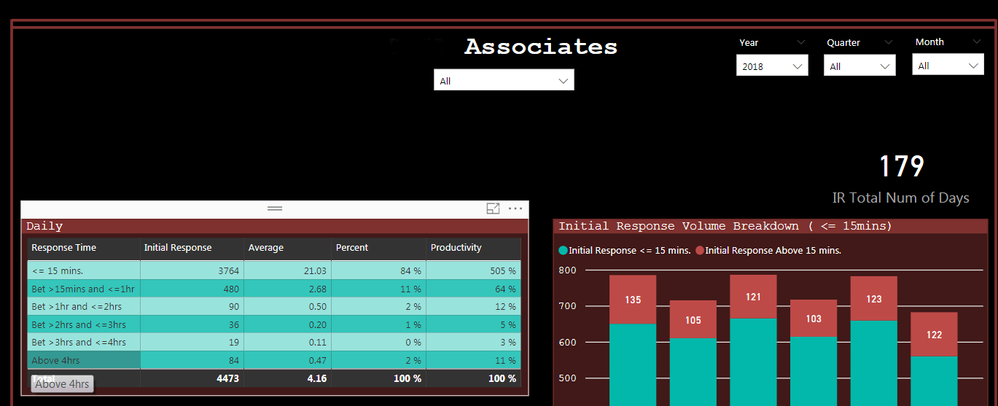
IR Total Num of Days shown in card is correct even when filters applied in YEAR, QUARTER and MONTH
January - 31
February - 28
March - 31
April - 30
May - 31
June - 28 (since 28 is the max/last current date in data)
Total = 179
My current measure above calculates the total days even non-contiguous months are filtered (ex. January, February and June)
January - 31
February - 28
June - 28
Total = 87
However, if I start applying filters for specific EmpName the total days for each employee is changing.
PLease help me..
Thank you all in advance


