Join us at FabCon Atlanta from March 16 - 20, 2026, for the ultimate Fabric, Power BI, AI and SQL community-led event. Save $200 with code FABCOMM.
Register now!Get Fabric Certified for FREE during Fabric Data Days. Don't miss your chance! Request now
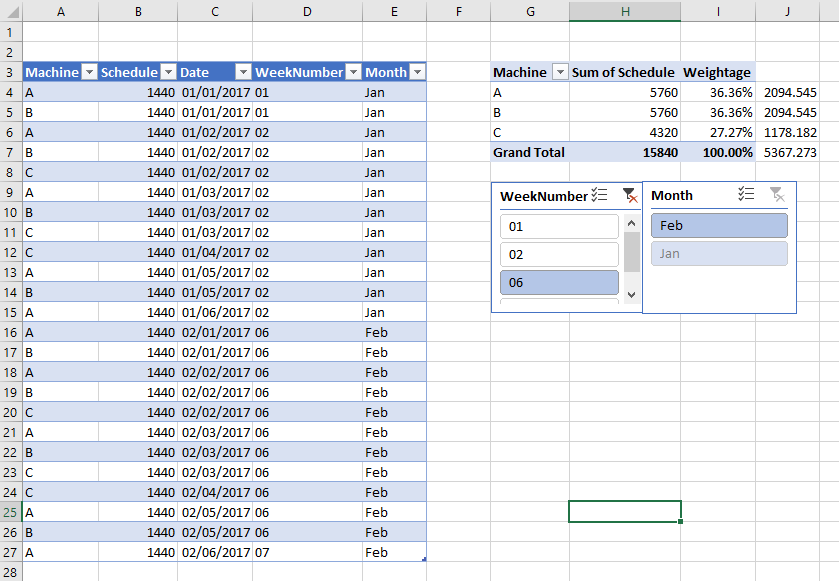
I have a database similar to below left table. But I would like to summariz it to right hand side pivot.
I manage to get two measure in data model one is "sum of schedule" another one is "weightage".
sum of schedule:=SUM('table'[schedule])
weightage:=DIVIDE([sum of schedule],CALCULATE([sum of schedule],ALLSELECTED()))
I can do a multiplication to get all individual values as displayed in cells J4 to J6. However, I couldn't get
value J7 which is the sum of J4 to J6 by using DAX function.
Appriciate if anyone could help.
Solved! Go to Solution.
Hi @Wanghongyu,
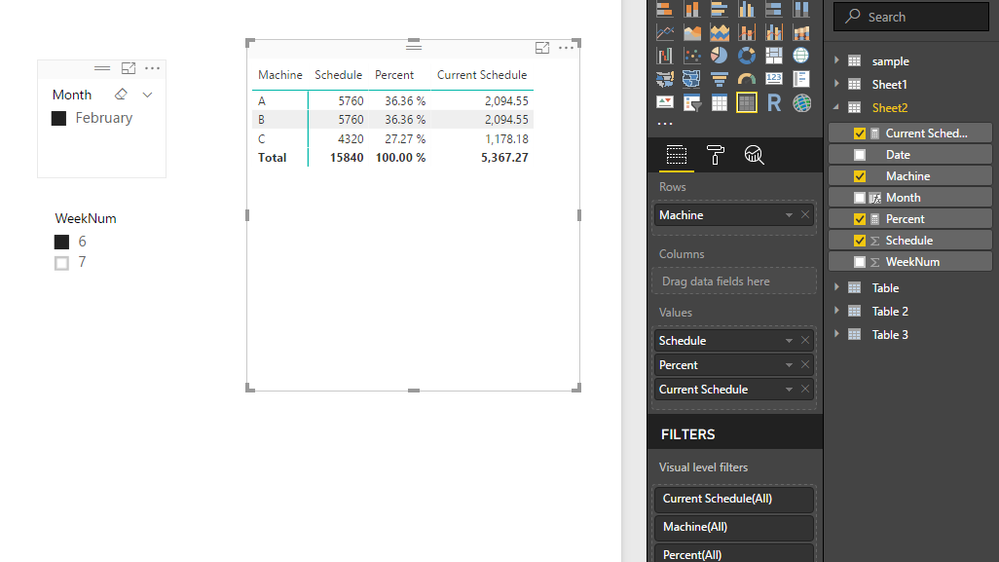
You can try to use below measure to achieve your requirement:
Current Schedule =
VAR current_machine =
LASTNONBLANK ( Sheet2[Machine], [Machine] )
VAR summary =
ADDCOLUMNS (
SUMMARIZE (
ALLSELECTED ( Sheet2 ),
[Machine],
"Total Schedule", SUM ( Sheet2[Schedule] ),
"Percent", SUM ( Sheet2[Schedule] ) / SUMX ( ALLSELECTED ( Sheet2 ), [Schedule] )
),
"Current", [Total Schedule] * [Percent]
)
RETURN
IF (
COUNTROWS ( Sheet2 ) <> COUNTROWS ( ALLSELECTED ( Sheet2 ) ),
MAXX ( FILTER ( summary, [machine] = current_machine ), [Current] ),
SUMX ( summary, [Current] )
)
Regards,
Xiaoxin Sheng
HI @Wanghongyu,
Please share the sample pbix file to test, I'm not so sure where the machine column come from and relationship to current tables.
Regards,
Xiaoxin Sheng
Sorry. Machine is in column A and it's not captured before.
Hi @Wanghongyu,
You can try to use below measure to achieve your requirement:
Current Schedule =
VAR current_machine =
LASTNONBLANK ( Sheet2[Machine], [Machine] )
VAR summary =
ADDCOLUMNS (
SUMMARIZE (
ALLSELECTED ( Sheet2 ),
[Machine],
"Total Schedule", SUM ( Sheet2[Schedule] ),
"Percent", SUM ( Sheet2[Schedule] ) / SUMX ( ALLSELECTED ( Sheet2 ), [Schedule] )
),
"Current", [Total Schedule] * [Percent]
)
RETURN
IF (
COUNTROWS ( Sheet2 ) <> COUNTROWS ( ALLSELECTED ( Sheet2 ) ),
MAXX ( FILTER ( summary, [machine] = current_machine ), [Current] ),
SUMX ( summary, [Current] )
)
Regards,
Xiaoxin Sheng
This is excatly what I want. Thanks so much
Check out the November 2025 Power BI update to learn about new features.
Advance your Data & AI career with 50 days of live learning, contests, hands-on challenges, study groups & certifications and more!