Join us at FabCon Atlanta from March 16 - 20, 2026, for the ultimate Fabric, Power BI, AI and SQL community-led event. Save $200 with code FABCOMM.
Register now!The Power BI Data Visualization World Championships is back! Get ahead of the game and start preparing now! Learn more
Hi,
I'm trying to calculate 2 running total colums for my business report on Power BI
1. Running total by project and date
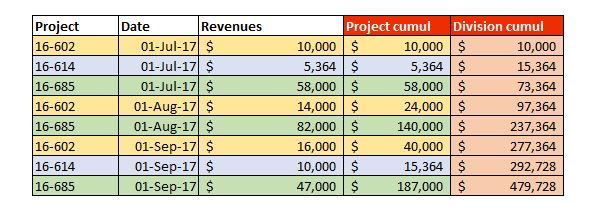
2. Running total by date (all projects or the one filtered)
Here's an exemple on Excel (red colums):
Thanks !
Solved! Go to Solution.
Hi @jaygtt,
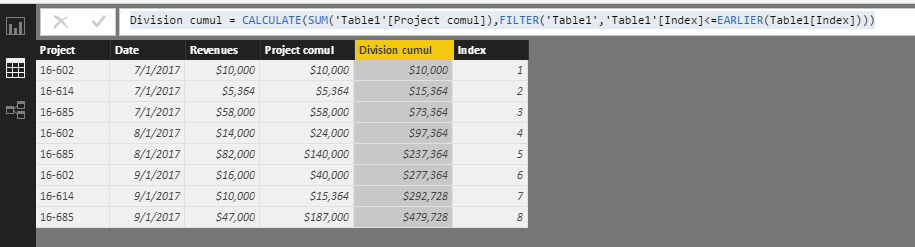
In your scenario, you can go to Query Editor, create a Index column from 1,
Then create calculated columns below:
Project comul = CALCULATE(SUM(Table1[Revenues]),FILTER('Table1','Table1'[Project]=EARLIER(Table1[Project]) && 'Table1'[Date]<=EARLIER(Table1[Date])))
Division cumul = CALCULATE(SUM('Table1'[Project comul]),FILTER('Table1','Table1'[Index]<=EARLIER(Table1[Index])))
Best Regards,
Qiuyun Yu
Hi @jaygtt,
In your scenario, you can go to Query Editor, create a Index column from 1,
Then create calculated columns below:
Project comul = CALCULATE(SUM(Table1[Revenues]),FILTER('Table1','Table1'[Project]=EARLIER(Table1[Project]) && 'Table1'[Date]<=EARLIER(Table1[Date])))
Division cumul = CALCULATE(SUM('Table1'[Project comul]),FILTER('Table1','Table1'[Index]<=EARLIER(Table1[Index])))
Best Regards,
Qiuyun Yu
Thank you for the help !
Anyone ?
The Power BI Data Visualization World Championships is back! Get ahead of the game and start preparing now!
Check out the November 2025 Power BI update to learn about new features.
| User | Count |
|---|---|
| 59 | |
| 43 | |
| 42 | |
| 23 | |
| 17 |
| User | Count |
|---|---|
| 190 | |
| 122 | |
| 96 | |
| 66 | |
| 47 |