cancel
Showing results for 
Search instead for 
Did you mean: 

The Power BI Data Visualization World Championships is back! Get ahead of the game and start preparing now! Learn more

Reply
TanawatP
New Member

Need formular to calculate turnover rolling 12 months

Hi, I am quite new in Power BI and try to calculate 12 months rolling turnover.

The prefered calculation is as below.

sum(number of employee who left from Aug 2020 to July 2021)

average(number of active employee from Aug 2020 to July 2021)/12


My data structure was a simple HRIS file with employee ID, join date, terminate date, and department information.
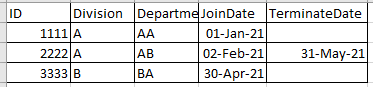
TanawatP_0-1629378466921.png

I have employee around 9,000 people and would need to drill down turnover rate between Division and Department.

There was around 150 departments in the organization.


I tried google it but did not seem to find a way to solved this. I also tried create a calculated table and it took forever to complete due to the size of data. Below is the method that I have tried but it gave incorrect results.

https://finance-bi.com/blog/power-bi-employee-turnover-rate/


In the past, I use manual work around by calculate number of active and number of leaver in another file and then load and unpivot to use time intelligence function.

TanawatP_1-1629379204832.png


I'm quite lost now, can anyone help?

Thanks 


1 ACCEPTED SOLUTION
amitchandak
Super User
Super User

@TanawatP , With help from a date table


Hired Employee = CALCULATE(COUNT(Employee[Employee Id ]),USERELATIONSHIP(Employee[Start Date],'Date'[Date]) )

Terminated Employees = CALCULATE(COUNT(Employee[Employee Id ]),USERELATIONSHIP(Employee[End Date],'Date'[Date]),not(ISBLANK(Employee[End Date])))


Current Employees = CALCULATE(COUNTx(FILTER(Employee,Employee[Start Date]<=max('Date'[Date]) && (ISBLANK(Employee[End Date]) || Employee[End Date]>max('Date'[Date]))),(Employee[Employee Id ])),CROSSFILTER(Employee[Start Date],'Date'[Date],None))


Avg last 12 months  =

calculate(AverageX(Values('Date'[Month Year]) , [Current Employees]),DATESINPERIOD('Date'[Date ],MAX('Date'[Date ]),-12,MONTH))


refer if needed

https://community.powerbi.com/t5/Community-Blog/HR-Analytics-Active-Employee-Hire-and-Termination-tr...

Share with Power BI Enthusiasts: Full Power BI Video (20 Hours) YouTube
Microsoft Fabric Series 60+ Videos YouTube
Microsoft Fabric Hindi End to End YouTube

View solution in original post

2 REPLIES 2
amitchandak
Super User
Super User

@TanawatP , With help from a date table


Hired Employee = CALCULATE(COUNT(Employee[Employee Id ]),USERELATIONSHIP(Employee[Start Date],'Date'[Date]) )

Terminated Employees = CALCULATE(COUNT(Employee[Employee Id ]),USERELATIONSHIP(Employee[End Date],'Date'[Date]),not(ISBLANK(Employee[End Date])))


Current Employees = CALCULATE(COUNTx(FILTER(Employee,Employee[Start Date]<=max('Date'[Date]) && (ISBLANK(Employee[End Date]) || Employee[End Date]>max('Date'[Date]))),(Employee[Employee Id ])),CROSSFILTER(Employee[Start Date],'Date'[Date],None))


Avg last 12 months  =

calculate(AverageX(Values('Date'[Month Year]) , [Current Employees]),DATESINPERIOD('Date'[Date ],MAX('Date'[Date ]),-12,MONTH))


refer if needed

https://community.powerbi.com/t5/Community-Blog/HR-Analytics-Active-Employee-Hire-and-Termination-tr...

Share with Power BI Enthusiasts: Full Power BI Video (20 Hours) YouTube
Microsoft Fabric Series 60+ Videos YouTube
Microsoft Fabric Hindi End to End YouTube

Thanks @amitchandak  your solution work like a charm!

Helpful resources

Announcements
Power BI DataViz World Championships

Power BI Dataviz World Championships

The Power BI Data Visualization World Championships is back! Get ahead of the game and start preparing now!

December 2025 Power BI Update Carousel

Power BI Monthly Update - December 2025

Check out the December 2025 Power BI Holiday Recap!

FabCon Atlanta 2026 carousel

FabCon Atlanta 2026

Join us at FabCon Atlanta, March 16-20, for the ultimate Fabric, Power BI, AI and SQL community-led event. Save $200 with code FABCOMM.