
cancel
Showing results for 
Search instead for 
Did you mean: 

The Power BI Data Visualization World Championships is back! Get ahead of the game and start preparing now! Learn more

Reply
Sunkari
Responsive Resident
Responsive Resident

Need a shortcut to update queries in Power BI report

Hi All,


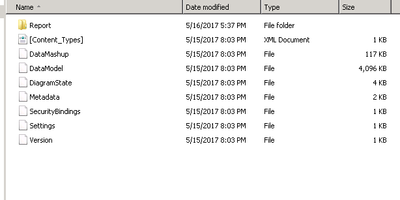
I have a .pbix file which contains more than 40 queries. I need to update underlying queries. I thought of doing directly in the source code of .pbix file.  I unzipped .pbix and seeing multiple files.


I am not sure where(which file) make the changes and how to open the underlying files.

.PBIX file.PNG

Please provide your inputs here.

3 REPLIES 3
vanessafvg
Super User
Super User

what exactly are you going to change?


If I took the time to answer your question and I came up with a solution, please mark my post as a solution and /or give kudos freely for the effort 🙂 Thank you!

Proud to be a Super User!


Need replace SQL query behind all power bi model tables

Hi @Sunkari,


As far as I know, you need to open Query Editor -> Advanced Editor to modify T-sql query separately for each table.


Best Regards,
Qiuyun Yu

Community Support Team _ Qiuyun Yu
If this post helps, then please consider Accept it as the solution to help the other members find it more quickly.

Helpful resources

Announcements
Power BI DataViz World Championships

Power BI Dataviz World Championships

The Power BI Data Visualization World Championships is back! Get ahead of the game and start preparing now!

November Power BI Update Carousel

Power BI Monthly Update - November 2025

Check out the November 2025 Power BI update to learn about new features.

FabCon Atlanta 2026 carousel

FabCon Atlanta 2026

Join us at FabCon Atlanta, March 16-20, for the ultimate Fabric, Power BI, AI and SQL community-led event. Save $200 with code FABCOMM.