Join us at FabCon Atlanta from March 16 - 20, 2026, for the ultimate Fabric, Power BI, AI and SQL community-led event. Save $200 with code FABCOMM.
Register now!The Power BI Data Visualization World Championships is back! Get ahead of the game and start preparing now! Learn more
Hi Power BI Community,
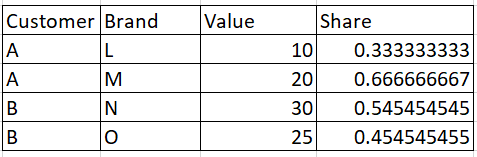
I need help in writing DAX for the below scenario, please find image attached.
I have 3 Columns, Customer, brand and Value.
If I select any slicer from Customer Column the % Share should be calculated wrt to the parent Customer.
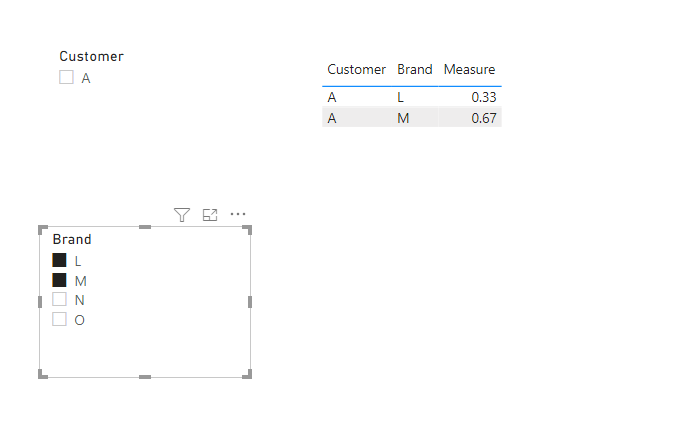
That is if if only L and M are selected it should be 10/30 and 20/30
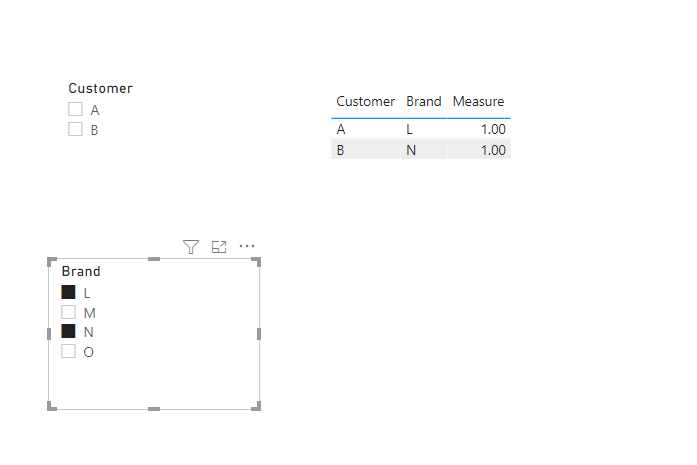
But if only L and N are selected it should be 10/10 and 30/30.
Please help, thanks in advance.
Solved! Go to Solution.
Hi @Anonymous ,
Create a measure as below:
Measure =
var _num=SUM('Table'[Value])
var _deno=CALCULATE(SUM('Table'[Value]),FILTER(ALLSELECTED('Table'),'Table'[Customer ]=MAX('Table'[Customer ])))
Return
DIVIDE(_num,_deno)
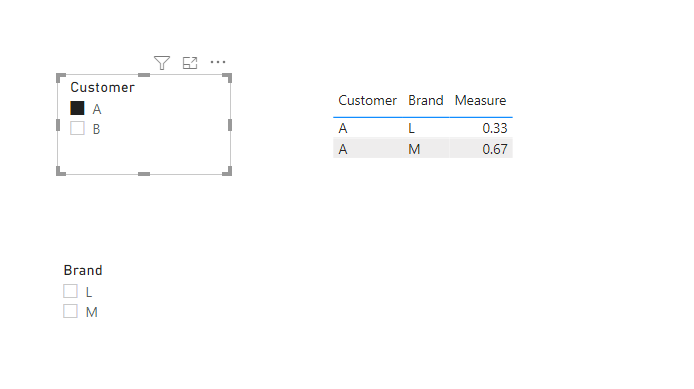
And you will see:
For the related .pbix file,pls see attached.
Best Regards,
Kelly
Did I answer your question? Mark my post as a solution!
Hi @Anonymous ,
Create a measure as below:
Measure =
var _num=SUM('Table'[Value])
var _deno=CALCULATE(SUM('Table'[Value]),FILTER(ALLSELECTED('Table'),'Table'[Customer ]=MAX('Table'[Customer ])))
Return
DIVIDE(_num,_deno)
And you will see:
For the related .pbix file,pls see attached.
Best Regards,
Kelly
Did I answer your question? Mark my post as a solution!
@Anonymous did you checked the measure I provided?
Subscribe to the @PowerBIHowTo YT channel for an upcoming video on List and Record functions in Power Query!!
Learn Power BI and Fabric - subscribe to our YT channel - Click here: @PowerBIHowTo
If my solution proved useful, I'd be delighted to receive Kudos. When you put effort into asking a question, it's equally thoughtful to acknowledge and give Kudos to the individual who helped you solve the problem. It's a small gesture that shows appreciation and encouragement! ❤
Did I answer your question? Mark my post as a solution. Proud to be a Super User! Appreciate your Kudos 🙂
Feel free to email me with any of your BI needs.
@Anonymous Try these measure:
Sum Value = SUM ( 'Table'[Value] )
% = DIVIDE ( [Sum Value], CALCULATE ( [Sum Value], ALLSELECTED ( 'Table'[Brand] ) ) )
Check my latest blog post Comparing Selected Client With Other Top N Clients | PeryTUS I would ❤ Kudos if my solution helped. 👉 If you can spend time posting the question, you can also make efforts to give Kudos to whoever helped to solve your problem. It is a token of appreciation!
⚡Visit us at https://perytus.com, your one-stop-shop for Power BI-related projects/training/consultancy.⚡
Subscribe to the @PowerBIHowTo YT channel for an upcoming video on List and Record functions in Power Query!!
Learn Power BI and Fabric - subscribe to our YT channel - Click here: @PowerBIHowTo
If my solution proved useful, I'd be delighted to receive Kudos. When you put effort into asking a question, it's equally thoughtful to acknowledge and give Kudos to the individual who helped you solve the problem. It's a small gesture that shows appreciation and encouragement! ❤
Did I answer your question? Mark my post as a solution. Proud to be a Super User! Appreciate your Kudos 🙂
Feel free to email me with any of your BI needs.
Please define "parent Customer" - is that the brand?
Are you saying 10/10 and 30/30 because the customers are different between brands L and N ?
The Power BI Data Visualization World Championships is back! Get ahead of the game and start preparing now!
| User | Count |
|---|---|
| 40 | |
| 35 | |
| 34 | |
| 31 | |
| 28 |
| User | Count |
|---|---|
| 137 | |
| 102 | |
| 68 | |
| 66 | |
| 64 |