Join us at FabCon Atlanta from March 16 - 20, 2026, for the ultimate Fabric, Power BI, AI and SQL community-led event. Save $200 with code FABCOMM.
Register now!The Power BI Data Visualization World Championships is back! Get ahead of the game and start preparing now! Learn more
Hi,
I have two tables, a student table and a family table.
The student table is as follows, where Student ID is the primary Key.
| Student ID | FamilyID |
| 1 | F001 |
| 2 | F002 |
| 3 | F003 |
| 4 | F004 |
| 5 | F001 |
The Family table is as follows, where many family members may belong to the same family ID..
| FamilyID | Member | Phone |
| F001 | Dad | 016-456-89876 |
| F001 | Mom | |
| F001 | Uncle | 676-876-98543 |
| F002 | Dad | |
| F002 | Mom | 412-562-88765 |
| F003 | Dad | 416-542-86758 |
| F004 | Dad | 416-592-86988 |
I need to find the list of pupils for whom any of the family member's phone no is missing. I'm using a direct query which makes creating Calculated columns and using calculate function difficult.
I need a final output of something similar to
| Student ID | column |
| 1 | 1 |
| 2 | 1 |
| 3 | 0 |
| 4 | 0 |
| 5 | 1 |
Can anyone help me with this?
Thanks in advance.
Hi @Anonymous ,
Do your table have any relationship between them? If there is any relationship depeding on the type you may just need to use the columns and the filter pane.
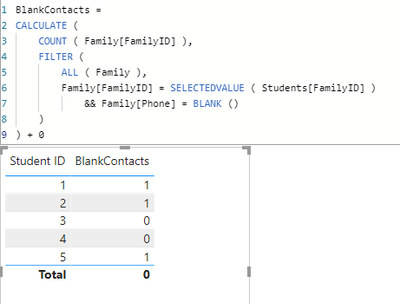
Not having a realtionship try to create the following measure:
BlankContacts =
CALCULATE (
COUNT ( Family[FamilyID] ),
FILTER (
ALL ( Family ),
Family[FamilyID] = SELECTEDVALUE ( Students[FamilyID] )
&& Family[Phone] = BLANK ()
)
) + 0
Now if you create a table visual and add the ID and the measure you get the following result:
Regards
Miguel Félix
Proud to be a Super User!
Check out my blog: Power BI em PortuguêsCheck out the November 2025 Power BI update to learn about new features.
Advance your Data & AI career with 50 days of live learning, contests, hands-on challenges, study groups & certifications and more!
| User | Count |
|---|---|
| 57 | |
| 45 | |
| 42 | |
| 20 | |
| 18 |