FabCon is coming to Atlanta
Join us at FabCon Atlanta from March 16 - 20, 2026, for the ultimate Fabric, Power BI, AI and SQL community-led event. Save $200 with code FABCOMM.
Register now!- Power BI forums
- Get Help with Power BI
- Desktop
- Service
- Report Server
- Power Query
- Mobile Apps
- Developer
- DAX Commands and Tips
- Custom Visuals Development Discussion
- Health and Life Sciences
- Power BI Spanish forums
- Translated Spanish Desktop
- Training and Consulting
- Instructor Led Training
- Dashboard in a Day for Women, by Women
- Galleries
- Data Stories Gallery
- Themes Gallery
- Contests Gallery
- QuickViz Gallery
- Quick Measures Gallery
- Visual Calculations Gallery
- Notebook Gallery
- Translytical Task Flow Gallery
- TMDL Gallery
- R Script Showcase
- Webinars and Video Gallery
- Ideas
- Custom Visuals Ideas (read-only)
- Issues
- Issues
- Events
- Upcoming Events
The Power BI Data Visualization World Championships is back! Get ahead of the game and start preparing now! Learn more
- Power BI forums
- Forums
- Get Help with Power BI
- Desktop
- Need Help Getting the Last Transaction Date per Cu...
- Subscribe to RSS Feed
- Mark Topic as New
- Mark Topic as Read
- Float this Topic for Current User
- Bookmark
- Subscribe
- Printer Friendly Page

- Mark as New
- Bookmark
- Subscribe
- Mute
- Subscribe to RSS Feed
- Permalink
- Report Inappropriate Content
Need Help Getting the Last Transaction Date per Customer
Need some help solving this challenge. Per the data table beow, I want to use a KPI to display the value for each client. The challenge is a calculation that will always return the PREVIOUS DATES value for each Client. For example, for Client 1, the KPI card displays 9. I want to set the KPI's Target Goal to the PREVIOUS DATE from the MAX DATE for that Client. For Client 1, the KPI's Target Goal would be the 15 from 9/10/2019.
I've tried many different formulas, but without success. This may be due to a lack of understanding concerning Filter Context, CALCULATE, EARLIER, etc...
I have a DateDim as a date table connected to Date, not sure if that helps or not.
Please Help.

Solved! Go to Solution.


- Mark as New
- Bookmark
- Subscribe
- Mute
- Subscribe to RSS Feed
- Permalink
- Report Inappropriate Content
here's a post with pretty good instructions
https://community.powerbi.com/t5/Desktop/How-to-get-previous-row-value-for-text-column/td-p/312560
Did this post answer your question? Mark it as a solution so others can find it!
Help when you know. Ask when you don't!
Join the conversation at We Talk BI find out more about me at Slow BI


- Mark as New
- Bookmark
- Subscribe
- Mute
- Subscribe to RSS Feed
- Permalink
- Report Inappropriate Content
Hi,
You may download my PBI file from here.
Hope this helps.
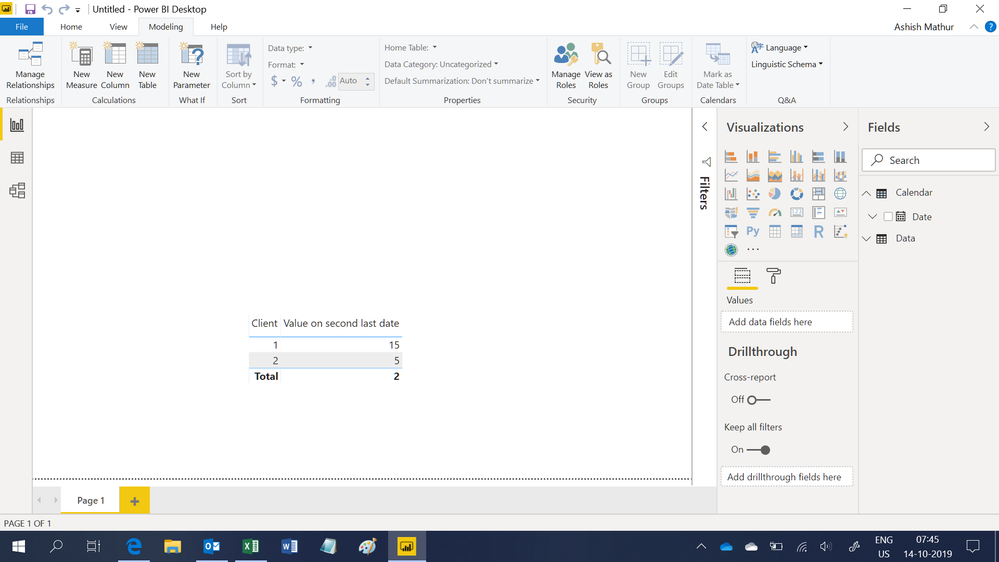
Regards,
Ashish Mathur
http://www.ashishmathur.com
https://www.linkedin.com/in/excelenthusiasts/
- Mark as New
- Bookmark
- Subscribe
- Mute
- Subscribe to RSS Feed
- Permalink
- Report Inappropriate Content
The best time to calculate the previous date's value is BEFORE you load the data. Here is the best explanation I've found of why that is:
Alternatively, and arguably a better approach, you may use Power Query before your data hits the DAX engine. Power Query bypasses the issue with DAX (discussed in the next two paragraphs) in multiple ways - the most elegant (although advanced - there's simpler methods) would List.Accumulate().
However, and every other post missed this, the answer to "Is it possible to have a Calculated DAX column that uses the previous rows calculated value as an input? " is NO. This is a recursive question. DAX cannot do recursion.
The reason why is simple: when the engine is compiling your calculated columns the smallest atomic unit in the DAX engine is a column - not a cell, like Excel. DAX cannot calculate the first cell in a column, then the next, then the next etc because it has no concept of a cell. It calculates the entire column at once because there is nothing smaller. This is a very important concept to understand when first learning DAX.
https://www.reddit.com/r/PowerBI/comments/9m0b49/dax_refer_to_previous_row_of_same_column/
Did this post answer your question? Mark it as a solution so others can find it!
Help when you know. Ask when you don't!
Join the conversation at We Talk BI find out more about me at Slow BI
- Mark as New
- Bookmark
- Subscribe
- Mute
- Subscribe to RSS Feed
- Permalink
- Report Inappropriate Content
@kentyler Thanks. Totally understand this concept. My question is, with a column in the data source that identifies the previous transaction date for a specific client, how then do I use that value to generate the KPI in the original thread?
- Mark as New
- Bookmark
- Subscribe
- Mute
- Subscribe to RSS Feed
- Permalink
- Report Inappropriate Content
There are ways in DAX to calculate values from previous rows....but they are complex and cumbersome.
Did this post answer your question? Mark it as a solution so others can find it!
Help when you know. Ask when you don't!
Join the conversation at We Talk BI find out more about me at Slow BI
- Mark as New
- Bookmark
- Subscribe
- Mute
- Subscribe to RSS Feed
- Permalink
- Report Inappropriate Content
@kentyler can you provide one of those methods, regardless how cumbersome it is?
- Mark as New
- Bookmark
- Subscribe
- Mute
- Subscribe to RSS Feed
- Permalink
- Report Inappropriate Content
here's a post with pretty good instructions
https://community.powerbi.com/t5/Desktop/How-to-get-previous-row-value-for-text-column/td-p/312560
Did this post answer your question? Mark it as a solution so others can find it!
Help when you know. Ask when you don't!
Join the conversation at We Talk BI find out more about me at Slow BI
- Mark as New
- Bookmark
- Subscribe
- Mute
- Subscribe to RSS Feed
- Permalink
- Report Inappropriate Content

Helpful resources

Power BI Dataviz World Championships
The Power BI Data Visualization World Championships is back! Get ahead of the game and start preparing now!

Power BI Monthly Update - December 2025
Check out the December 2025 Power BI Holiday Recap!

FabCon Atlanta 2026
Join us at FabCon Atlanta, March 16-20, for the ultimate Fabric, Power BI, AI and SQL community-led event. Save $200 with code FABCOMM.

| User | Count |
|---|---|
| 37 | |
| 37 | |
| 33 | |
| 32 | |
| 29 |


| User | Count |
|---|---|
| 130 | |
| 88 | |
| 82 | |
| 68 | |
| 64 |


