We've captured the moments from FabCon & SQLCon that everyone is talking about, and we are bringing them to the community, live and on-demand. Starts on April 14th. Register now
anyone able to help me with this function.
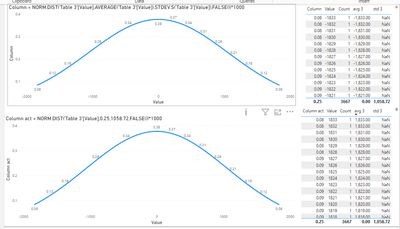
im getting different results on my data set compared to someone else.
is it okay to have multiple values for X?
i made another fake set of data that only ever has 1 value for X and it doesn't seem to have this problem
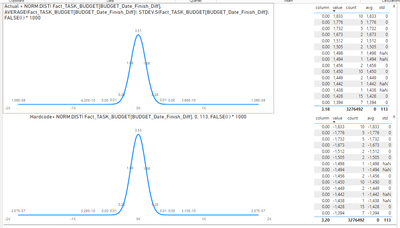
Also, when making the calculated column. for NORM .DIST. does it interact with filters?
I noticed when i hard code in 0 and 113 from the unfiltered page and then bring that curve into a page with the measure one, they both have the same curve.
Solved! Go to Solution.
we used the Python visual instead. This visual is dynamic 🙂
Hi @Robert14358 ,
Thanks @lbendlin answer , and I have some other suggestions:
The DIST function is designed to use a single value for each calculation, X. If you enter an array or multiple values for X in a single function call, it may not work as expected. For datasets in which X can accept multiple values, you would typically apply the NORM.DIST function to iterate over each value of X separately, either by iterating in a script or by iterating in a column of the computation that handles each row separately.
As for the interaction with filters, calculated columns in Power BI are calculated during data refresh and are not dynamically recalculated when filters are applied in the report. This means that values in calculated columns, such as with the NORM.DIST function, remain static and do not change based on filters applied in the report view. However, metrics in Power BI interact with filters and are recalculated based on the current filter context.
If you observe that the hard-coded value generates the same curve regardless of the filter applied, it is consistent with the expected behavior of the calculated column. For dynamic interactions with filters, consider using metric values instead of computed columns where feasible.
Best Regards,
Xianda Tang
If this post helps, then please consider Accept it as the solution to help the other members find it more quickly.
yeah i need this is a measure, is there anyway to use NORM.DIST as a measure?
Please provide sample data that covers your issue or question completely, in a usable format (not as a screenshot).
Do not include sensitive information or anything not related to the issue or question.
If you are unsure how to upload data please refer to https://community.fabric.microsoft.com/t5/Community-Blog/How-to-provide-sample-data-in-the-Power-BI-...
Please show the expected outcome based on the sample data you provided.
Want faster answers? https://community.fabric.microsoft.com/t5/Desktop/How-to-Get-Your-Question-Answered-Quickly/m-p/1447...
Also, when making the calculated column. for NORM .DIST. does it interact with filters?
Calculated columns do not react to filters by themselves. But they can be used in a measure that is impacted by filters.
If you have recently started exploring Fabric, we'd love to hear how it's going. Your feedback can help with product improvements.
A new Power BI DataViz World Championship is coming this June! Don't miss out on submitting your entry.
Share feedback directly with Fabric product managers, participate in targeted research studies and influence the Fabric roadmap.
| User | Count |
|---|---|
| 57 | |
| 38 | |
| 33 | |
| 19 | |
| 16 |
| User | Count |
|---|---|
| 67 | |
| 66 | |
| 40 | |
| 34 | |
| 25 |