Don't miss your chance to take the Fabric Data Engineer (DP-600) exam for FREE! Find out how by watching the DP-600 session on-demand now through April 28th.
Learn moreJoin the FabCon + SQLCon recap series. Up next: Power BI, Real-Time Intelligence, IQ and AI, and Data Factory take center stage. All sessions are available on-demand after the live show. Register now
Hello,
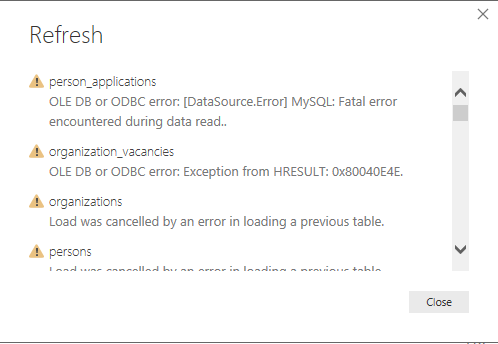
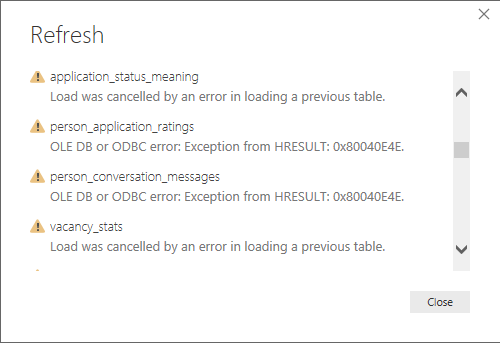
I have these errors when trying to refresh the dataset in my project (power bi desktop):
The errors interchange between the tables when I hit refresh again. I haven't refreshed the data since 3rd of September this year and the major change that I can recall is installing the new September patch, could this be the problem?
Solved! Go to Solution.
Problem fixed
So 2 things that i've done that could have helped:
- File -> Options & settings -> Options ->Global: Data load: Maximum allowed - doubled the MB
- File -> Options & settings -> Options ->Current file: Paralel loading of tables deselect
Problem fixed
So 2 things that i've done that could have helped:
- File -> Options & settings -> Options ->Global: Data load: Maximum allowed - doubled the MB
- File -> Options & settings -> Options ->Current file: Paralel loading of tables deselect
Check out the April 2026 Power BI update to learn about new features.
If you have recently started exploring Fabric, we'd love to hear how it's going. Your feedback can help with product improvements.
A new Power BI DataViz World Championship is coming this June! Don't miss out on submitting your entry.
| User | Count |
|---|---|
| 48 | |
| 40 | |
| 38 | |
| 20 | |
| 17 |
| User | Count |
|---|---|
| 68 | |
| 65 | |
| 30 | |
| 26 | |
| 25 |