This time we’re going bigger than ever. Fabric, Power BI, SQL, AI and more. We're covering it all. You won't want to miss it.
Learn moreLevel up your Power BI skills this month - build one visual each week and tell better stories with data! Get started
i have a datasource that is converted into a table. There are columns within the table that contain multivalues separated by a semi colon, So for example like this:
| ID | Department | Years | Colour |
| 1 | Billing;Stores;Office | 3 | Red;Blue |
| 2 | Office;Billing | 7 | Green;Orange |
| 3 | Stores | 10 | pink |
So i am trying to extract the multivalue fields, perhaps put them into their own table? But i cannot see anyway of doing this after i have already converted the original datasource into a table. Any ideas?
Solved! Go to Solution.
Hi @cheezy ,
If I took your question correctly then you could follow below steps:-
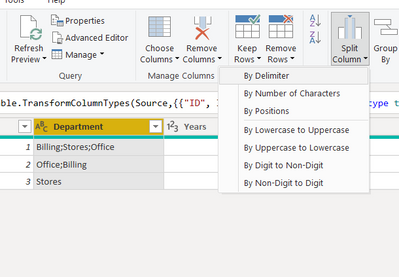
1. Select Department column then use split column by delimiter
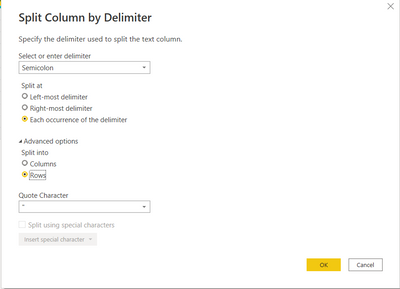
2. Now select the options as below:-
3. Follow the same for colour column.
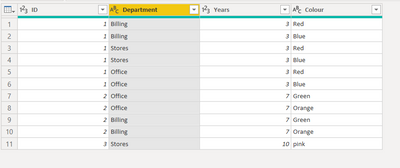
4. Final output:-
Refer the file below.
Thanks,
Samarth
Best Regards,
Samarth
If this post helps, please consider accepting it as the solution to help the other members find it more quickly.
Appreciate your Kudos!!
Connect on Linkedin
Hi @cheezy ,
If I took your question correctly then you could follow below steps:-
1. Select Department column then use split column by delimiter
2. Now select the options as below:-
3. Follow the same for colour column.
4. Final output:-
Refer the file below.
Thanks,
Samarth
Best Regards,
Samarth
If this post helps, please consider accepting it as the solution to help the other members find it more quickly.
Appreciate your Kudos!!
Connect on Linkedin
thanks for your help - this works
Check out the April 2026 Power BI update to learn about new features.
Sign up to receive a private message when registration opens and key events begin.
If you have recently started exploring Fabric, we'd love to hear how it's going. Your feedback can help with product improvements.
| User | Count |
|---|---|
| 32 | |
| 28 | |
| 21 | |
| 18 | |
| 17 |
| User | Count |
|---|---|
| 62 | |
| 35 | |
| 34 | |
| 24 | |
| 24 |