Join us at FabCon Atlanta from March 16 - 20, 2026, for the ultimate Fabric, Power BI, AI and SQL community-led event. Save $200 with code FABCOMM.
Register now!The Power BI Data Visualization World Championships is back! Get ahead of the game and start preparing now! Learn more
Dear all,
I am completely blocked, I would need to multiply a measure calculated by a conditional factor, I mean, I have created a formula to receive an average between 2 years depending the order type and now I have to multiply that measure by a factor conditioning the order type.
| Order Type | Year | Qty |
| A | 2019 | 3 |
| A | 2018 | 4 |
| B | 2019 | 5 |
| B | 2018 | 2 |
| C | 2019 | 6 |
| C | 2018 | 32 |
| Order Type | Factor |
| A | 0,33 |
| B | 1,05 |
| C | 1,15 |
could someone please help me?
Thanks in advance!
Solved! Go to Solution.
Hi @RookiePBI2019 ,
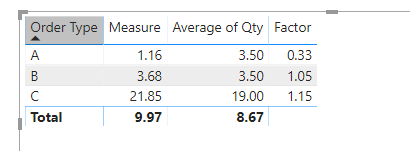
To create a measure as below.
Measure =
VAR averag =
AVERAGE ( 'Table'[Qty] )
VAR ty =
MAX ( 'Table'[Order Type] )
VAR fact =
CALCULATE ( MAX ( Factor[Factor] ), FILTER ( Factor, Factor[Order Type] = ty ) )
RETURN
averag * fact
For more details, please check the pbix as attached.
Hi,
Build a relationship from the Order Type column of Table1 to the Order Type column of Table2. In Table1, write this calculated column formula
=RELATED(Table2[Factor])
To your visual, drag Order Type from Table2. You may now create this measure
=SUMX(Table1,Table1[Factor]*Table1[Qty])
Hope this helps.
Hi @RookiePBI2019 ,
To create a measure as below.
Measure =
VAR averag =
AVERAGE ( 'Table'[Qty] )
VAR ty =
MAX ( 'Table'[Order Type] )
VAR fact =
CALCULATE ( MAX ( Factor[Factor] ), FILTER ( Factor, Factor[Order Type] = ty ) )
RETURN
averag * fact
For more details, please check the pbix as attached.
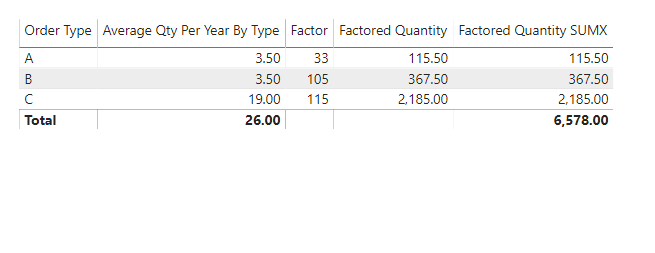
There are multiple ways to do this though I think the neatest is to use a separate order types (dimension) table that contains the factors and relate it to the measure with the order quantities as so:
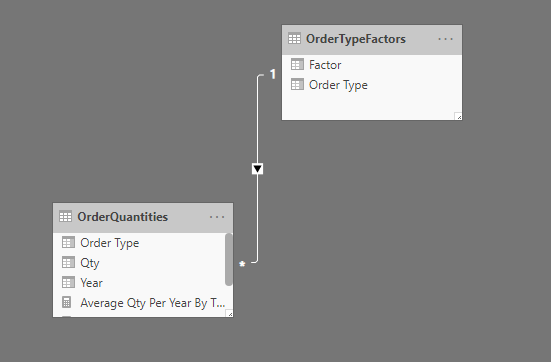
You can then multiply your measure by the corresponding row in the factors table by using SUMX e.g.
Note that if you want to make sure that the measure is only shown against a specified order type (with no total), you could write a measure that picks out the relevant factor e.g:
A PBIX which shows this can be viewed here
The Power BI Data Visualization World Championships is back! Get ahead of the game and start preparing now!
| User | Count |
|---|---|
| 37 | |
| 37 | |
| 33 | |
| 32 | |
| 29 |
| User | Count |
|---|---|
| 130 | |
| 88 | |
| 82 | |
| 68 | |
| 64 |