cancel
Showing results for 
Search instead for 
Did you mean: 

The Power BI Data Visualization World Championships is back! Get ahead of the game and start preparing now! Learn more

Reply
Anonymous
Not applicable

Multiple stacked column chart

Hi All,


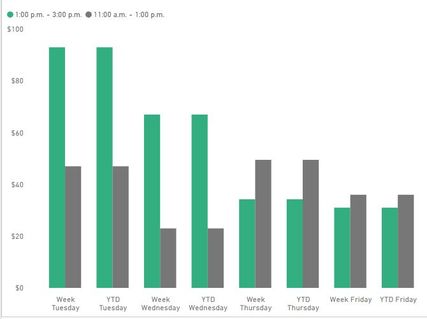
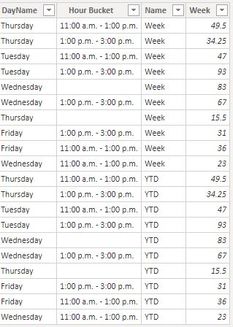
I am facing diffculties in creating Multiple stacked column chart  for Weekly and YTD. Is there any workout to acheive like below chart


Stacked Column.jpg


7 REPLIES 7
TomMartens
Super User
Super User

Hey @Anonymous ,


unfortunately, this kind of visual is not supported at the moment.

But maybe you can create your own visual using Charticulator: https://charticulator.com/


Regards,

Tom


Did I answer your question? Mark my post as a solution, this will help others!

Proud to be a Super User!
I accept Kudos 😉
Hamburg, Germany
Anonymous
Not applicable

@TomMartens  Is there any other option available in PBI to acheive this kind of reporting.


OR


can i show my YTD bar in different color


2.JPGCapture.JPG

Hey @Anonymous ,


you can control the fill color of a column/bar by using conditional formatting.


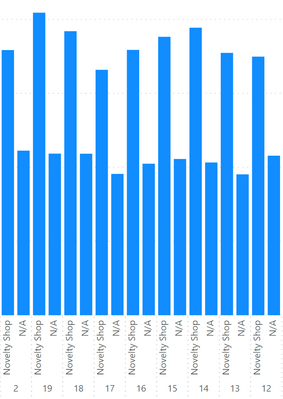
To change the color of the columns from this:

image.png

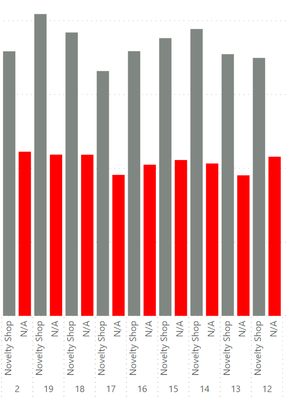
 to this

image.png

I created this measure:

Measure 2 = 
var _category = MAX('Dimension Customer'[Category])
var fillColor = IF(_category = "N/A" , "red" , "#808782")
return
fillColor

What the measure does is this:

It reads the current value of the column Category by using the MAX(...) function. The column is used as inner axis-label.

If the current value equals "N/A" then the color "red" should be used, otherwise a hexcode.


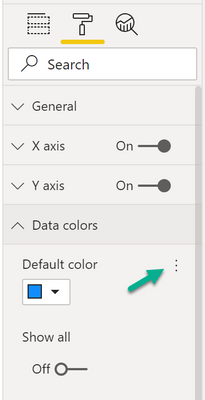
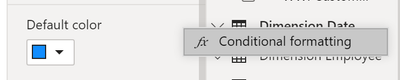
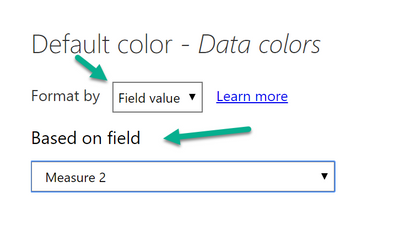
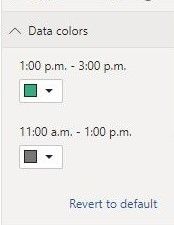
I applied the measure for the conditional formatting by changing the data colors option of the chart:

image.png


image.png


image.png

Hopefully, this provides what you are looking for.


Regards,

Tom


Did I answer your question? Mark my post as a solution, this will help others!

Proud to be a Super User!
I accept Kudos 😉
Hamburg, Germany
Anonymous
Not applicable

@TomMartens 


I have created the measure, but its not allowing me to drop in axis or legend.


1.JPG2.JPG

Hey @Anonymous ,


you can't use the measure as legend or axis.

You have to change the Data colors formatting option of the chart, see the screenshots inside my previous answer.


Regards,

Tom


Did I answer your question? Mark my post as a solution, this will help others!

Proud to be a Super User!
I accept Kudos 😉
Hamburg, Germany
Anonymous
Not applicable

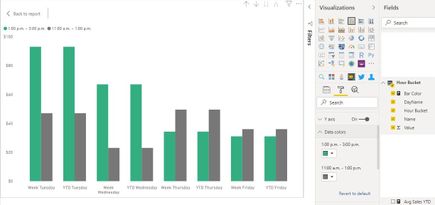
@TomMartens  Unable to see default data color


2 - Copy.JPG


May be i am using differnet chart. can i share my pbix file

Hey @Anonymous ,


you are right, this seems to be related to using a column at the legend.


I recommend that you file an idea ideas.powerbi.com


Regards,

Tom


Did I answer your question? Mark my post as a solution, this will help others!

Proud to be a Super User!
I accept Kudos 😉
Hamburg, Germany

Helpful resources

Announcements
Power BI DataViz World Championships

Power BI Dataviz World Championships

The Power BI Data Visualization World Championships is back! Get ahead of the game and start preparing now!

November Power BI Update Carousel

Power BI Monthly Update - November 2025

Check out the November 2025 Power BI update to learn about new features.

FabCon Atlanta 2026 carousel

FabCon Atlanta 2026

Join us at FabCon Atlanta, March 16-20, for the ultimate Fabric, Power BI, AI and SQL community-led event. Save $200 with code FABCOMM.