Hey guys,
I want to visualize the number of start and end dates (each point in time) in a line diagram. My problem is, that the columns "start date" and "end date" do not have the same points on the x-axis (dates), which is totally okay and wanted, but the x-axis needs both of them. So I just made a new table with a column, that contains the merged dates via CALENDARAUTO, but that does not work because this table needs to be related to the original table, which is impossible (there can only be one connection, but I have 2 columns to connect (start date and end date).
I have tried to viszualize the desired result:
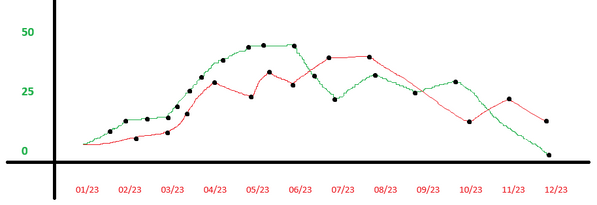
I guess it can't be that difficult, it's possible in Excel, but I can't transform my thoughts about it from the cell-sight to the row-sight 😅
To make it easier, here are some sample data:
| Activity | Start Date | End Date |
| A1 | 21.04.2023 | 25.06.2023 |
| A2 | 21.04.2023 | 12.08.2023 |
| A3 | 01.02.2023 | 01.03.2023 |
| A4 | 17.10.2023 | 31.12.2024 |
| A5 | 21.04.2023 | 31.12.2024 |
| A6 | 01.02.2023 | 25.06.2023 |
I'm excited for your anwers and grateful for help.
Kind regards
Dennis