Don't miss your chance to take the Fabric Data Engineer (DP-600) exam for FREE! Find out how by watching the DP-600 session on-demand now through April 28th.
Learn moreJoin the FabCon + SQLCon recap series. Up next: Power BI, Real-Time Intelligence, IQ and AI, and Data Factory take center stage. All sessions are available on-demand after the live show. Register now
I want to have a number of filters for different groups or "Families" of attributes.
So I want to have multipe selections on the one column which are grouped into different filters.
For ex my table may contain:
| Attribute | Family |
| hat | hat |
| cap | hat |
| sunhat | hat |
| wedding hat | hat |
| long | dress |
| short | dress |
| middle length | dress |
| above knee | dress |
| long | coat |
| with belt | coat |
| with zip | coat |
| waterproof | coat |
I want to choose and show one attribute from each "Family" in a table
I have made 3 filter objects.
In the "Hat" filter visual I have filtered the attibute column with "Hat Family" and one can choose from "hat", "cap", "sunhat" and "wedding"
In the "Dress" filter visual I have filtered only "Dress" Family one can choose from "long" short" "midle length" and "above knee"
In the "Coat" filter visual I have filtered "Coat" Family and one can choose from "long", "with belt" "zip" or "waterproof"
BUT if I for ex choose "cap" in my Hat filter, I am unable to choose anything from the other filters.
I want to be able to choose one attribute from each filter family as:
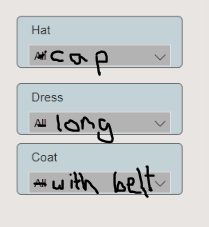
As it is now I can only have one row at a time seeing as I can only choose one attribute from all my filter visuals.
But I want to have one selection from each filter visual so my table has one row showing each selection:
| Table |
| cap |
| long |
| with belt |
Ultimately I want to show how many and which collections have these attributes. For example 2 collections, XC54 and YU43 contain a cap, a long dress and a coat with a belt.
Very grateful for help with this. Thanks in advance, Anna.
Solved! Go to Solution.
I ended up making a new table for each family, then I could have one slicer per family.
Hi @Anonymous,
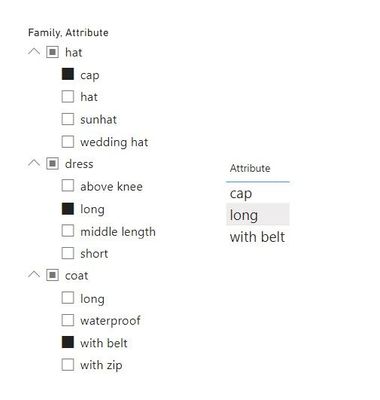
Just create one slicer and add both family and attribute fields in it, keeping attribute lower in the heirarchy.
Works for you? Mark this post as a solution if it does!
Consider taking a look at my blog: Forecast Period - Graphical Comparison
Thank you, that is an alternative, but my real data has up to 30 attributes per family so I cannot have them expanded. I would prefer to be able to have one filter object per family. Then it is easier to search per family and one can easily see what chioces are made per family. I was thinking maybe there is some way of pivoting the data and connecting a copy of the table that way...but I can't get my head around it! Or perhaps using an "ALL" function so I can select several attributes at a time but I can'tget my head around that either.
I ended up making a new table for each family, then I could have one slicer per family.
Check out the April 2026 Power BI update to learn about new features.
If you have recently started exploring Fabric, we'd love to hear how it's going. Your feedback can help with product improvements.
A new Power BI DataViz World Championship is coming this June! Don't miss out on submitting your entry.
| User | Count |
|---|---|
| 44 | |
| 38 | |
| 34 | |
| 21 | |
| 17 |
| User | Count |
|---|---|
| 65 | |
| 64 | |
| 31 | |
| 26 | |
| 25 |