Join us at FabCon Atlanta from March 16 - 20, 2026, for the ultimate Fabric, Power BI, AI and SQL community-led event. Save $200 with code FABCOMM.
Register now!The Power BI Data Visualization World Championships is back! Get ahead of the game and start preparing now! Learn more
Hi ,
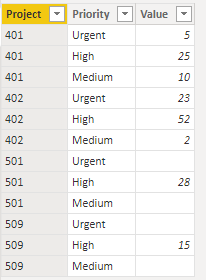
I have a column with project has 401 ,402,501,509
It has Urgent , Medium and High as Priority
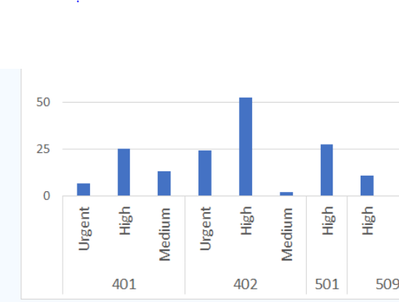
How to dispay like below chat .
Solved! Go to Solution.
Hi, @Ayappan
You can try the following methods.
Sample data:
Click Expand down in the view.
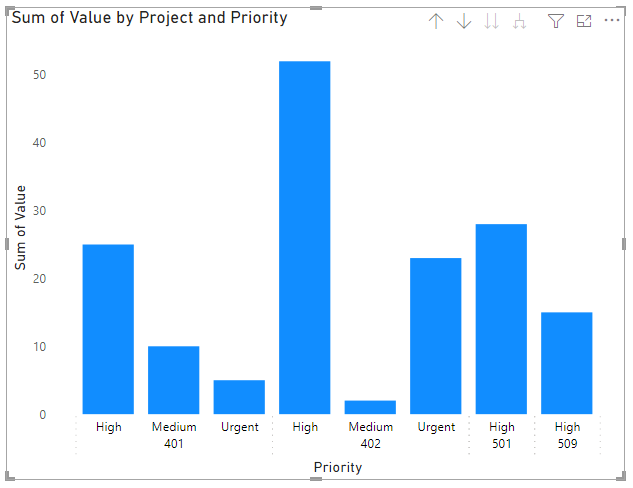
Result:
Is this the result you expect?
Solved: Multiple Values in X-Axis - Microsoft Power BI Community
Best Regards,
Community Support Team _Charlotte
If this post helps, then please consider Accept it as the solution to help the other members find it more quickly.
Hi, @Ayappan
You can try the following methods.
Sample data:
Click Expand down in the view.
Result:
Is this the result you expect?
Solved: Multiple Values in X-Axis - Microsoft Power BI Community
Best Regards,
Community Support Team _Charlotte
If this post helps, then please consider Accept it as the solution to help the other members find it more quickly.
HI There,
You can use a custom column and sort the data based on priority. Attached with PBIX file for your quick look.
Let me know in case of any access issues, I will send you directly.
https://drive.google.com/file/d/1aTnnUijIXVUEEzjzAZmOLS-qa11UHfXm/view?usp=sharing
Cheers,
Bimal
If this post helps, then please consider Accept it as the solution to help the other members find it more quickly.
The Power BI Data Visualization World Championships is back! Get ahead of the game and start preparing now!
| User | Count |
|---|---|
| 40 | |
| 35 | |
| 34 | |
| 31 | |
| 28 |
| User | Count |
|---|---|
| 136 | |
| 102 | |
| 68 | |
| 66 | |
| 58 |