Good people, I'm just starting to play with Power Bi with a database that I downloaded and I'm currently stuck in something, I tell you and the last thing I leave the formulas I used:
I have the following table, called FilterSalesDetails
| Guy | Share |
| Units sold | About the total |
| Orders | About the category |
| GR$ | About the brand |
| Hl | |
My idea is to create an array where there are two filters: one for "Type" and one for "Share", here I show you my matrix:
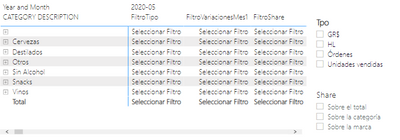
If I select an option in the "Type" filter, I should change only the columas "FilterType" and "FilterVariacionMes1", the "FilterShare" column should only be changed when I press something in the "Share" filter. What I did works half-heartedly:
If I select an option in "Share", it effectively gives me the result I expect in the "FilterShare" column and if I select a value in the "Type" filter it correctly shows me the values for their two respective columns, but here the problems begin:
-First: when I select something in filter "Type", it also shows me a value in "FilterShare" and this has to do, I suppose, """with the relationship between the columns of the tables"", I explain: if I select "Units sold", in FiltroShare I see the value corresponding to "About the total" (since, seeing the table above, it is "next to"), the same if I select Orders-->About the category, etc.
-Second: as there is clearly a problem in that """relationship"", if I select in the first filter, "Units Sold" and in the second filter one other than "About Total", I see "Select Filter" (which has to do with the formula I use, I leave them below).
So, here are the formulas:
SelectTipo = SELECTEDVALUE('FiltrosSalesDetails'[Tipo])
SelectShare = SELECTEDVALUE('FiltrosSalesDetails'[Share])
FiltroTipo = SWITCH(TRUE(),
[SelectTipo]="Units sold", calculation,
[SelectTipo]="Orders", calculation,
[SelectTipo]="GR", calculation,
[SelectTipo]="HL",calculation,
"Select Filter"
)
(For FiltroShare it's the same.)
So: first with SelectTipo/Share I make me select the values of the respective column of the table, then, with the switch, I make me calculate something (which returns it well).
As I said above, there is clearly a problem in the relationship between the rows, which I cannot remove. I tried to edit the interactions, staying like this:
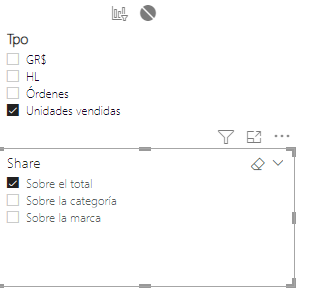
(same at the time, Tipo I blocked it with respect to Share) but it didn't work.
I know that this could be easily solved by creating another table with those 3 rows (or 4, depending on which column you choose), but let's say that I do not want because I am stubborn or does not walk the Power Bi 😅 button, I would like to know if there is any solution, some kind of filter, something with an if that can solve this.
Of course, thank you very much


