Join us at FabCon Atlanta from March 16 - 20, 2026, for the ultimate Fabric, Power BI, AI and SQL community-led event. Save $200 with code FABCOMM.
Register now!The Power BI Data Visualization World Championships is back! Get ahead of the game and start preparing now! Learn more
Hi Experts,
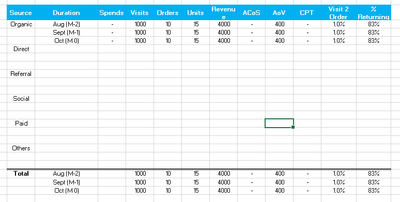
I want to show table that is identical to given screen shot. is there any way to show multiple rows in Final total like that?
Thank you in advance...
Waiting for your reply.
Solved! Go to Solution.
Hi @Uzi2019 ,
Theres is no such option to make the visualization has you are placing it here.
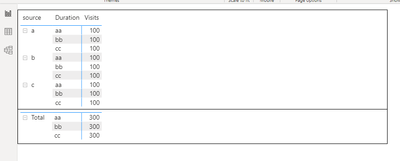
You can have two option one is to create tow table with different groupings and then make one on top of the of the other.
Other option is to create dimensiont table and measure that agregate the information has your need but believe that having so many diffent options that will cause a big increase in your model.
The only change was that I added a column to the model sayning Total as the first level of thesecond table.
Regards
Miguel Félix
Proud to be a Super User!
Check out my blog: Power BI em PortuguêsHi @Uzi2019 ,
Theres is no such option to make the visualization has you are placing it here.
You can have two option one is to create tow table with different groupings and then make one on top of the of the other.
Other option is to create dimensiont table and measure that agregate the information has your need but believe that having so many diffent options that will cause a big increase in your model.
The only change was that I added a column to the model sayning Total as the first level of thesecond table.
Regards
Miguel Félix
Proud to be a Super User!
Check out my blog: Power BI em Português@MFelix Thank you for your reply. Option for 2 different table works for me.
The Power BI Data Visualization World Championships is back! Get ahead of the game and start preparing now!
| User | Count |
|---|---|
| 39 | |
| 37 | |
| 33 | |
| 32 | |
| 29 |
| User | Count |
|---|---|
| 133 | |
| 88 | |
| 85 | |
| 68 | |
| 64 |