cancel
Showing results for 
Search instead for 
Did you mean: 

The Power BI Data Visualization World Championships is back! Get ahead of the game and start preparing now! Learn more

Reply
LRamsey
Frequent Visitor

Multiple Relationships


Hello,
I currently have two datasets that I am trying to combine. I created a custom table from the primary data set using Distinct values on one of the columns. I then used that custom table as a bridge for my relationship. However, there are cases where there is not a match on this particular dimension, either incorrect data in secondary data source or blank, but there are other matching columns within both that I would like to create the match with. Best way to describe it is if the there is not match using the Bridge create a match using the other dimension.


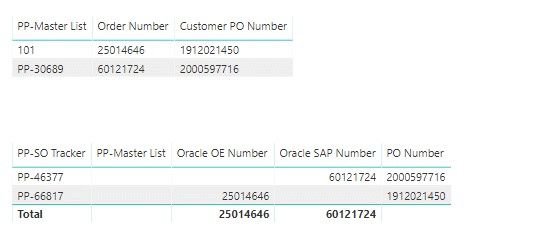
In the example below the PP-Master List is a custom table of distinct values of the PP Number from the primary data source.  The Secondary data source is SO Tracker.  As you can see it is not matching off the PP Number, but both have matches in either the Order Number or PO Number.  I would like to create a formula or relationship that says if PP does not match use match off Order Number or PO Number.

Screenshots are below:


Power BI.jpg


Thank you

1 ACCEPTED SOLUTION
Greg_Deckler
Community Champion
Community Champion

You can build multiple relationships between tables. However, only one of those relationships will be active. But, you can use a measure calculation with the function USERELATIONSHIP to address that issue. For example, let's say that want to count the number of matching rows in your dimesion table. You could do something like:


VAR __rows = COUNTROWS(RELATEDTABLE('Table'))
RETURN
IF(NOT(ISBLANK(__rows)),
  __rows,
  VAR __rows = CALCULATE(COUNTROWS(RELATEDTABLE('Table')),USERELATIONSHIP('Table1'[Column],'Table'[Column]))
  RETURN
  IF(NOT(ISBLANK(__rows)),
  __rows,
  VAR __rows = ...

IF(COUNTROWS(RELATEDTABLE(


Follow on LinkedIn
@ me in replies or I'll lose your thread!!!
Instead of a Kudo, please vote for this idea
Become an expert!: Enterprise DNA
External Tools: MSHGQM
YouTube Channel!: Microsoft Hates Greg
Latest book!:
DAX For Humans

DAX is easy, CALCULATE makes DAX hard...

View solution in original post

1 REPLY 1
Greg_Deckler
Community Champion
Community Champion

You can build multiple relationships between tables. However, only one of those relationships will be active. But, you can use a measure calculation with the function USERELATIONSHIP to address that issue. For example, let's say that want to count the number of matching rows in your dimesion table. You could do something like:


VAR __rows = COUNTROWS(RELATEDTABLE('Table'))
RETURN
IF(NOT(ISBLANK(__rows)),
  __rows,
  VAR __rows = CALCULATE(COUNTROWS(RELATEDTABLE('Table')),USERELATIONSHIP('Table1'[Column],'Table'[Column]))
  RETURN
  IF(NOT(ISBLANK(__rows)),
  __rows,
  VAR __rows = ...

IF(COUNTROWS(RELATEDTABLE(


Follow on LinkedIn
@ me in replies or I'll lose your thread!!!
Instead of a Kudo, please vote for this idea
Become an expert!: Enterprise DNA
External Tools: MSHGQM
YouTube Channel!: Microsoft Hates Greg
Latest book!:
DAX For Humans

DAX is easy, CALCULATE makes DAX hard...

Helpful resources

Announcements
Power BI DataViz World Championships

Power BI Dataviz World Championships

The Power BI Data Visualization World Championships is back! Get ahead of the game and start preparing now!

December 2025 Power BI Update Carousel

Power BI Monthly Update - December 2025

Check out the December 2025 Power BI Holiday Recap!

FabCon Atlanta 2026 carousel

FabCon Atlanta 2026

Join us at FabCon Atlanta, March 16-20, for the ultimate Fabric, Power BI, AI and SQL community-led event. Save $200 with code FABCOMM.