cancel
Showing results for 
Search instead for 
Did you mean: 

Level up your Power BI skills this month - build one visual each week and tell better stories with data! Get started

Reply
Anonymous
Not applicable

Multiple Layers on map

Hello Everyone I need your help,

I am trying to show in a report 2 visualization.


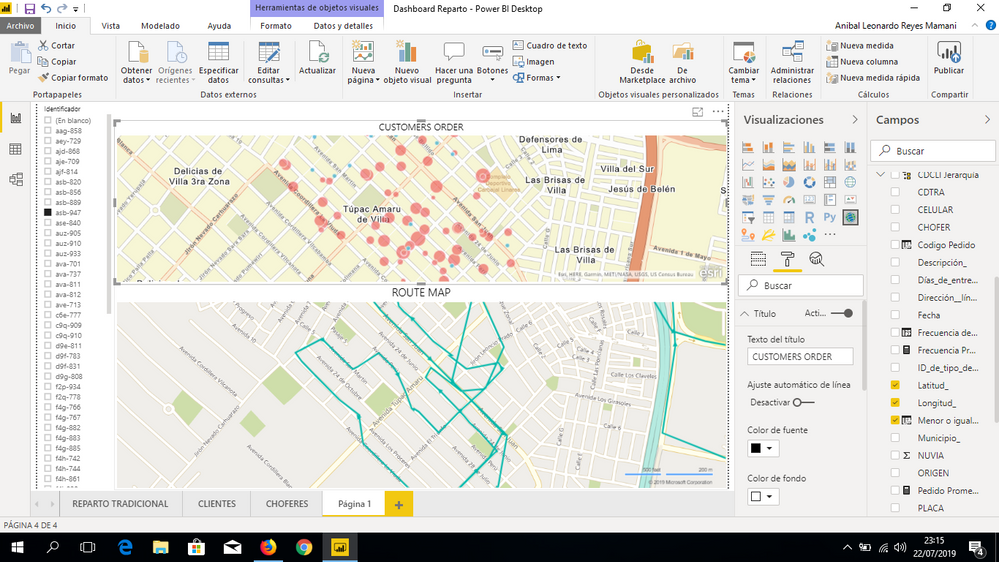
1. The order program, which shows the order for every customer by date and by truck.


2. The route define by the truck by the same date.


In the picture below you will see both visuals, the first one has been ploted by arcgis and the second one ploted by route map.


I need to combine both visuals in only one. So if my boss wan't to see what happend with "PEPITO" and his orders, he could see if "PEPITO" attended all the customers orders.


Thank you, sorry for my bad english I am beginner.

L.R

COCA COLA COMPANY

imagen.png


1 REPLY 1
v-chuncz-msft
Community Support
Community Support

@Anonymous 


As far as I know, it is not yet supported. You may try to take advantage of the Color field.

Community Support Team _ Sam Zha
If this post helps, then please consider Accept it as the solution to help the other members find it more quickly.

Helpful resources

Announcements
April Power BI Update Carousel

Power BI Monthly Update - April 2026

Check out the April 2026 Power BI update to learn about new features.

Fabric SQL PBI Data Days

Data Days 2026 coming soon!

Sign up to receive a private message when registration opens and key events begin.

New to Fabric survey Carousel

New to Fabric Survey

If you have recently started exploring Fabric, we'd love to hear how it's going. Your feedback can help with product improvements.

Power BI DataViz World Championships carousel

Power BI DataViz World Championships - June 2026

A new Power BI DataViz World Championship is coming this June! Don't miss out on submitting your entry.