cancel
Showing results for 
Search instead for 
Did you mean: 

We've captured the moments from FabCon & SQLCon that everyone is talking about, and we are bringing them to the community, live and on-demand. Starts on April 14th. Register now

Reply
rolitos
Regular Visitor

Multiple Header Column with Live Connection

Hi,


I'm using Power BI in order to replicate a Performance Board (nowadays only on a physical board).


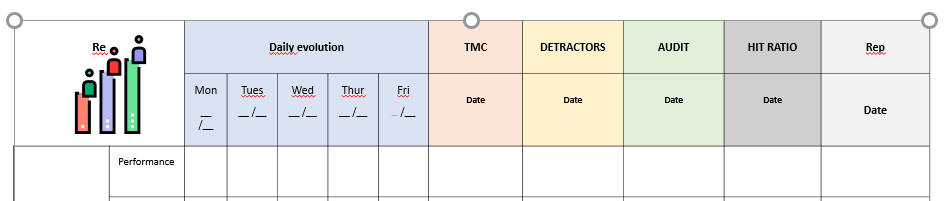
The board looks like this:


board.PNG


Is it possible to merge the column "Daily evolution" above the day names and keep the other KPIs outside the day names? All data comes from Live Connection, even the day names.


Since I'm using a live connection, thus I cannot modify data in the edit queries section, like I read in other similar posts.


Can someone help me? 🙂


Thanks!

3 REPLIES 3
tkirilov
Resolver I
Resolver I

Hi @rolitos ,


It's rather difficult to answer this without knowing what the actual data looks like, but an idea might be to use several card visuals to display the different components of this table and then colour code these to achieve the same effect. Hope this helps.


Best,


Tom

Hi @tkirilov ,


An example of data in the board:


board 2.PNG

The variable "names" and "week day" are string variables. Furthermore, I want to have values in the KPIs (VoC, TMC, Detractors, Audit, HIT Ration, Rep), which are numeric variables.


Does still your suggestion works with the inputs above?


Thanks,

R

So if the KPIs titles do not change with time, then you could have those in card visuals and the rest (names and dates) in a table below those.

You could also try to transpose those in a Matrix visual. You can have KPIs and dates as rows and Names as columns. 

Helpful resources

Announcements
New to Fabric survey Carousel

New to Fabric Survey

If you have recently started exploring Fabric, we'd love to hear how it's going. Your feedback can help with product improvements.

Power BI DataViz World Championships carousel

Power BI DataViz World Championships - June 2026

A new Power BI DataViz World Championship is coming this June! Don't miss out on submitting your entry.

Join our Fabric User Panel

Join our Fabric User Panel

Share feedback directly with Fabric product managers, participate in targeted research studies and influence the Fabric roadmap.

March Power BI Update Carousel

Power BI Community Update - March 2026

Check out the March 2026 Power BI update to learn about new features.