- Power BI forums
- Get Help with Power BI
- Desktop
- Service
- Report Server
- Power Query
- Mobile Apps
- Developer
- DAX Commands and Tips
- Custom Visuals Development Discussion
- Health and Life Sciences
- Power BI Spanish forums
- Translated Spanish Desktop
- Training and Consulting
- Instructor Led Training
- Dashboard in a Day for Women, by Women
- Galleries
- Data Stories Gallery
- Themes Gallery
- Contests Gallery
- QuickViz Gallery
- Quick Measures Gallery
- Visual Calculations Gallery
- Notebook Gallery
- Translytical Task Flow Gallery
- TMDL Gallery
- R Script Showcase
- Webinars and Video Gallery
- Ideas
- Custom Visuals Ideas (read-only)
- Issues
- Issues
- Events
- Upcoming Events
We've captured the moments from FabCon & SQLCon that everyone is talking about, and we are bringing them to the community, live and on-demand. Starts on April 14th. Register now
- Power BI forums
- Forums
- Get Help with Power BI
- Desktop
- Multiple Condition Conditional Formats Matrix Tabl...
- Subscribe to RSS Feed
- Mark Topic as New
- Mark Topic as Read
- Float this Topic for Current User
- Bookmark
- Subscribe
- Printer Friendly Page

- Mark as New
- Bookmark
- Subscribe
- Mute
- Subscribe to RSS Feed
- Permalink
- Report Inappropriate Content
Multiple Condition Conditional Formats Matrix Table
I am working on benchmarking data visualizations.
I need to format a row total in a matrix table to show a yellow or red value based on the percentage and which size facility it is. I have the categories for the locations and their names in the table as well.
Facility Sizes - Values
>200 Beds- 17.1%- 21.09% (Yellow), 21.1% and greater (Red)
200-349 Beds- 19.8% - 29.79%(Yellow) 29.8% and greater (Red)
350- 500 Beds- 16.9%- 26.89% (Yellow), 26.9% and greater (Red)
>500 Beds- 15.9%- 25.89 (Yellow), 25.9% and greater (Red)
Anything less than those I would need as white.
Examples
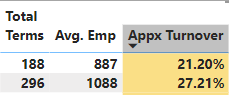
Hospital A - >200 Beds has a turnover of 17% they would be white, but when they have a few more leave it becomes 20.15% so at that time it would become yellow.
BUT
If location B has a bed size of 350-500 and has 16% it would be white, but when they have several more terms they would go to 18% and be yellow as well.
Solved! Go to Solution.


- Mark as New
- Bookmark
- Subscribe
- Mute
- Subscribe to RSS Feed
- Permalink
- Report Inappropriate Content
@Anonymous try this then
Color Measure =
VAR __bedsCount = MAX ( Table[Bed Count Column] )
VAR __turnover = [Percentage Measure]
RETURN
SWITCH ( TRUE(),
   __bedsCount "> 500 Beds", IF ( __turnover > 0.259, "Red", IF ( __turnover > 0.159, "Yellow" ) ),
   __bedsCount "350-500 Beds", IF ( __turnover > 0.269, "Red", IF ( __turnover > 0.169, "Yellow" ) ),
   __bedsCount "<200 Beds", IF ( __turnover > 0.298, "Red", IF ( __turnover > 0.198, "Yellow" ) ),
    IF ( __turnover > 0.211, "Red", IF ( __turnover > 0.171, "Yellow" ) )
)
make sure value exactly matches with the values in your data.
✨ Follow us on LinkedIn and  to our YouTube channel
Learn about conditional formatting at Microsoft Reactor
My latest blog post The Power of Using Calculation Groups with Inactive Relationships (Part 1) (perytus.com) I would ❤ Kudos if my solution helped. 👉 If you can spend time posting the question, you can also make efforts to give Kudos to whoever helped to solve your problem. It is a token of appreciation!
⚡ Visit us at https://perytus.com, your one-stop-shop for Power BI-related projects/training/consultancy.⚡
Subscribe to the @PowerBIHowTo YT channel for an upcoming video on List and Record functions in Power Query!!
Learn Power BI and Fabric - subscribe to our YT channel - Click here: @PowerBIHowTo
If my solution proved useful, I'd be delighted to receive Kudos. When you put effort into asking a question, it's equally thoughtful to acknowledge and give Kudos to the individual who helped you solve the problem. It's a small gesture that shows appreciation and encouragement! ❤
Did I answer your question? Mark my post as a solution. Proud to be a Super User! Appreciate your Kudos 🙂
Feel free to email me with any of your BI needs.
- Mark as New
- Bookmark
- Subscribe
- Mute
- Subscribe to RSS Feed
- Permalink
- Report Inappropriate Content
@Anonymous try this then
Color Measure =
VAR __bedsCount = MAX ( Table[Bed Count Column] )
VAR __turnover = [Percentage Measure]
RETURN
SWITCH ( TRUE(),
   __bedsCount "> 500 Beds", IF ( __turnover > 0.259, "Red", IF ( __turnover > 0.159, "Yellow" ) ),
   __bedsCount "350-500 Beds", IF ( __turnover > 0.269, "Red", IF ( __turnover > 0.169, "Yellow" ) ),
   __bedsCount "<200 Beds", IF ( __turnover > 0.298, "Red", IF ( __turnover > 0.198, "Yellow" ) ),
    IF ( __turnover > 0.211, "Red", IF ( __turnover > 0.171, "Yellow" ) )
)
make sure value exactly matches with the values in your data.
✨ Follow us on LinkedIn and to our YouTube channel
Learn about conditional formatting at Microsoft Reactor
My latest blog post The Power of Using Calculation Groups with Inactive Relationships (Part 1) (perytus.com) I would ❤ Kudos if my solution helped. 👉 If you can spend time posting the question, you can also make efforts to give Kudos to whoever helped to solve your problem. It is a token of appreciation!
⚡ Visit us at https://perytus.com, your one-stop-shop for Power BI-related projects/training/consultancy.⚡
Subscribe to the @PowerBIHowTo YT channel for an upcoming video on List and Record functions in Power Query!!
Learn Power BI and Fabric - subscribe to our YT channel - Click here: @PowerBIHowTo
If my solution proved useful, I'd be delighted to receive Kudos. When you put effort into asking a question, it's equally thoughtful to acknowledge and give Kudos to the individual who helped you solve the problem. It's a small gesture that shows appreciation and encouragement! ❤
Did I answer your question? Mark my post as a solution. Proud to be a Super User! Appreciate your Kudos 🙂
Feel free to email me with any of your BI needs.
- Mark as New
- Bookmark
- Subscribe
- Mute
- Subscribe to RSS Feed
- Permalink
- Report Inappropriate Content

Hello, I am finally getting to circle back- I am receiving an error message on the hospital size information. I have replaces the quotation marks since BI does not like them. It says I have an incorrect syntax for the dax.
- Mark as New
- Bookmark
- Subscribe
- Mute
- Subscribe to RSS Feed
- Permalink
- Report Inappropriate Content
@Anonymous I assume it is a number column, change the measure as below:
Color Measure =
VAR __bedsCount = SUM ( Table[Bed Count Column] )
VAR __turnover = [Percentage Measure]
RETURN
SWITCH ( TRUE(),
   __bedsCount > 500, IF ( __turnover > 0.259, "Red", IF ( __turnover > 0.159, "Yellow" ) ),
   __bedsCount > 349, IF ( __turnover > 0.269, "Red", IF ( __turnover > 0.169, "Yellow" ) ),
   __bedsCount > 199, IF ( __turnover > 0.298, "Red", IF ( __turnover > 0.198, "Yellow" ) ),
    IF ( __turnover > 0.211, "Red", IF ( __turnover > 0.171, "Yellow" ) )
)
✨ Follow us on LinkedIn and subscribe to our YouTube channel
Learn about conditional formatting at Microsoft Reactor
My latest blog post The Power of Using Calculation Groups with Inactive Relationships (Part 1) (perytus.com) I would ❤ Kudos if my solution helped. 👉 If you can spend time posting the question, you can also make efforts to give Kudos to whoever helped to solve your problem. It is a token of appreciation!
⚡ Visit us at https://perytus.com, your one-stop-shop for Power BI-related projects/training/consultancy.⚡
Subscribe to the @PowerBIHowTo YT channel for an upcoming video on List and Record functions in Power Query!!
Learn Power BI and Fabric - subscribe to our YT channel - Click here: @PowerBIHowTo
If my solution proved useful, I'd be delighted to receive Kudos. When you put effort into asking a question, it's equally thoughtful to acknowledge and give Kudos to the individual who helped you solve the problem. It's a small gesture that shows appreciation and encouragement! ❤
Did I answer your question? Mark my post as a solution. Proud to be a Super User! Appreciate your Kudos 🙂
Feel free to email me with any of your BI needs.
- Mark as New
- Bookmark
- Subscribe
- Mute
- Subscribe to RSS Feed
- Permalink
- Report Inappropriate Content
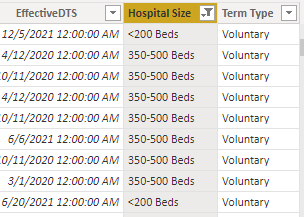
It is just a category, not a number. So the hospital/bed size is a category for a turnover. So there are the
>200 Beds
and
350-500 Beds
- Mark as New
- Bookmark
- Subscribe
- Mute
- Subscribe to RSS Feed
- Permalink
- Report Inappropriate Content
what do you refer to hospital size, bed count?
Subscribe to the @PowerBIHowTo YT channel for an upcoming video on List and Record functions in Power Query!!
Learn Power BI and Fabric - subscribe to our YT channel - Click here: @PowerBIHowTo
If my solution proved useful, I'd be delighted to receive Kudos. When you put effort into asking a question, it's equally thoughtful to acknowledge and give Kudos to the individual who helped you solve the problem. It's a small gesture that shows appreciation and encouragement! ❤
Did I answer your question? Mark my post as a solution. Proud to be a Super User! Appreciate your Kudos 🙂
Feel free to email me with any of your BI needs.
- Mark as New
- Bookmark
- Subscribe
- Mute
- Subscribe to RSS Feed
- Permalink
- Report Inappropriate Content
Yes, the bed count would be the same as hospital size. Apologies for that.
- Mark as New
- Bookmark
- Subscribe
- Mute
- Subscribe to RSS Feed
- Permalink
- Report Inappropriate Content
@Anonymous assuming these are measures, bed count and % and use following measure to get the color and then use it in the conditional formatting, tweak the formula as per your need
Color Measure =
VAR __bedsCount = [Bed Count Measure]
VAR __turnover = [Percentage Measure]
RETURN
SWITCH ( TRUE(),
   __bedsCount > 500, IF ( __turnover > 0.259, "Red", IF ( __turnover > 0.159, "Yellow" ) ),
   __bedsCount > 349, IF ( __turnover > 0.269, "Red", IF ( __turnover > 0.169, "Yellow" ) ),
   __bedsCount > 199, IF ( __turnover > 0.298, "Red", IF ( __turnover > 0.198, "Yellow" ) ),
    IF ( __turnover > 0.211, "Red", IF ( __turnover > 0.171, "Yellow" ) )
)
✨ Follow us on LinkedIn
Learn about conditional formatting at Microsoft Reactor
My latest blog post The Power of Using Calculation Groups with Inactive Relationships (Part 1) (perytus.com) I would ❤ Kudos if my solution helped. 👉 If you can spend time posting the question, you can also make efforts to give Kudos to whoever helped to solve your problem. It is a token of appreciation!
⚡ Visit us at https://perytus.com, your one-stop-shop for Power BI-related projects/training/consultancy.⚡
Subscribe to the @PowerBIHowTo YT channel for an upcoming video on List and Record functions in Power Query!!
Learn Power BI and Fabric - subscribe to our YT channel - Click here: @PowerBIHowTo
If my solution proved useful, I'd be delighted to receive Kudos. When you put effort into asking a question, it's equally thoughtful to acknowledge and give Kudos to the individual who helped you solve the problem. It's a small gesture that shows appreciation and encouragement! ❤
Did I answer your question? Mark my post as a solution. Proud to be a Super User! Appreciate your Kudos 🙂
Feel free to email me with any of your BI needs.
- Mark as New
- Bookmark
- Subscribe
- Mute
- Subscribe to RSS Feed
- Permalink
- Report Inappropriate Content
The Hospital size is not a measure, it is a conditional column category.
Helpful resources

New to Fabric Survey
If you have recently started exploring Fabric, we'd love to hear how it's going. Your feedback can help with product improvements.

Power BI DataViz World Championships - June 2026
A new Power BI DataViz World Championship is coming this June! Don't miss out on submitting your entry.

Join our Fabric User Panel
Share feedback directly with Fabric product managers, participate in targeted research studies and influence the Fabric roadmap.

Power BI Community Update - March 2026
Check out the March 2026 Power BI update to learn about new features.

| User | Count |
|---|---|
| 54 | |
| 39 | |
| 32 | |
| 17 | |
| 15 |


| User | Count |
|---|---|
| 64 | |
| 63 | |
| 37 | |
| 36 | |
| 22 |


