cancel
Showing results for 
Search instead for 
Did you mean: 

The Power BI Data Visualization World Championships is back! Get ahead of the game and start preparing now! Learn more

Reply
Anonymous
Not applicable

Multi condition RLS formula

Hi everyone,


I want to implement an a dynamic row level security and I need your help.


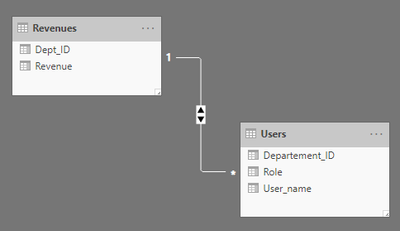
I have two tables


frexville_0-1603747934759.png


I want to put a condition, if the user is a manager or belong to the departement_ID=3 to see all the data, else to see only his departement data.


frexville_1-1603748075044.png

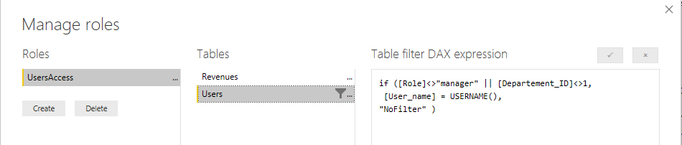
My dax formula does not work. I don't know how to define the "NO FILTER".

if ([Role]<>"manager" || [Departement_ID]<>1,
[User_name] = USERNAME(),
"NoFilter" )


that's my relationship, the bidirectionnal security is enabled

frexville_0-1603748444113.png


Thanks

1 ACCEPTED SOLUTION
jdbuchanan71
Super User
Super User

@Anonymous 

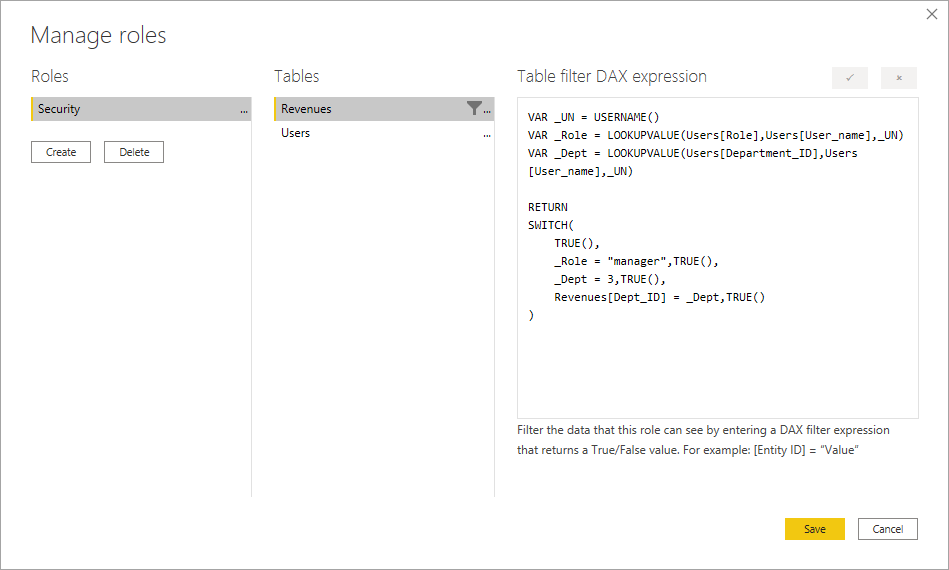
You don't actually want to filter the user table, you want to filter the revenues table and you don't need the users table joined to the revenues table.  You can write your security meaure like this.


VAR _UN = USERNAME()
VAR _Role = LOOKUPVALUE(Users[Role],Users[User_name],_UN)
VAR _Dept = LOOKUPVALUE(Users[Department_ID],Users[User_name],_UN)

RETURN
SWITCH(
    TRUE(),
    _Role = "manager",TRUE(),
    _Dept = 3,TRUE(),
    Revenues[Dept_ID] = _Dept,TRUE()
)


And this gets applied to your revenues table.

jdbuchanan71_0-1603749473196.png

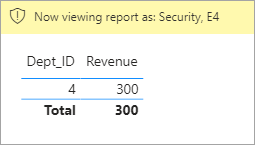
Basically, if the role = manager or the users dept id = 3 it will return TRUE for every row in the revenues table.  RLS shows only rows where the filter is TRUE so it will show every row.  If it is an employee in another dept it finds their dept ID and compares it to the dept id of the revenues table which will only return TRUE if it is their dept.

Manager in dept 1Manager in dept 1

worker in dept 3worker in dept 3

worker in dept 4worker in dept 4


I have attached my sample file for you to look at.


View solution in original post

2 REPLIES 2
jdbuchanan71
Super User
Super User

@Anonymous 

You don't actually want to filter the user table, you want to filter the revenues table and you don't need the users table joined to the revenues table.  You can write your security meaure like this.


VAR _UN = USERNAME()
VAR _Role = LOOKUPVALUE(Users[Role],Users[User_name],_UN)
VAR _Dept = LOOKUPVALUE(Users[Department_ID],Users[User_name],_UN)

RETURN
SWITCH(
    TRUE(),
    _Role = "manager",TRUE(),
    _Dept = 3,TRUE(),
    Revenues[Dept_ID] = _Dept,TRUE()
)


And this gets applied to your revenues table.

jdbuchanan71_0-1603749473196.png

Basically, if the role = manager or the users dept id = 3 it will return TRUE for every row in the revenues table.  RLS shows only rows where the filter is TRUE so it will show every row.  If it is an employee in another dept it finds their dept ID and compares it to the dept id of the revenues table which will only return TRUE if it is their dept.

Manager in dept 1Manager in dept 1

worker in dept 3worker in dept 3

worker in dept 4worker in dept 4


I have attached my sample file for you to look at.


Anonymous
Not applicable

@jdbuchanan71 thanks a lot

it works fine 🙂

Helpful resources

Announcements
Power BI DataViz World Championships

Power BI Dataviz World Championships

The Power BI Data Visualization World Championships is back! Get ahead of the game and start preparing now!

December 2025 Power BI Update Carousel

Power BI Monthly Update - December 2025

Check out the December 2025 Power BI Holiday Recap!

FabCon Atlanta 2026 carousel

FabCon Atlanta 2026

Join us at FabCon Atlanta, March 16-20, for the ultimate Fabric, Power BI, AI and SQL community-led event. Save $200 with code FABCOMM.