cancel
Showing results for 
Search instead for 
Did you mean: 

Learn from the best! Meet the four finalists headed to the FINALS of the Power BI Dataviz World Championships! Register now

Reply
Ykankam
Helper I
Helper I

Multi Condition column

I am writing a DAX formula, where given the DATEDIFF in days between 

Master_Data'[Dispo.ActualDispoDate] and  'Master_Data'[QC_Release_Date_BDS.QC_DATE] is less than or equal to 50 days, the formula returns "on time" or "Late" respectively.
However, there is one unique product that if the 

DATEDIFF in days between  Master_Data'[Dispo.ActualDispoDate] and  'Master_Data'[QC_Release_Date_BDS.QC_DATE] is less than or equal to 60 days, the formula should return the same output i.e. either "on time" or "Late" respectivel.


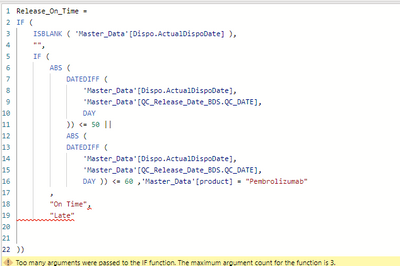
How do I capture this in one single DAX formula? See DAX formula below


Ykankam_0-1692282000174.png


1 ACCEPTED SOLUTION
amitchandak
Super User
Super User

@Ykankam , the comma before  'Master_data[Product]' ="Pembrolizuab" should be and or or

means && and || 


In case it is and(&&) , but or condition in brackets ()


Share with Power BI Enthusiasts: Full Power BI Video (20 Hours) YouTube
Microsoft Fabric Series 60+ Videos YouTube
Microsoft Fabric Hindi End to End YouTube

View solution in original post

2 REPLIES 2
Ykankam
Helper I
Helper I

thank you, @amitchandak . It worked

amitchandak
Super User
Super User

@Ykankam , the comma before  'Master_data[Product]' ="Pembrolizuab" should be and or or

means && and || 


In case it is and(&&) , but or condition in brackets ()


Share with Power BI Enthusiasts: Full Power BI Video (20 Hours) YouTube
Microsoft Fabric Series 60+ Videos YouTube
Microsoft Fabric Hindi End to End YouTube

Helpful resources

Announcements
Join our Fabric User Panel

Join our Fabric User Panel

Share feedback directly with Fabric product managers, participate in targeted research studies and influence the Fabric roadmap.

March Power BI Update Carousel

Power BI Community Update - March 2026

Check out the March 2026 Power BI update to learn about new features.