Join us at FabCon Atlanta from March 16 - 20, 2026, for the ultimate Fabric, Power BI, AI and SQL community-led event. Save $200 with code FABCOMM.
Register now!The Power BI Data Visualization World Championships is back! Get ahead of the game and start preparing now! Learn more
I have created one table for dates using MIN(DATE) & MAX(DATE) from existing table, then I have added column for Month and Year.
Now I have used Month in Slicer, but months are not showing in chronological order.
Any suggestion?
Help would be highly appreciated.
Solved! Go to Solution.
Hi @Anonymous
I might need more information to understand this properly.
So you've created a Date table using the MIN and MAX dates in your data? Then added columns for Month and Year?
Is the Month column text e.g. the name of the month or some abbreviation like Jan, Feb etc?
If so then you need to also create a month number column and use that as the Sort By column for any text month column.
In my example PBIX (linked to above) I have columns for Date, Month Name and Month Number.
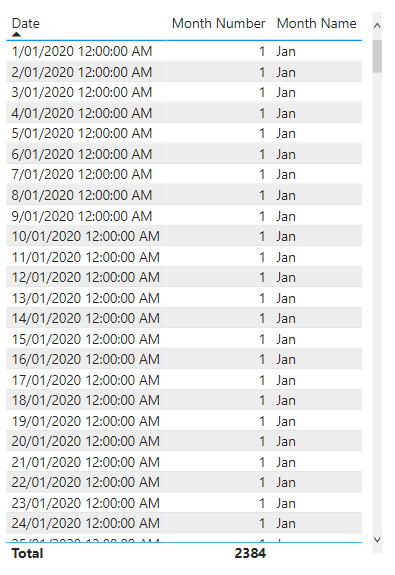
Click on the Month Name column and then from the Ribbon click on Sort By column and select Month Number.
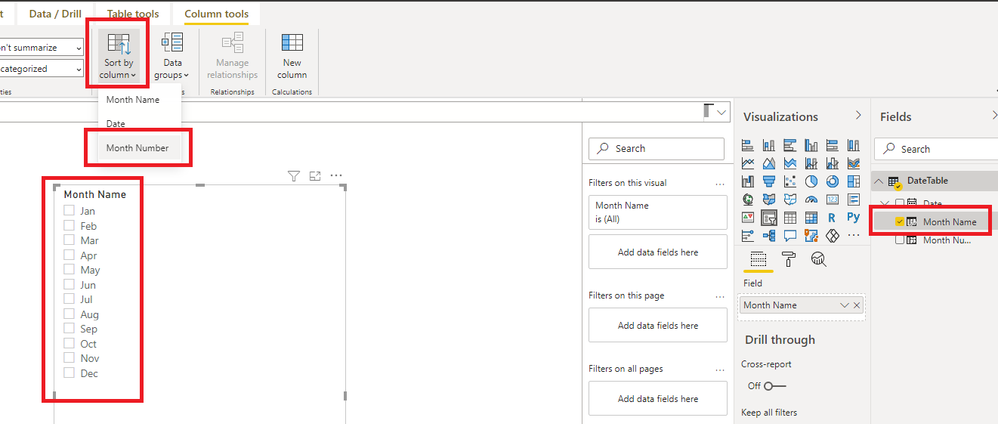
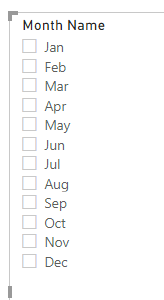
The slicer should now be sorted chronologically.
Regards
Phil
Proud to be a Super User!
Hi @Anonymous
I might need more information to understand this properly.
So you've created a Date table using the MIN and MAX dates in your data? Then added columns for Month and Year?
Is the Month column text e.g. the name of the month or some abbreviation like Jan, Feb etc?
If so then you need to also create a month number column and use that as the Sort By column for any text month column.
In my example PBIX (linked to above) I have columns for Date, Month Name and Month Number.
Click on the Month Name column and then from the Ribbon click on Sort By column and select Month Number.
The slicer should now be sorted chronologically.
Regards
Phil
Proud to be a Super User!
Thank you very much @PhilipTreacy -Phil
Initially I was getting an error while doing the same. later I created new Calendar Table, this time I gave static date range from 01-01-2017 to Till Date instead of getting from my existing table and sorted the column on Month Number and it worked.
Hi rameshg.
You need to create a custon colum in your calendar table with the number of the month. Use the code below.
"Month number", FORMAT([Date], "MM")
After that, you have to sort the column month by the number month.
Best regards.
The Power BI Data Visualization World Championships is back! Get ahead of the game and start preparing now!
| User | Count |
|---|---|
| 41 | |
| 38 | |
| 36 | |
| 31 | |
| 28 |
| User | Count |
|---|---|
| 129 | |
| 88 | |
| 79 | |
| 68 | |
| 63 |