We've captured the moments from FabCon & SQLCon that everyone is talking about, and we are bringing them to the community, live and on-demand. Starts on April 14th. Register now
Hello,
I am developing a report to monitor an Azure Analysis Service server.
I saw that I can retrieve the logs directly through Azure Analytics Logs (https://www.mssqltips.com/sqlservertip/6623/azure-reporting-for-resource-usage-with-power-bi/)
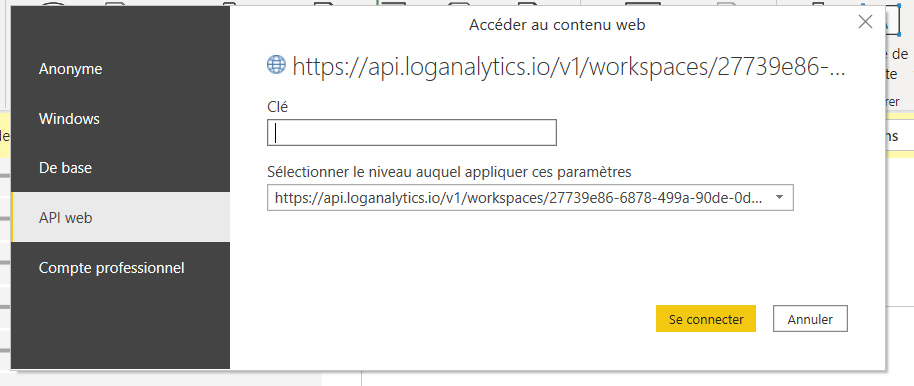
But I have connection errors to execute the request M.
1- Could you please show me how to have the key ?
2- For the report, I am looking for a template report for inspiring me.
Do you have a template for me?
3- I saw this report the Power BI Activity Log : https://powerbi.microsoft.com/fr-fr/blog/announcing-improved-report-usage-metrics-in-modern-workspac...
Do you know how I could download it and modify it ?
Thank you for your help
Solved! Go to Solution.
For the First question, I think you can use an Organizational account (an account which you are using to log in to your azure portal), then you don't need any key
Thanks,
Sayali
If this post helps, then please consider Accept it as the solution to help others find it more quickly
Proud to be a Super User!
For the First question, I think you can use an Organizational account (an account which you are using to log in to your azure portal), then you don't need any key
Thanks,
Sayali
If this post helps, then please consider Accept it as the solution to help others find it more quickly
Proud to be a Super User!
If you have recently started exploring Fabric, we'd love to hear how it's going. Your feedback can help with product improvements.
A new Power BI DataViz World Championship is coming this June! Don't miss out on submitting your entry.
Share feedback directly with Fabric product managers, participate in targeted research studies and influence the Fabric roadmap.
| User | Count |
|---|---|
| 57 | |
| 38 | |
| 33 | |
| 19 | |
| 16 |
| User | Count |
|---|---|
| 68 | |
| 66 | |
| 41 | |
| 34 | |
| 25 |