Join us at FabCon Atlanta from March 16 - 20, 2026, for the ultimate Fabric, Power BI, AI and SQL community-led event. Save $200 with code FABCOMM.
Register now!The Power BI Data Visualization World Championships is back! Get ahead of the game and start preparing now! Learn more
Hi All,
I am trying to replicate the below sql into power bi relationship, however, it is not getting me the desired results.
select
a2.name as target_table_name
,attr.target_column_physical_name
,attr.target_data_type
,column_sequence_number
,attr.hard_rules
,attr.required_flag
,a1.name as source_table_name
,source_column_physical_name
,source_data_type
from process_artefact_rel pa
join artefact a1
on pa.source_artefact_guid = a1.artefact_guid
join artefact a2
on pa.target_artefact_guid =a2.artefact_guid
join attribute attr
on a2.artefact_guid=attr.artefact_guid
Below is my image of what I have done, but it is not helping me.
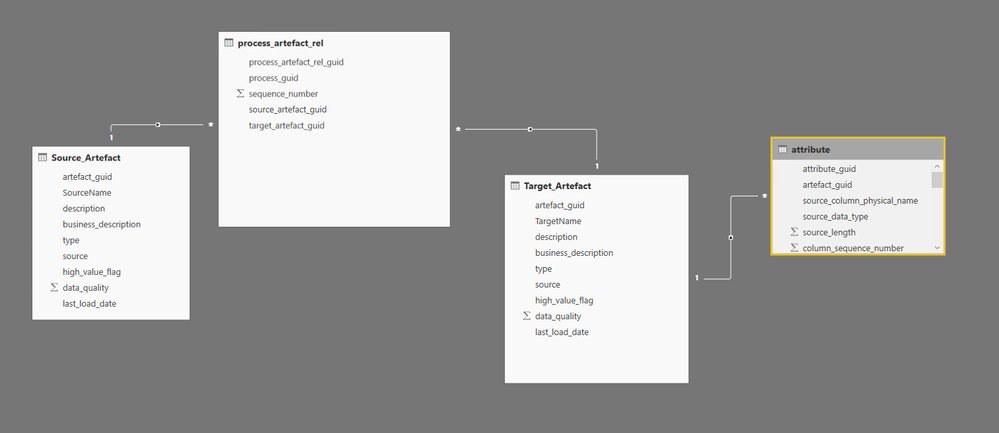
Now When I try to get any column from Source Artefact and Target Artefact, work well. but as soon as I bring in anything from Attributes table, it throughs an error saying "
Error Message:
Can't display the data because Power BI can't determine the relationship between two or more fields.
I try defining the different direction for each relationship but nothing works, but if I run the above query, it works absolutely fine.
Any idea what's wrong here?
Solved! Go to Solution.
Hi @Anonymous,
Target_artefact to Target_attributes is one to many
I think this may be the key problem here. If the relationship between Target_artefact and Target_attributes is Many to one, then all will work as expected, because cross filter in Power BI works well with a single table that has a number of lookup tables that surround it(this is often called a Star schema configuration).
So creating a SQL query and importing the data may be the best option here in your scenairo. ![]()
Regards
Thanks for the response @v-ljerr-msft.
I thought so. This seems like a challenging task to do it through power BI.
Appreciate all the replies to this post.
Cheers,
HD
@GilbertQ Thanks for you the quick reply.
Option 1, I already tried doing it and it still doesn't work.
Option 2, If I create a new table, Target_artefact to Target_attributes is one to many so writting a dax to get the value in Artafct from Attribute will not work and if I have to combine the table at DB level, why not write DQL.
Option 3: would be my last option to create a SQL query and get the data.
Hi @Anonymous,
Target_artefact to Target_attributes is one to many
I think this may be the key problem here. If the relationship between Target_artefact and Target_attributes is Many to one, then all will work as expected, because cross filter in Power BI works well with a single table that has a number of lookup tables that surround it(this is often called a Star schema configuration).
So creating a SQL query and importing the data may be the best option here in your scenairo. ![]()
Regards
Thanks for the response @v-ljerr-msft.
I thought so. This seems like a challenging task to do it through power BI.
Appreciate all the replies to this post.
Cheers,
HD
The Power BI Data Visualization World Championships is back! Get ahead of the game and start preparing now!
| User | Count |
|---|---|
| 39 | |
| 35 | |
| 34 | |
| 32 | |
| 27 |
| User | Count |
|---|---|
| 136 | |
| 96 | |
| 77 | |
| 67 | |
| 65 |