Join us at FabCon Atlanta from March 16 - 20, 2026, for the ultimate Fabric, Power BI, AI and SQL community-led event. Save $200 with code FABCOMM.
Register now!The Power BI Data Visualization World Championships is back! Get ahead of the game and start preparing now! Learn more
Hi team,
I'm getting this message but data is not loading "Creating connection in Model" what could be the solution?
I tried disbaling uncheck time intelligence, auto detect relationship....
but still its' not loading
Hi @adityavighne ,
Please review the solution in the following treads and check whether it can resolve your problem.
Creating Connection in model stuck
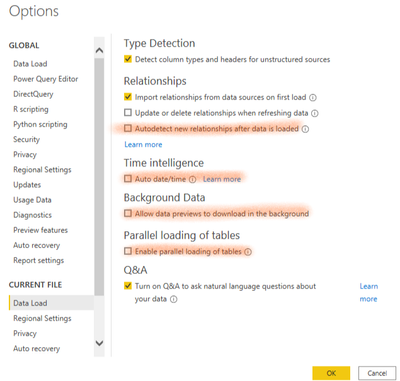
In Power bi desktop, to improve the performance when connecting, please turn off options below in Options and Settings->Data load: 'Relationship","Time Intelligence","Backgroud data","parallel loading of tables".
![]()
Besides, please check if any blank column from excel(your data source) is loaded into Power bi.
It was because I was reading columns to infinity of a file, so if this happens to you also check the columns that do not have information, in order to delete them.
"LOAD CREATING CONNECTION IN MODEL" when apply changes
We suggest that you check this Excel file that needs to be loaded into Power BI and if it contains columns with [null] values, remove them and make sure that only the required columns are loaded.
Best Regards
@amitchandak thanks for the link. do you know how to delete updates or when Microsoft will resolve this issue?
@adityavighne , if you facing this on Sep-2021 release, check the issuse, few users reported the same -https://community.powerbi.com/t5/Issues/idb-p/Issues
The Power BI Data Visualization World Championships is back! Get ahead of the game and start preparing now!
| User | Count |
|---|---|
| 40 | |
| 35 | |
| 34 | |
| 31 | |
| 27 |
| User | Count |
|---|---|
| 135 | |
| 102 | |
| 67 | |
| 65 | |
| 56 |