Join us at FabCon Atlanta from March 16 - 20, 2026, for the ultimate Fabric, Power BI, AI and SQL community-led event. Save $200 with code FABCOMM.
Register now!The Power BI Data Visualization World Championships is back! Get ahead of the game and start preparing now! Learn more
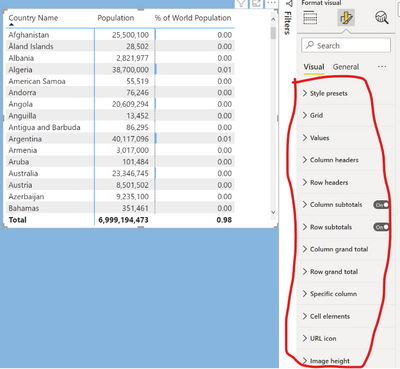
Hi guys, I'm new to Power BI and learning quickly but one thing very helpful that I noticed mine version (full enterprise one) does not have or is not showing up is the "Field formatting" options when deadling with columns in a matrix or table visual. I've seem that in some video tutorials I'm watching and I'd really need that in the future. Is that missing on purpose or can I add somehow?? Please see the print screen below...there is not sucha field on the right pane.
Thanks so much
Solved! Go to Solution.
@trigo ,
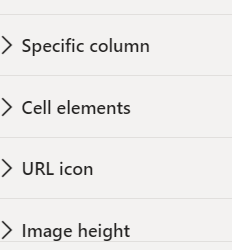
You can check that under Cell elements or Specific Column, due latest Power BI format pane updates this name would have changed. I hope this is what you required.
Thanks,
Arul
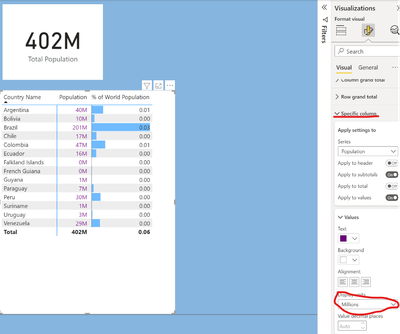
Hey Arul thanks very much for your help! In fact I just needed to dig a little deeper and I found that in the up to date version, the formatting is under the "Specific COlumn" section. There I can chose to dplay the units in "Millions" for example, which was what I was trying to do. Thanks again! João
You are the best, my AI sent me on a wild gooschase and this post solved my issue. Thank you!
The Power BI Data Visualization World Championships is back! Get ahead of the game and start preparing now!
Check out the November 2025 Power BI update to learn about new features.
| User | Count |
|---|---|
| 59 | |
| 43 | |
| 42 | |
| 23 | |
| 17 |
| User | Count |
|---|---|
| 190 | |
| 122 | |
| 96 | |
| 66 | |
| 47 |