cancel
Showing results for 
Search instead for 
Did you mean: 

Learn from the best! Meet the four finalists headed to the FINALS of the Power BI Dataviz World Championships! Register now

Reply
Nathan0001
Regular Visitor

Merge Rows if they start with a specific string

I am very new to creating a query in excel, this is my first one 🙂


I have created a query in excel to import a text file, this is my query thus far:

let
Source = Table.FromColumns({Lines.FromBinary(File.Contents(" **this is the directory and file name**"), null, null, 1252)}),
#"Split Column by Positions" = Table.SplitColumn(Source, "Column1", Splitter.SplitTextByPositions({16}), {"Column1.1"}),
#"Changed Type" = Table.TransformColumnTypes(#"Split Column by Positions",{{"Column1.1", type text}}),
#"Removed Blank Rows" = Table.SelectRows(#"Changed Type", each not List.IsEmpty(List.RemoveMatchingItems(Record.FieldValues(_), {"", null}))),
#"Replaced Value" = Table.ReplaceValue(#"Removed Blank Rows"," ","",Replacer.ReplaceText,{"Column1.1"}),
#"Replaced Value1" = Table.ReplaceValue(#"Replaced Value"," ","",Replacer.ReplaceText,{"Column1.1"})
in
#"Replaced Value1"


It is at this point in my query that I want the following to occur: If the first two characters in the row are not "Q ", "A ", or "MR", then I want the current row to be merged with the previous row, with one space to be inserted between the two when they are merged (the second of the rows should be deleted once it is merged into the first). Otherwise, I want to leave the row as is and then move onto the next row to check it.


Any ideas how to accomplish this? I have searched this forum and the web without much luck

1 ACCEPTED SOLUTION
Anonymous
Not applicable

@Nathan0001 

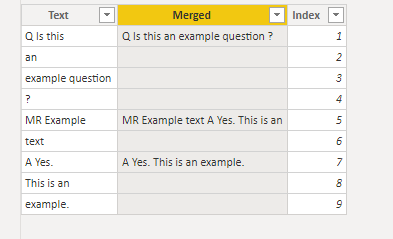
I did some test, I doubt it is possible to merge to the expected result. The difficult part is the merged row is not consistent, it can be random based on the next n rows untill the next "N","A " or "MR. The following is my test file.

V-pazhen-msft_0-1623649799015.png


Merged = 
var next1 = CALCULATE(MAX([Text]),FILTER('Table',[Index]=EARLIER([Index])+1))
var next2 = CALCULATE(MAX([Text]),FILTER('Table',[Index]=EARLIER([Index])+2))
var next3 = CALCULATE(MAX([Text]),FILTER('Table',[Index]=EARLIER([Index])+3))
Return
IF(LEFT([Text],1)="Q"||LEFT([Text],2)="A "||LEFT([Text],2)="MR",CONCATENATE([Text],CONCATENATE(" ", CONCATENATE(next1,CONCATENATE(" ", CONCATENATE(next2,CONCATENATE(" ", next3)))))))


Paul Zheng _ Community Support Team
If this post helps, please Accept it as the solution to help the other members find it more quickly.

View solution in original post

3 REPLIES 3
Anonymous
Not applicable

@Nathan0001 

I did some test, I doubt it is possible to merge to the expected result. The difficult part is the merged row is not consistent, it can be random based on the next n rows untill the next "N","A " or "MR. The following is my test file.

V-pazhen-msft_0-1623649799015.png


Merged = 
var next1 = CALCULATE(MAX([Text]),FILTER('Table',[Index]=EARLIER([Index])+1))
var next2 = CALCULATE(MAX([Text]),FILTER('Table',[Index]=EARLIER([Index])+2))
var next3 = CALCULATE(MAX([Text]),FILTER('Table',[Index]=EARLIER([Index])+3))
Return
IF(LEFT([Text],1)="Q"||LEFT([Text],2)="A "||LEFT([Text],2)="MR",CONCATENATE([Text],CONCATENATE(" ", CONCATENATE(next1,CONCATENATE(" ", CONCATENATE(next2,CONCATENATE(" ", next3)))))))


Paul Zheng _ Community Support Team
If this post helps, please Accept it as the solution to help the other members find it more quickly.

Nathan0001
Regular Visitor

Here is an example of the input:

Example text
Q Example
question?
MR Example
text
A Yes


And the output that is desired:

Example text
Q Example question?
MR Example text
A Yes

Here is a further example - there may be multiple rows to be merged - depending upon where the next two charaters "Q ", "A ", or "MR" are:

Q Is this
an
example question
?
MR Example
text
A Yes.
This is an
example.


And the output that is desired:

Q Is this an example question ?
MR Example text
A Yes. This is an example.


Helpful resources

Announcements
Join our Fabric User Panel

Join our Fabric User Panel

Share feedback directly with Fabric product managers, participate in targeted research studies and influence the Fabric roadmap.

February Power BI Update Carousel

Power BI Monthly Update - February 2026

Check out the February 2026 Power BI update to learn about new features.

FabCon Atlanta 2026 carousel

FabCon Atlanta 2026

Join us at FabCon Atlanta, March 16-20, for the ultimate Fabric, Power BI, AI and SQL community-led event. Save $200 with code FABCOMM.