cancel
Showing results for 
Search instead for 
Did you mean: 

The Power BI Data Visualization World Championships is back! Get ahead of the game and start preparing now! Learn more

Reply
Anonymous
Not applicable

Memory limit

Hi guys,


I have a PBIX file with 7 large data sets(around 2million rows and 20 columns per set ).I have deleted all the data that i could possibly not need to make them lighter so I dont hit memmory limits however,it seems my luck wasnt great.


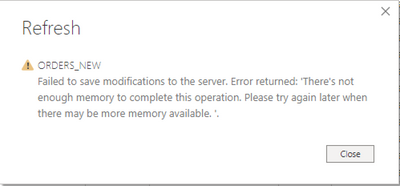
Every time I try to refresh one of the tables i keep hitting in memmory error although I keep deleting columns after every error message.It feels like soon i will have no data left at all but I would be still getting the same message popping.


Screenshot 2021-08-13 at 16.44.47.png


I have plenty of memmory in my Ram by the way and I have cleared the cache memory but I havent seen any progress.I have also tried to save it as a new file but nothing has worked.However,the published version of it works and refreshes without giving me any error messages.


Have anyone else come across the same issue before or has any ideas on how to solve this.


Anything will be very much appreciated.


Thank you 🙂

6 REPLIES 6
mussaenda
Super User
Super User

Hi @Anonymous ,


it sometimes happens when you are runnig your report and you are also running other programs at the same time.

Try closing all other programs and only refresh the report.


If still the same error, you need to clear you cache and check your available memory.

Remember that when you are running your query, you are running all the data you imported (assuming you used import).


Otherwise, check  the solution that @Anonymous provided.


Hope this helps.

Anonymous
Not applicable

Hi @Anonymous 

Could you tell me if your problem has been solved? If it is, kindly Accept it as the solution. More people will benefit from it. Or you are still confused about it, please provide me with more details about your table and your problem or share me with your pbix file from your Onedrive for Business.


Best Regards,

Rico Zhou

amitchandak
Super User
Super User

@Anonymous , I am facing the same issue beyond 2.2 GB of file size. Few options to try


1. Increase Cache. File -> Options & setting -> Option -> Data load

2. Increase virtual memory of the system. Sometimes C drive does not have enough space to expand. if you other drive add Virtual memory there

Share with Power BI Enthusiasts: Full Power BI Video (20 Hours) YouTube
Microsoft Fabric Series 60+ Videos YouTube
Microsoft Fabric Hindi End to End YouTube
Anonymous
Not applicable

@amitchandak I have done all te relevant amendments but the issue still instists.


My file is only 700MB.Do you think that getting a premium subscription change something?


Also,I am running Power bi from my Mac though Parallels but all the settings are in place for it to not get affected.


Anonymous
Not applicable

Hi @Anonymous 

Here I will give you some advice.

1. 

Please try to turn off the 'relationship detect' options to disable auto detect the table relationships.

For reference: Create and manage relationships in Power BI Desktop 


2.

If there are some date type column in your Sample. In the Options and setting disable Auto Date time option ,

Refer to these setting: https://www.thebiccountant.com/speedperformance-aspects/


3. 

How many records are your data table hosted? Any complex expressions calculation(multiple iterators, nested cross table looping calculation ....) and advanced operation(merge, combine, reference, invoke custom functions, recursion...) existed in Dax or query editor side?

For reference:

Optimizing nested iterators in DAX 

Recursive Functions in Power BI / Power Query 

They may affect the performance and spend a huge amount of system resources.

You can also take a look at the following document about performance tips:

For reference: Optimization guide for Power BI 


4. You can try to use Query Diagnostics or Performance Analyzer to monitor your Power BI performance.

For reference: Monitor report performance in Power BI


5. Please download the latest Power BI Desktop version and try again.

Download by this link: Link


Best Regards,
Rico Zhou


If this post helps, then please consider Accept it as the solution to help the other members find it more quickly.

 

Anonymous
Not applicable

@Anonymous Unfortunately I havent been able to find a solution on this,I have an open ticket with the support team.I will update as soon as I hear from them.

Helpful resources

Announcements
Power BI DataViz World Championships

Power BI Dataviz World Championships

The Power BI Data Visualization World Championships is back! Get ahead of the game and start preparing now!

December 2025 Power BI Update Carousel

Power BI Monthly Update - December 2025

Check out the December 2025 Power BI Holiday Recap!

FabCon Atlanta 2026 carousel

FabCon Atlanta 2026

Join us at FabCon Atlanta, March 16-20, for the ultimate Fabric, Power BI, AI and SQL community-led event. Save $200 with code FABCOMM.