cancel
Showing results for 
Search instead for 
Did you mean: 

The Power BI Data Visualization World Championships is back! Get ahead of the game and start preparing now! Learn more

Reply
webbj
Helper I
Helper I

Measures Calculation?

I'm wondering if anyone can help me with a calculation. The issue is that the data is all stored in a single column, my manager would like the the data displayed by product without breaking it down by type. Is there a way using measures to calculate the total number of 'product 1' cases, 'product 2' etc in the column so that when i create a pie chart it only shows the numbers of the combined products. 


Services
Product 1 - service type 1
Product 1 - service type 2
Product 2 - service type 1


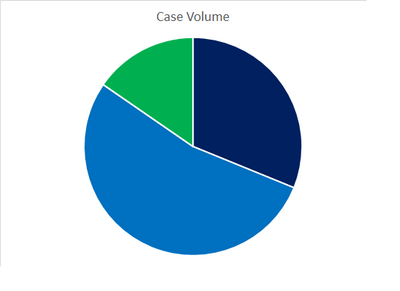
Showing like so, rather than a slice for each 'service type' per product.


webbj_0-1646845941587.png


If you need anything clarifying or there's a better way to do this please let me know 🙂

1 ACCEPTED SOLUTION

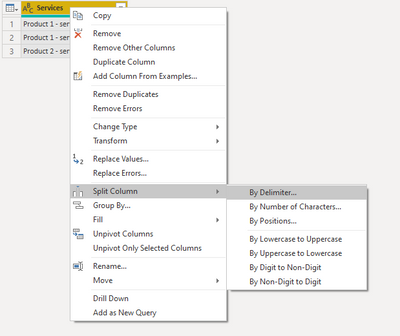
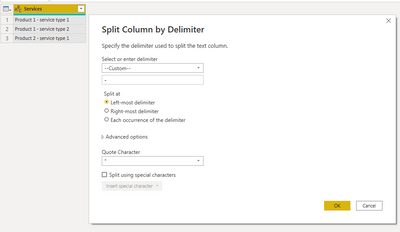
You can edit the data in the power query editor

Syk_0-1646849846077.png

Syk_1-1646849916351.png


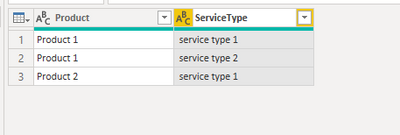
Then just rename your columns

Syk_2-1646849957629.png


View solution in original post

4 REPLIES 4
webbj
Helper I
Helper I

I thought that might be the answer - sheet duplicating the column is there a way within powerbi to do a replace - where column cell = product 1 replace with X.


The data is being pulled in by an API so I can't format the source - only the data I get in powerbi 


You can edit the data in the power query editor

Syk_0-1646849846077.png

Syk_1-1646849916351.png


Then just rename your columns

Syk_2-1646849957629.png


Thankyou! This resolved my main issue, couple of extra tweeks and it was working 🙂 

Syk
Super User
Super User

You should start by at least seperating them into 2 columns. 1 for Product and 1 for Service Type.
Then you can recreate your pie chart just using the product column.

Helpful resources

Announcements
Power BI DataViz World Championships

Power BI Dataviz World Championships

The Power BI Data Visualization World Championships is back! Get ahead of the game and start preparing now!

November Power BI Update Carousel

Power BI Monthly Update - November 2025

Check out the November 2025 Power BI update to learn about new features.

FabCon Atlanta 2026 carousel

FabCon Atlanta 2026

Join us at FabCon Atlanta, March 16-20, for the ultimate Fabric, Power BI, AI and SQL community-led event. Save $200 with code FABCOMM.