cancel
Showing results for 
Search instead for 
Did you mean: 

The Power BI Data Visualization World Championships is back! Get ahead of the game and start preparing now! Learn more

Reply
rrhutch
Helper II
Helper II

Measure with new Date Slider Value

I have been doing some research on using slicer values for create dynamics measures. However, I am looking for some clarity of developing the measure, since this is my first run at it.


I have two tables:


                TableA has columns [Status] and [Decision Date]

                TableB has one column [Unique Decision Dates]


TableB has no relationship with TableA.


I am trying to use the new date slider option that was released in the latest version of PowerBI. I have the date slider using the values from TableB.[Unique Decision Dates]. The slider is including values “Before” the selected slider date.


Here is the measure that I am trying to accomplish.


If TableA.[Status] = “XX” or “XY” then “Yes”

If TableA.[Status] = “XT” or “XZ” and TableA.[Decision Date] <= TableB.[Unique Decision Dates] then “N” else “Y”


Thoughts on how best to accomplish this?

3 REPLIES 3
MattAllington
Community Champion
Community Champion


It is really not clear what you are trying to do.  Can you post some sample workbook and show the output you are expecting?


* Matt is an 8 times Microsoft MVP (Power BI) and author of the Power BI Book Supercharge Power BI.
I will not give you bad advice, even if you unknowingly ask for it.

Here is a link to an example PowerBI file.


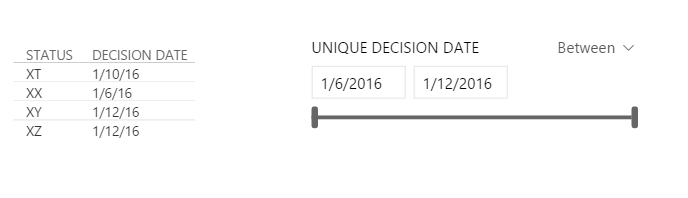
Raw data looks like:


Capture1.PNG

I would want to create a new column that has values of something like 'Yes' or 'No' or '0' or '1' in TableA where if TableA.[Status] = 'XX' or 'XY' the result would be 'Yes', but if 'XT' or 'XZ' if would determine whether the result is 'Yes' or 'No' based on if TableA.[Decision Date] is <= to the Max date the user selects on the date slider that is pulling from TableB. I would use the 'Yes' or 'No' reuslt to filter the TableA results.


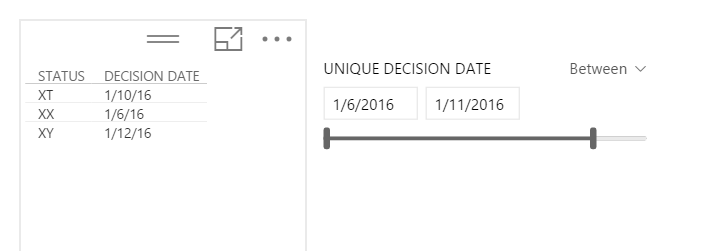
As an example, if the user set 1/11/16 the result would look like:


Capture2.PNG


Join your 2 tables on date.


Write this measure

Min Selected Date = FIRSTDATE(TableB[UNIQUE DECISION DATE])

and this

Display Result = if(HASONEVALUE(TableA[STATUS]),
	     				if(VALUES(TableA[STATUS]) in ("XX", "XY"),"Yes","No"),
						 if(min(TableA[Decision Date]) >=[Min Selected Date],"Y","N"))

I'm not sure if my logic is quite right, but you can probably fix it from there.


Here is the workbook https://www.dropbox.com/s/5vilq70ai8b02kq/Example.pbix?dl=0


Note that the in statement above is new.  It is not supported in the intellisense, but it does work.


* Matt is an 8 times Microsoft MVP (Power BI) and author of the Power BI Book Supercharge Power BI.
I will not give you bad advice, even if you unknowingly ask for it.

Helpful resources

Announcements
Power BI DataViz World Championships

Power BI Dataviz World Championships

The Power BI Data Visualization World Championships is back! Get ahead of the game and start preparing now!

November Power BI Update Carousel

Power BI Monthly Update - November 2025

Check out the November 2025 Power BI update to learn about new features.

FabCon Atlanta 2026 carousel

FabCon Atlanta 2026

Join us at FabCon Atlanta, March 16-20, for the ultimate Fabric, Power BI, AI and SQL community-led event. Save $200 with code FABCOMM.