Join us at FabCon Atlanta from March 16 - 20, 2026, for the ultimate Fabric, Power BI, AI and SQL community-led event. Save $200 with code FABCOMM.
Register now!Get Fabric Certified for FREE during Fabric Data Days. Don't miss your chance! Request now
Hello,
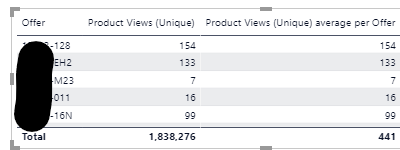
I used a quick measure to get the average views of my products and the result is correct.
In my example below, the average product gets 441 Views. I'd like to filter that Visual so that it only shows products with < 441 Views, knowing the average will continually change. I'm connected live, so looking for a Measure solution if possible. Thanks!
Hi @cassidy ,
Create a measure as below:
Product Views (Unique) average per Offer =
AVERAGEX(
FILTER(KEEPFILTERS(VALUES('Product Detail'[Offer])),[Product Views (Unique)]<441),
CALCULATE([Product Views (Unique)]))
Hi @v-kelly-msft , thanks for the recommendation. The Average value changes with filters and with time. It looks like your solution has <441 in it. Today it might be 350 for example.
Hi @cassidy
You can use the Filters pane to display the <441 views as in the below screenshot.
Did I answer your question? Mark my post as a solution! Appreciate your Kudos!!
Regards,
Pranit
Hi @Anonymous , thanks for the recommendation. The Average value changes with filters and with time, so I cannot just filter on <441. Today it might be 350 for example.
Hi @cassidy ,
So you wanna filter values based on the sum result of an average measure?
Hi @cassidy
Can you please explain a bit more on the requirement as to in the list of data you get
C1 C2
-----
A 1
A 2
A 3
B 3
B 5
B 7
and the average of these numbers for each category will be
A 2
B 5
So your output will be if it is more than not equalto then
A 3
B 7
If the above is your requirement then I would create a measure as below
ABOVE_AVG_GLG
var CALC_AVG = CALCULATE(AVG(table[C2],ALLEXCEPT(table,table[C1]))
return SELECTEDVALUE(table[C2]) > CALC_AVG
This would return a True/False in the measure and then I would filter on this mearure in the filter pane to only true.
Did I answer your question? Mark my post as a solution! Appreciate your Kudos!!
Regards,
Pranit
Check out the November 2025 Power BI update to learn about new features.
Advance your Data & AI career with 50 days of live learning, contests, hands-on challenges, study groups & certifications and more!