Join us at FabCon Atlanta from March 16 - 20, 2026, for the ultimate Fabric, Power BI, AI and SQL community-led event. Save $200 with code FABCOMM.
Register now!The Power BI Data Visualization World Championships is back! Get ahead of the game and start preparing now! Learn more
Hi,
This is my first post and am very new to DAX functions. What I would like to achieve is to sum the prior months data and the current months data to calculate the percentage growth on the totals. The table however only illustrates the numbers for different items and needs to be SUM up then calculated. Below you will find a example table:
| period | billed |
| 01 January 2016 | 1 |
| 01 January 2016 | 1 |
| 01 January 2016 | 1 |
| 01 January 2016 | 1 |
| 01 January 2016 | 1 |
| 01 February 2016 | 1 |
| 01 February 2016 | 1 |
| 01 February 2016 | 1 |
| 01 February 2016 | 1 |
| 01 February 2016 | 1 |
| 01 February 2016 | 1 |
| 01 March 2016 | 1 |
| 01 March 2016 | 1 |
| 01 March 2016 | 1 |
| 01 March 2016 | 1 |
| 01 March 2016 | 1 |
| 01 March 2016 | 1 |
| 01 March 2016 | 1 |
| 01 April 2016 | 1 |
| 01 April 2016 | 1 |
| 01 April 2016 | 1 |
| 01 May 2016 | 1 |
| 01 May 2016 | 1 |
| 01 May 2016 | 1 |
| 01 May 2016 | 1 |
| 01 June 2016 | 1 |
| 01 June 2016 | 1 |
Desired result:
| Jan | 5 | |
| Feb | 6 | 20.00% |
| Mar | 7 | 16.67% |
| Apr | 3 | -57.14% |
| May | 4 | 33.33% |
| Jun | 2 | -50.00% |
I have tried the following without success:
test_2 = (CALCULATE(SUM('test.txt'[billed]), PREVIOUSMONTH('test.txt'[period])) - sum('test.txt'[billed])) /CALCULATE(SUM('test.txt'[billed]), PREVIOUSMONTH('test.txt'[period]))
Hi @norbi and welcome to the community
Please give this calculated measure a crack. Then add it to a Grid along with your two columns
Measure =
Var PrevMonth = CALCULATE(SUM('Table'[billed]),PARALLELPERIOD('Table'[period],-1,MONTH))
Var ThisMonth = CALCULATE(SUM('Table'[billed]))
return DIVIDE((ThisMonth - PrevMonth),PrevMonth)
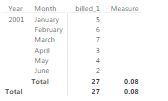
Thank you @Phil_Seamark I have tried the formula however it looks like the calculation is only on the total:
I would like to achieve the measure for every month on month percentage.
Hi @norbi
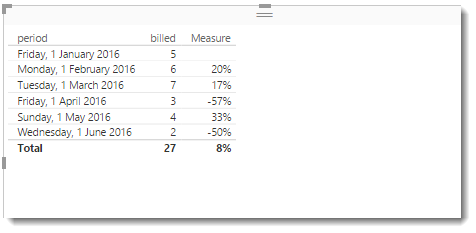
I double checked and it definitely works for me.
Please make sure your Period column is set to the DATE datatype, and your Billed is a numeric datatype. I also format the Measure as a percentage.
Note that Phil uses a Date while you use a Date Hierarchy,
If you want to use a Hierarchy build a Calendar Table
A generic can be easily built by clicking New Table and typing Calendar Table = CALENDARAUTO( )
then relate the 2 date columns and use the Calendar Table [Date] in the Table/Matrix
then you can also write therse simple Measures to do the same
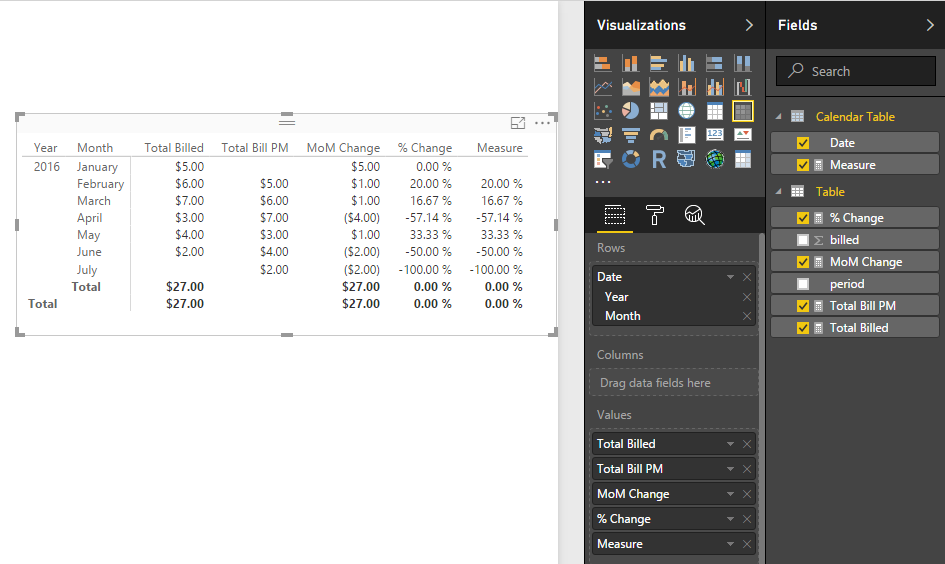
Total Billed = SUM ( 'Table'[billed] ) Total Bill PM = CALCULATE ( SUM ( 'Table'[billed] ), PREVIOUSMONTH ( 'Calendar Table'[Date] ) ) % Change = DIVIDE ( [Total Billed] - [Total Bill PM], [Total Bill PM], 0 ) MoM Change = [Total Billed] - [Total Bill PM]
And the result...
Hope this helps! ![]()
EDIT: You can still use the Measure from above but reference the Calendar date again
Measure =
VAR PrevMonth =
CALCULATE (
SUM ( 'Table'[billed] ),
PARALLELPERIOD ( 'Calendar Table'[Date], -1, MONTH )
)
VAR ThisMonth =
CALCULATE ( SUM ( 'Table'[billed] ) )
RETURN
DIVIDE ( ( ThisMonth - PrevMonth ), PrevMonth )
@Seanand @Phil_Seamark,thank you very much for the definition of these Measures. They will most probably work, I am however still struggling with my date format and getting this corrected. For the Calendar Table I get the following error: The optional argument of CALENDARAUTO function must evaluate to a constant value.
Hi @norbi,
Could you please provide you formula that use CALENDARAUTO function? This function returns a table with a single column named “Date” that contains a contiguous set of dates. The range of dates is calculated automatically based on data in the model.
https://msdn.microsoft.com/en-us/library/dn802534.aspx
Regards,
Charlie Liao
The Power BI Data Visualization World Championships is back! Get ahead of the game and start preparing now!
| User | Count |
|---|---|
| 41 | |
| 38 | |
| 36 | |
| 30 | |
| 28 |
| User | Count |
|---|---|
| 128 | |
| 88 | |
| 79 | |
| 67 | |
| 62 |