cancel
Showing results for 
Search instead for 
Did you mean: 

Get Fabric Certified for FREE during Fabric Data Days. Don't miss your chance! Request now

Reply
Pandadev
Post Prodigy
Post Prodigy

Measure only works when I apply filter , is there a way to get it working not using slicer

Hi , I need to have a measure that groups the output  by region.

So I get the top rank list for each region , my measure is only working when I select a region from the slicer.

I would like it to work , without having to apply any slicer filters if possible


FTK Region Rank 2019 =
MINX (
FILTER (
SELECTCOLUMNS (
ALLEXCEPT( A_List ,A_List[region]),
"index", A_List[19 FTK World Rank],
"rank", RANKX ( ALLSELECTED ( A_List ), A_List[19 FTK],, DESC, DENSE )
),
[index] = MAX ( A_List[19 FTK World Rank] )
),
[rank]
)


Desired output would be


Code    Region    Rank     RPK

AA         EUR        1          5000

AB         EUR         2         3000

AC         EUR         3         1000

AD         MDE       1          4000

AE         MDE        2          2000


3 REPLIES 3
v-henryk-mstf
Community Support
Community Support

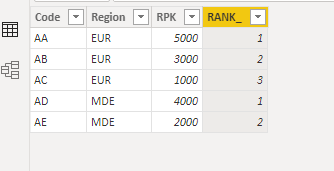
Hi @Pandadev ,


You can try formula like below:

RANK_ =
RANKX (
    FILTER ( ALL ( 'Table' ), 'Table'[Region] = EARLIER ( 'Table'[Region] ) ),
    [RPK],
    ,
    DESC
)

vhenrykmstf_1-1667382129289.png


If the problem is still not resolved, please provide detailed error information and test data. Looking forward to your reply.


Best Regards,
Henry


If this post helps, then please consider Accept it as the solution to help the other members find it more quickly.

Thanks , yes that has fixed the ranking code , my last issue is trying to apply the same logic to my coverage code , is this also possible

Finance Region Coverage 2020 = SUM([20 Rev USD])/CALCULATE(SUM(A_List[20 Rev USD]),ALLEXCEPT( A_List ,A_List[region]))

Here is an example table

codeRegionValue
AAAMDE1000
BBBEUR900
CCCEUR800
DDDMDE700
EEEEUR600
FFFNOA500
GGGNOA400
HHHMDE300


I need a formula to create the world coverage and region coverage in same table visual so the results are like this 

codeRegionValueRegion CovWorld Cov
AAAMDE10000.50.192308
BBBEUR9000.3913040.173077
CCCEUR8000.3478260.153846
DDDMDE7000.350.134615
EEEEUR6000.260870.115385
FFFNOA5000.55560.096154
GGGNOA4000.44440.076923
HHHMDE3000.150.057692

So for the world coverage the total value is 5200 , I am dividing the value of the row by the total value of the row

For the regional coverage for MDE the total value is 2000 

AAAMDE1000
DDDMDE700
HHHMDE

300


I am dividing the value by 2000


For NOA it is 900

and EUR is 2300

Helpful resources

Announcements
November Power BI Update Carousel

Power BI Monthly Update - November 2025

Check out the November 2025 Power BI update to learn about new features.

Fabric Data Days Carousel

Fabric Data Days

Advance your Data & AI career with 50 days of live learning, contests, hands-on challenges, study groups & certifications and more!

FabCon Atlanta 2026 carousel

FabCon Atlanta 2026

Join us at FabCon Atlanta, March 16-20, for the ultimate Fabric, Power BI, AI and SQL community-led event. Save $200 with code FABCOMM.

Top Solution Authors
Top Kudoed Authors