cancel
Showing results for 
Search instead for 
Did you mean: 

The Power BI Data Visualization World Championships is back! Get ahead of the game and start preparing now! Learn more

Reply
MatSantos
Regular Visitor

Measure inside Matrix to calculate de diference

Hi guys!

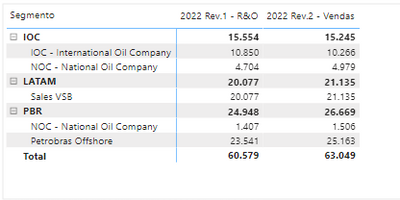
I am doing a matrix with two versions and I need to calculate the diference between the second and the first.

The values are in the same column and I am using the same measure to calculate the total.

Is it possible to create a dinamic measure to calculate this?

I can change the versions, but always keeping two versions to compare the diference between it.

The choose will be from data segmentation or filter.


Thanks a lot for help!!!


MatSantos_0-1648601097012.png


1 ACCEPTED SOLUTION

You are using Versao in the column of the matrix. Remove that and do this:
Create this measures:


Total Ton R&O = 
calculate( SUM('fPlanoVendas'[Tonelada]), 'fPlanoVendas'[Version] = "2022 Rev.1 - R&O")


Total Ton Verdas = 
calculate( SUM('fPlanoVendas'[Tonelada]), 'fPlanoVendas'[Version] = "2022 Rev.2 - Vendas")


Diff = [Total Ton R&O] - [Total Ton Verdas]


Use all 3 measures in the matrix ( and dont forget to remove Versao from the column matrix)

View solution in original post

6 REPLIES 6
amitchandak
Super User
Super User

@MatSantos , You need to create a measure like


calculate( SUM('fPlanoVendas'[Tonelada]), filter('fPlanoVendas', 'fPlanoVendas'[Version] = "2022 Rev.1 R&O")) -calculate( SUM('fPlanoVendas'[Tonelada]), filter('fPlanoVendas', 'fPlanoVendas'[Version] = "2021 Rev.1 R&O"))


If this does not help
Can you share sample data and sample output in table format? Or a sample pbix after removing sensitive data.

Share with Power BI Enthusiasts: Full Power BI Video (20 Hours) YouTube
Microsoft Fabric Series 60+ Videos YouTube
Microsoft Fabric Hindi End to End YouTube

Hi,

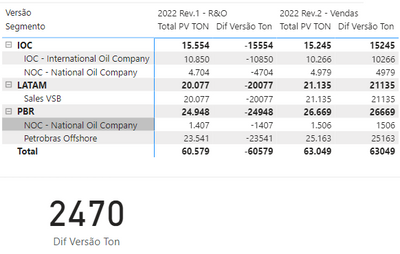
The mesure worked in the card, but when I put in the matrix shows other value and duplicate the column. 

MatSantos_0-1648638097250.png


You are using Versao in the column of the matrix. Remove that and do this:
Create this measures:


Total Ton R&O = 
calculate( SUM('fPlanoVendas'[Tonelada]), 'fPlanoVendas'[Version] = "2022 Rev.1 - R&O")


Total Ton Verdas = 
calculate( SUM('fPlanoVendas'[Tonelada]), 'fPlanoVendas'[Version] = "2022 Rev.2 - Vendas")


Diff = [Total Ton R&O] - [Total Ton Verdas]


Use all 3 measures in the matrix ( and dont forget to remove Versao from the column matrix)

Thanks a lot!!!!

It is working!

MatSantos
Regular Visitor

Total TON = SUM('fPlanoVendas'[Tonelada])
I use the same measure for both.
Tutu_in_YYC
Super User
Super User

Can you provide the DAX measures for those 2? R&o and Vendas?

Helpful resources

Announcements
Power BI DataViz World Championships

Power BI Dataviz World Championships

The Power BI Data Visualization World Championships is back! Get ahead of the game and start preparing now!

December 2025 Power BI Update Carousel

Power BI Monthly Update - December 2025

Check out the December 2025 Power BI Holiday Recap!

FabCon Atlanta 2026 carousel

FabCon Atlanta 2026

Join us at FabCon Atlanta, March 16-20, for the ultimate Fabric, Power BI, AI and SQL community-led event. Save $200 with code FABCOMM.