cancel
Showing results for 
Search instead for 
Did you mean: 

The Power BI Data Visualization World Championships is back! Get ahead of the game and start preparing now! Learn more

Reply
analyst85
Helper I
Helper I

Measure incorrect

Hi, I have a measure that counts the number of users by the date in the past 30 days, then also does the same for the previous month (31-60) and subtracts the 30 day count from the 31-60 count. From counting the raw data it doesn't that this is right, have I wrote it wrong?


# Operations MoM Comparison =
CALCULATE(
    [# Operations],
    FILTER(
        ALL('Dates'[FullDate]),
        'Dates'[FullDate] >= TODAY() - 60 && 'Dates'[FullDate] <= TODAY() - 31
    )
) -
CALCULATE(
    [# Operations],
    FILTER(
        ALL('Dates'[FullDate]),
    'Dates'[FullDate] >= TODAY() - 30 && 'Dates'[FullDate] <= TODAY()
    )
)
1 ACCEPTED SOLUTION
Anonymous
Not applicable

Hi @analyst85 ,

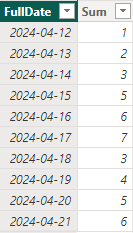
I create a table as you mentioned but I have only ten days before.

vyilongmsft_0-1713755550541.png

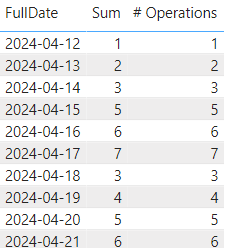
Also I have a measure.

# Operations = SUM(Dates[Sum])

vyilongmsft_1-1713755601743.png

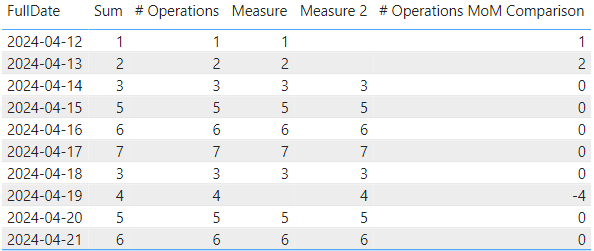
Then I do some changes on your DAX codes and it will give you the correct result. You can change the "31" to "30".

# Operations MoM Comparison = 
CALCULATE(
    [# Operations],
    FILTER(
        ALL('Dates'[FullDate]),
        'Dates'[FullDate] >= TODAY() - 10 && 'Dates'[FullDate] <= TODAY() - 5
    )
) -
CALCULATE(
    [# Operations],
    FILTER(
        ALL('Dates'[FullDate]),
    'Dates'[FullDate] >= TODAY() - 5 && 'Dates'[FullDate] <= TODAY()
    )
)

vyilongmsft_2-1713755723231.png


Best Regards

Yilong Zhou

If this post helps, then please consider Accept it as the solution to help the other members find it more quickly.

View solution in original post

2 REPLIES 2
Anonymous
Not applicable

Hi @analyst85 ,

I create a table as you mentioned but I have only ten days before.

vyilongmsft_0-1713755550541.png

Also I have a measure.

# Operations = SUM(Dates[Sum])

vyilongmsft_1-1713755601743.png

Then I do some changes on your DAX codes and it will give you the correct result. You can change the "31" to "30".

# Operations MoM Comparison = 
CALCULATE(
    [# Operations],
    FILTER(
        ALL('Dates'[FullDate]),
        'Dates'[FullDate] >= TODAY() - 10 && 'Dates'[FullDate] <= TODAY() - 5
    )
) -
CALCULATE(
    [# Operations],
    FILTER(
        ALL('Dates'[FullDate]),
    'Dates'[FullDate] >= TODAY() - 5 && 'Dates'[FullDate] <= TODAY()
    )
)

vyilongmsft_2-1713755723231.png


Best Regards

Yilong Zhou

If this post helps, then please consider Accept it as the solution to help the other members find it more quickly.

Kishore_KVN
Super User
Super User

Hello @analyst85 ,

Can you please try below measure:

# Operations MoM Comparison =
CALCULATE(
    [# Operations],
    FILTER(
        ALL('Dates'[FullDate]),
        'Dates'[FullDate] > TODAY() - 61 && 'Dates'[FullDate] <= TODAY() - 30
    )
) -
CALCULATE(
    [# Operations],
    FILTER(
        ALL('Dates'[FullDate]),
        'Dates'[FullDate] >= TODAY() - 29 && 'Dates'[FullDate] <= TODAY()
    )
)


If this post helps, then please consider accepting it as the solution to help other members find it more quickly. Thank You!!

Helpful resources

Announcements
Power BI DataViz World Championships

Power BI Dataviz World Championships

The Power BI Data Visualization World Championships is back! Get ahead of the game and start preparing now!

November Power BI Update Carousel

Power BI Monthly Update - November 2025

Check out the November 2025 Power BI update to learn about new features.

FabCon Atlanta 2026 carousel

FabCon Atlanta 2026

Join us at FabCon Atlanta, March 16-20, for the ultimate Fabric, Power BI, AI and SQL community-led event. Save $200 with code FABCOMM.