Join us in Barcelona for FabCon and SQLCon, September 28 - October 1, 2026.
This is best Fabric, Power BI, SQL and AI community event. How do we know? The last event sold out! Save €200 with code FABCMTY200.
Register now- Power BI forums
- Get Help with Power BI
- Desktop
- Service
- Report Server
- Power Query
- Mobile Apps
- Developer
- DAX Commands and Tips
- Custom Visuals Development Discussion
- Health and Life Sciences
- Power BI Spanish forums
- Translated Spanish Desktop
- Training and Consulting
- Instructor Led Training
- Dashboard in a Day for Women, by Women
- Galleries
- Data Stories Gallery
- Themes Gallery
- Contests Gallery
- QuickViz Gallery
- Quick Measures Gallery
- Visual Calculations Gallery
- Fabric Apps Gallery
- Notebook Gallery
- Translytical Task Flow Gallery
- TMDL Gallery
- R Script Showcase
- Webinars and Video Gallery
- Ideas
- Custom Visuals Ideas (read-only)
- Issues
- Issues
- Events
- Upcoming Events
The Fabric community is upgrading! Read all of the details including the timeline and what you can expect. Learn more
- Power BI forums
- Forums
- Get Help with Power BI
- Desktop
- Measure help
- Subscribe to RSS Feed
- Mark Topic as New
- Mark Topic as Read
- Float this Topic for Current User
- Bookmark
- Subscribe
- Printer Friendly Page


- Mark as New
- Bookmark
- Subscribe
- Mute
- Subscribe to RSS Feed
- Permalink
- Report Inappropriate Content
Measure help
Dear Community,
i have created a margin, which is throwing error, can you let me know what could be the right way to do it?
Margin% = IF(SUM(Inbound[NER_FYTD_Constant]=0,0,SUM(Inbound[MarginFYTD_Constant]/SUM(Inbound[NER_FYTD_Constant]))))
Solved! Go to Solution.


- Mark as New
- Bookmark
- Subscribe
- Mute
- Subscribe to RSS Feed
- Permalink
- Report Inappropriate Content
You have put all of your parentheses at the end! Try:
Margin% = IF(SUM(Inbound[NER_FYTD_Constant])=0,0,SUM(Inbound[MarginFYTD_Constant])/SUM(Inbound[NER_FYTD_Constant]))
Hope this helps!

- Mark as New
- Bookmark
- Subscribe
- Mute
- Subscribe to RSS Feed
- Permalink
- Report Inappropriate Content
Hi vjnvinod,
You forgot to close some parenthesis.
IF(SUM(Inbound[NER_FYTD_Constant])=0,0 , SUM(Inbound[MarginFYTD_Constant])/SUM(Inbound[NER_FYTD_Constant]))
Tell us if it works for you.
- Mark as New
- Bookmark
- Subscribe
- Mute
- Subscribe to RSS Feed
- Permalink
- Report Inappropriate Content
@Anonymous@Christann
Actually the output is not showing in % and should be one place decimal
is there anything we need to tweek in this measure?
- Mark as New
- Bookmark
- Subscribe
- Mute
- Subscribe to RSS Feed
- Permalink
- Report Inappropriate Content
The formatting is not included in the actual Measure. You can simply select the measure in your Fields pane, and then modify the formatting on the Modeling tab > Formatting.
- Mark as New
- Bookmark
- Subscribe
- Mute
- Subscribe to RSS Feed
- Permalink
- Report Inappropriate Content
Great, this helps & an easy one.
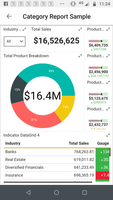
Can you also help me on more issue, i have a metrics, where i want to show the upward and downward trend, something like shown in below (which is basically an indicator )
Not sure, how do i achieve this, as i don't find any option to do that
- Mark as New
- Bookmark
- Subscribe
- Mute
- Subscribe to RSS Feed
- Permalink
- Report Inappropriate Content
I am not sure what you are asking. Are you looking for how to create Conditional Formatting(i.e. text or background changes color based on the value), or are you wondering how to create the whole combination of graphics in your screenshot?
- Mark as New
- Bookmark
- Subscribe
- Mute
- Subscribe to RSS Feed
- Permalink
- Report Inappropriate Content
conditional formatting is something i am aware, if you noticed in the pic, there is some indicators(up & down in triangle shape), how can we build that indicators in the table?
- Mark as New
- Bookmark
- Subscribe
- Mute
- Subscribe to RSS Feed
- Permalink
- Report Inappropriate Content
Sure!, take a look at this link from Curbal.com, and see if this is what you needed.
- Mark as New
- Bookmark
- Subscribe
- Mute
- Subscribe to RSS Feed
- Permalink
- Report Inappropriate Content
You have put all of your parentheses at the end! Try:
Margin% = IF(SUM(Inbound[NER_FYTD_Constant])=0,0,SUM(Inbound[MarginFYTD_Constant])/SUM(Inbound[NER_FYTD_Constant]))
Hope this helps!
Helpful resources

FabCon & SQLCon – Barcelona 2026
Join us in Barcelona for FabCon and SQLCon, the Fabric, Power BI, SQL, and AI community event. Save €200 with code FABCMTY200.

Power BI DataViz World Championships - June 2026
A new Power BI DataViz World Championship is coming this June! Don't miss out on submitting your entry.

| User | Count |
|---|---|
| 24 | |
| 22 | |
| 20 | |
| 18 | |
| 14 |


| User | Count |
|---|---|
| 44 | |
| 36 | |
| 23 | |
| 20 | |
| 20 |


