Don't miss your chance to take the Fabric Data Engineer (DP-600) exam for FREE! Find out how by watching the DP-600 session on-demand now through April 28th.
Learn moreJoin the FabCon + SQLCon recap series. Up next: Power BI, Real-Time Intelligence, IQ and AI, and Data Factory take center stage. All sessions are available on-demand after the live show. Register now
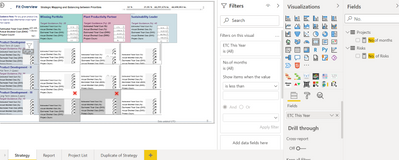
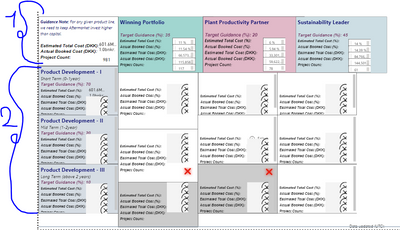
Currently, I have a dashboard, which contains the below fields:
1- Estimated Total Cost (%) >>>> this is custom measure
2- Actuals Cost (%)>>>> this is custom measure
1- Estimated Total Cost ($) >>>> this is custom measure
2- Actuals Cost ($) >>>> this is custom measure
I succeeded to build the first row for total and for Strategy Categories.
the error here in the second section I need to filter the fields based on duration (Short-Mid-Long).
first I created a measure to calculate the difference between the Start and End Date of projects to give me No. of the month in order to allow me to calculate duration as:
Short Term (0-1 Year)
Mid Term (1-2 years)
Long Term (Above 2 years)
here is the measure expression:
No.of months = SUMX(Projects, DATEDIFF(Projects[fls_actualstartdate],Projects[fls_actualenddate],month))
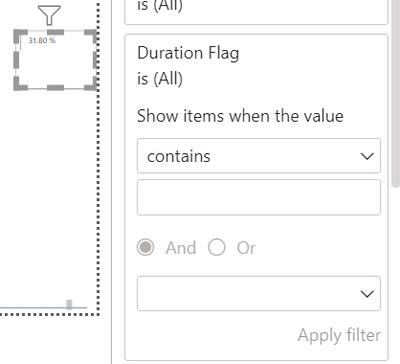
Second I have card visual as 1st section to set the values but cards not allow filter measure as below screen:
Any help how to accomplish this task please??
Hi @GhadaMehrez ,
I suggest you to add a duraction flag column in 'Product' table.
Duration Flag =
SWITCH (
TRUE (),
[No.of months] <= 12, "Short Term",
[No.of months] <= 24, "Mid Term",
"Long Term"
)
Then you can filter your measure by the slicer which is built based on this calcualted column.
Best Regards,
Rico Zhou
If this post helps, then please consider Accept it as the solution to help the other members find it more quickly.
thanks a lot for your help but I don't have permission to add column so I added {duration} measure as you suggested but I still cannot filter card visuals by Duration measure :
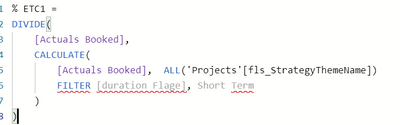
I have another idea maybe I need to update this measure by adding filter by duration, could you help me in this:
Check out the April 2026 Power BI update to learn about new features.
If you have recently started exploring Fabric, we'd love to hear how it's going. Your feedback can help with product improvements.
A new Power BI DataViz World Championship is coming this June! Don't miss out on submitting your entry.
| User | Count |
|---|---|
| 45 | |
| 38 | |
| 34 | |
| 21 | |
| 17 |
| User | Count |
|---|---|
| 66 | |
| 65 | |
| 31 | |
| 26 | |
| 26 |