cancel
Showing results for 
Search instead for 
Did you mean: 

The Power BI Data Visualization World Championships is back! Get ahead of the game and start preparing now! Learn more

Reply
garzamalan
New Member

Max data point for each month

Hi,


I have an issue that I can seem to resolve.


So I have a DB that has the balance (saldo) up to a certain date (Fecha Corrida) (process that runs every sunday) per customer (numcliente)


I want to show a graph (which in these case I converted it to tabel to better show the results), that will provide the max date of Fecha Corrida, and since I have Year / Month / Day hierarchy in the X axis, to calculate the balance of the max date, per each month.


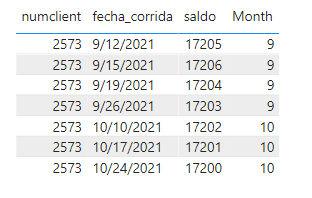
So in the screenshot you can see that I have for the specific numcliente 2573 in october there are 3 dates of Fecha Corrida, I want that table to only show the 10/24/2021, which is the max of that date. 


My measurement is


Cartera Hist = 
CALCULATE(
    SUM(CarteraSnapshots[saldo]),
    FILTER(
        CarteraSnapshots,
        CarteraSnapshots[fecha_corrida] = MAX(CarteraSnapshots[fecha_corrida])))


My data is

numclientesaldoFecha Corrida
25731720010/24/2021
25731720010/17/2021
25731720010/10/2021
2573172009/26/2021
2573172009/19/2021
2573172009/12/2021
2573172009/5/2021


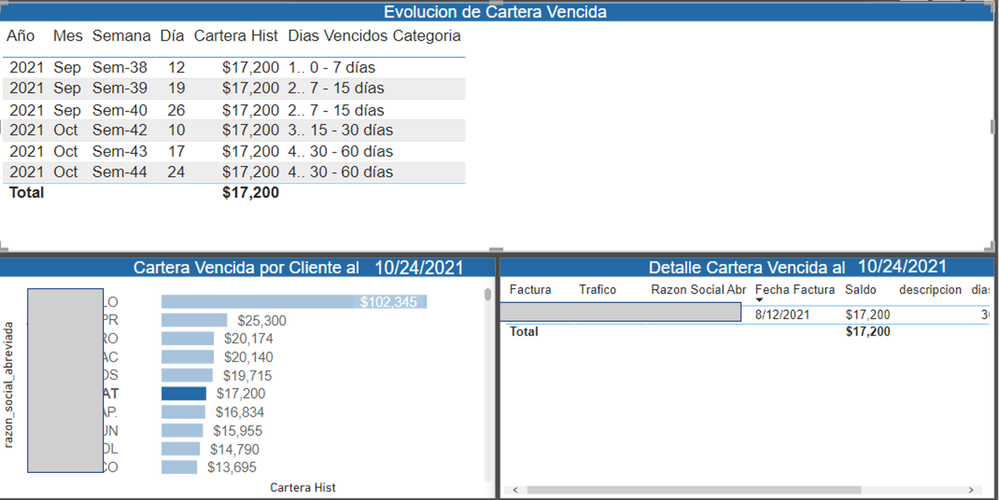
And my dashboard is

Community 1.png


Now, when I do not select an specific customer, it seems to work just fine the measurement (balance of the last date for each month), but it messes up when I select a customer.


My expectation is to have the following result

numclientesaldoFecha Corrida
25731720010/24/2021
2573172009/26/2021


1 ACCEPTED SOLUTION
v-yanjiang-msft
Community Support
Community Support

Hi @garzamalan ,

According to your description, I think there are some loopholes in your formula, the same client and the same month have not been not specified, and MAX function in a measure always return the current value, not the maximum value.

Here's my sample data, I modify the value of saldo column.

vkalyjmsft_0-1643359258458.png

My solution is:

Cartera Hist = 
CALCULATE (
    SUM ( CarteraSnapshots[saldo] ),
    'CarteraSnapshots'[fecha_corrida]
        = MAXX (
            FILTER (
                ALLSELECTED ( CarteraSnapshots ),
                'CarteraSnapshots'[Month] = MAX ( 'CarteraSnapshots'[Month] )
                    && 'CarteraSnapshots'[numclient] = MAX ( 'CarteraSnapshots'[numclient] )
            ),
            'CarteraSnapshots'[fecha_corrida]
        )
)

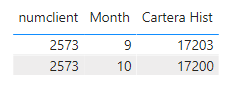
Get the expected result.

vkalyjmsft_1-1643359881317.png

I attach my sample below for reference.


Best Regards,
Community Support Team _ kalyj


If this post helps, then please consider Accept it as the solution to help the other members find it more quickly.


View solution in original post

4 REPLIES 4
elektrikticaret
New Member

I want to create a system that sets the maximum number of customers who place orders equal to 100 and scores the others at this rate. How do I write?

Ekran görüntüsü 2024-12-24 153129.png


Hi,

This measure pattern should work

Measure = MAXX(ALL(Data[Customers]),[Total])

Measure1 = divide([Total],[Measure])

Format Measure1 as %.

Hope this helps.


Regards,
Ashish Mathur
http://www.ashishmathur.com
https://www.linkedin.com/in/excelenthusiasts/
v-yanjiang-msft
Community Support
Community Support

Hi @garzamalan ,

According to your description, I think there are some loopholes in your formula, the same client and the same month have not been not specified, and MAX function in a measure always return the current value, not the maximum value.

Here's my sample data, I modify the value of saldo column.

vkalyjmsft_0-1643359258458.png

My solution is:

Cartera Hist = 
CALCULATE (
    SUM ( CarteraSnapshots[saldo] ),
    'CarteraSnapshots'[fecha_corrida]
        = MAXX (
            FILTER (
                ALLSELECTED ( CarteraSnapshots ),
                'CarteraSnapshots'[Month] = MAX ( 'CarteraSnapshots'[Month] )
                    && 'CarteraSnapshots'[numclient] = MAX ( 'CarteraSnapshots'[numclient] )
            ),
            'CarteraSnapshots'[fecha_corrida]
        )
)

Get the expected result.

vkalyjmsft_1-1643359881317.png

I attach my sample below for reference.


Best Regards,
Community Support Team _ kalyj


If this post helps, then please consider Accept it as the solution to help the other members find it more quickly.


Ashish_Mathur
Super User
Super User

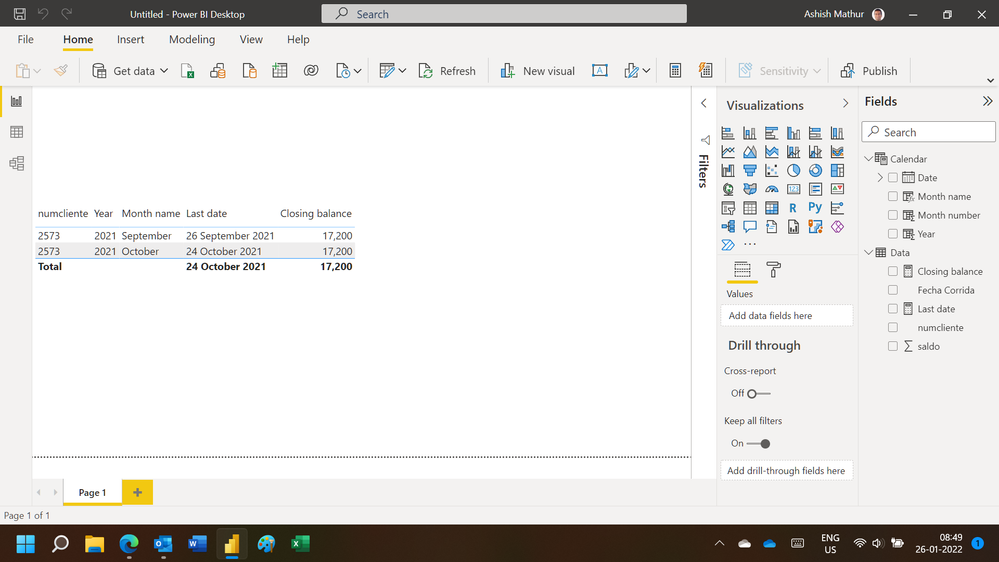
Hi,

You may download my PBI file from here.

Hope this helps.

Untitled.png


Regards,
Ashish Mathur
http://www.ashishmathur.com
https://www.linkedin.com/in/excelenthusiasts/

Helpful resources

Announcements
Power BI DataViz World Championships

Power BI Dataviz World Championships

The Power BI Data Visualization World Championships is back! Get ahead of the game and start preparing now!

December 2025 Power BI Update Carousel

Power BI Monthly Update - December 2025

Check out the December 2025 Power BI Holiday Recap!

FabCon Atlanta 2026 carousel

FabCon Atlanta 2026

Join us at FabCon Atlanta, March 16-20, for the ultimate Fabric, Power BI, AI and SQL community-led event. Save $200 with code FABCOMM.