Hi @Salman_85,
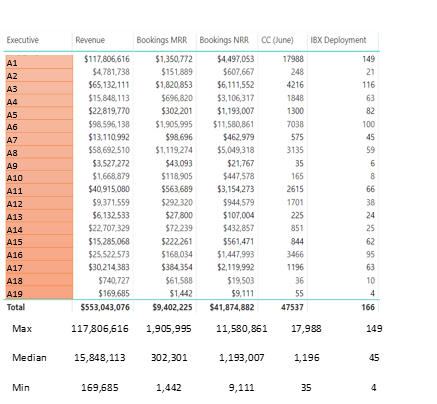
Currently it is not supported to show max/min/median row like the total row under details data.
As a workaround, you can plot max/min/median values in column level.
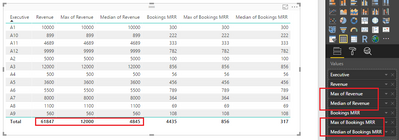
Alternatively, to show max/min/median values in row level, you need a calendar table with a different table structure.
In original table, create calculated column to generate total/max/min for each category.
Total for Revenue = SUM('summary table'[Revenue])
Max for Revenue = MAX('summary table'[Revenue])
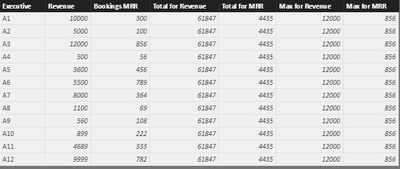
Create calculated tables using below formulas:
New table1 =
UNION (
    SUMMARIZE (
        SELECTCOLUMNS (
            'summary table',
            "Executive", "Total",
            "Revenue", 'summary table'[Total for Revenue],
            "Bookings MRR", 'summary table'[Total for MRR]
        ),
        [Executive],
        "Revenue", AVERAGE ( 'summary table'[Total for Revenue] ),
        "bookings MRR", AVERAGE ( 'summary table'[Total for MRR] )
    ),
    SUMMARIZE (
        SELECTCOLUMNS (
            'summary table',
            "Executive", "Max",
            "Revenue", 'summary table'[Max for Revenue],
            "Bookings MRR", 'summary table'[Max for MRR]
        ),
        [Executive],
        "Revenue", AVERAGE ( 'summary table'[Max for Revenue] ),
        "bookings MRR", AVERAGE ( 'summary table'[Max for MRR] )
    )
)
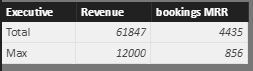
New Table2 =
UNION (
    SELECTCOLUMNS (
        'summary table',
        "Executive", 'summary table'[Executive],
        "Revenue", 'summary table'[Revenue],
        "Bookings MRR", 'summary table'[Bookings MRR]
    ),
    'New table1'
)
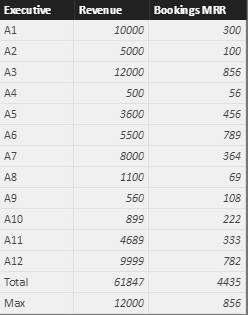
Use a table visual to display data from 'New Table2'.
Best regards,
Yuliana Gu
Community Support Team _ Yuliana Gu
If this post helps, then please consider Accept it as the solution to help the other members find it more quickly.