Don't miss your chance to take the Fabric Data Engineer (DP-600) exam for FREE! Find out how by attending the DP-600 session on April 23rd (pacific time), live or on-demand.
Learn moreJoin the FabCon + SQLCon recap series. Up next: Power BI, Real-Time Intelligence, IQ and AI, and Data Factory take center stage. All sessions are available on-demand after the live show. Register now
Hello,
I have 3 tables namely Op Stk, Purchase, Sales and i want to create summary table as below.
When i use matrix table each measurs(Op Stck, Purchase etc..) reflect in seperate column but i need all the materix in one column ("Value").
| Particulars | Value |
| Op Stk (From Op Stk table) | 1000 |
| Purchsaes ( From Purchase table) | 2000 |
| Sales (From Sales table) | 2500 |
| Cl Stk (To be calculated from the above) | 500 |
Solved! Go to Solution.
Hi @prabhuk ,
On the matrix options search for the option show on rows this is on the Values part of the options.
Regards
Miguel Félix
Proud to be a Super User!
Check out my blog: Power BI em PortuguêsHi @prabhuk ,
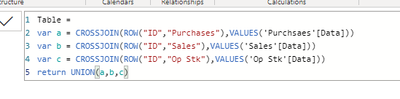
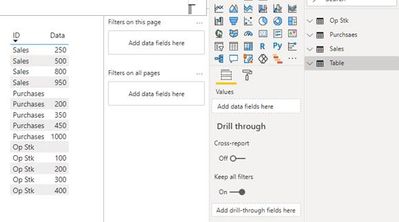
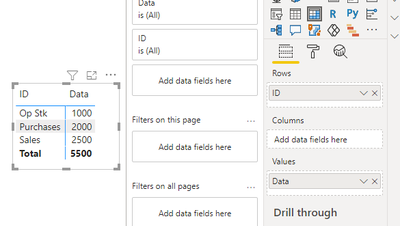
According to your request, I simply did the following test: created 3 tables, namely OP, STK, purchase, sales. On this basis, I created a new table structure and data, as shown in the figure. Finally, the ID column is added to rows and the Data column is added to values by matrix visual, and the correct results are obtained. If there are problems, please provide comprehensive table data and information, so that I can do more detailed tests to solve your problems.
Best Regards,
Henry
If this post helps, then please consider Accept it as the solution to help the other members find it more quickly.
Hi @prabhuk ,
On the matrix options search for the option show on rows this is on the Values part of the options.
Regards
Miguel Félix
Proud to be a Super User!
Check out my blog: Power BI em PortuguêsCheck out the April 2026 Power BI update to learn about new features.
If you have recently started exploring Fabric, we'd love to hear how it's going. Your feedback can help with product improvements.
A new Power BI DataViz World Championship is coming this June! Don't miss out on submitting your entry.
| User | Count |
|---|---|
| 48 | |
| 46 | |
| 41 | |
| 20 | |
| 17 |
| User | Count |
|---|---|
| 70 | |
| 69 | |
| 32 | |
| 27 | |
| 26 |